TT-Lang Specification
Specification Versions
Version |
Date |
Description of changes |
|---|---|---|
0.1 |
12/15/2025 |
Initial version |
0.2 |
01/20/2026 |
Remove |
0.3 |
01/23/2026 |
Add specification for block operators and math functions |
0.4 |
01/26/2026 |
Add |
0.5 |
02/05/2026 |
Use dataflow buffer instead of circular buffer term |
0.6 |
02/06/2026 |
Add rounding, mask, |
0.7 |
02/09/2026 |
Move |
0.8 |
02/09/2026 |
Formal block states |
0.9 |
03/04/2026 |
Add |
0.9 |
03/06/2026 |
Add |
0.10 |
03/06/2026 |
Add debug printing |
0.11 |
03/19/2026 |
Rename |
0.12 |
03/24/2026 |
Remove |
0.13 |
03/31/2026 |
Rename |
0.14 |
04/02/2026 |
Add |
0.15 |
04/06/2026 |
Rename |
0.16 |
04/22/2026 |
Add |
0.17 |
04/28/2026 |
Move |
0.18 |
06/16/2026 |
Add |
0.19 |
06/15/2026 |
Unified-body |
0.20 |
06/23/2026 |
Add |
Introduction
TT-Lang is a Python based domain specific language (DSL) designed to express low-level programs for Tenstorrent hardware. Here the low-level is used to contrast with the high-level programming model represented in TT-NN. Specifically, this means that computation and data movement are programmed explicitly and need to be synchronized, while TT-NN hides this from the user in its built-in operations. Furthermore, instead of operating on entire tensors, like TT-NN, TT-Lang operates on chunks of tensors called blocks, for which the user has to pick the shape to achieve best performance. While based on Python the TT-Lang maintains a number of constraints to what parts of Python can be used in what context, hence the DSL nature of it. The TT-Lang is tightly integrated with TT-NN to provide seamless experience of mixing built-in TT-NN operations and user-written TT-Lang operations in a single program.
In addition to kernels, TT-Lang offers other abstractions familiar to TT-Metalium users such as dataflow buffers and semaphores. In contrast with TT-Metalium, TT-Lang also offers new, higher level abstractions. In addition to blocks these new abstractions include tensor slices and pipes that wrap the complexity of dealing with tensor memory layout and node-to-node communication correspondingly.
Operation function
Operation function is a Python function with the ttl.operation decorator. It takes input and output TT-NN tensors as arguments and returns None. Its body is a single, unified description of the work to perform, along with the objects (such as dataflow buffers and pipe nets) shared by that work. Each node that runs the operation has a number of compute and data movement threads. The author writes the body once and the compiler assigns each statement to the thread that executes it, so the threads are not written out by hand. The user can call a TT-Lang operation function from a TT-NN program and is free to mix it with calling any of the built-in TT-NN operations.
A thread is a unit of concurrent execution on a node. Compute threads evaluate block expressions, the math of the operation; data movement threads move data between dataflow buffers, tensor slices, and pipes. The number and kind of threads are fixed by the architecture, and the compiler assigns each statement of the operation body to the thread that executes it.
An operation can also be written with explicit kernels, where the author writes the threads by hand as separate kernel functions. This multi-kernel operation (described below) is an alternative for cases that need precise control over the individual threads.
Program example
@ttl.operation(grid=(1, 1))
def __add(
    a: ttnn.Tensor,  # input tensor
    b: ttnn.Tensor,  # input tensor
    out: ttnn.Tensor,  # output tensor
) -> None:
    # Dataflow buffers shared by the threads.
    a_dfb = ttl.make_dataflow_buffer_like(a, shape=(1, 1), block_count=2)
    b_dfb = ttl.make_dataflow_buffer_like(b, shape=(1, 1), block_count=2)
    out_dfb = ttl.make_dataflow_buffer_like(out, shape=(1, 1), block_count=2)

    # One body: the compiler places the copies on the data movement threads
    # and the addition on the compute thread.
    a_dst_blk = a_dfb.reserve()
    b_dst_blk = b_dfb.reserve()
    ttl.copy(a[0:1, 0:1], a_dst_blk).wait()
    ttl.copy(b[0:1, 0:1], b_dst_blk).wait()
    a_dst_blk.push()
    b_dst_blk.push()

    out_blk = out_dfb.reserve()
    a_blk = a_dfb.wait()
    b_blk = b_dfb.wait()
    out_blk.store(a_blk + b_blk)
    a_blk.pop()
    b_blk.pop()

    ttl.copy(out_dfb.wait(), out[0:1, 0:1]).wait()
    out_blk.push()


# Simple wrapper to allow returning output tensor in TT-NN style
def add(a: ttnn.Tensor, b: ttnn.Tensor) -> ttnn.Tensor:
    out = ttnn.zeros(a.shape, layout=ttnn.TILE_LAYOUT)
    __add(a, b, out)
    return out


x = ttnn.rand(ttnn.Shape([32, 32]), layout=ttnn.TILE_LAYOUT)

# TT-Lang operations mix freely with built-in TT-NN operations.
y = ttnn.exp(add(ttnn.abs(x), x))
Runtime and compile-time arguments
An operation distinguishes runtime arguments from compile-time arguments.
Runtime arguments are the values supplied at each call of the operation function. They are TT-NN tensors and only TT-NN tensors. They are resolved at the call site, and the compiled operation depends only on their properties (shape, data type, layout, and memory space), not their contents, so the same compiled operation serves every call whose tensors share those properties. Passing a non-tensor value as a runtime argument is an error.
Compile-time arguments are values fixed when the operation is defined. They are captured from the enclosing Python scope, for example as the parameters of a factory function that returns the operation, or as module-level constants. They are substituted into the body before compilation, so changing one defines a different operation. Block shapes, loop bounds, grid dimensions, and scalar coefficients are compile-time arguments.
An operation function therefore takes only tensors as parameters; all other configuration is passed as compile-time arguments through the enclosing scope. Operation parameters have no default values, and the signature uses no *args or **kwargs.
Thread assignment
The compiler assigns each statement of the operation body to a thread:
Compute operations, the block expressions and their
store, run on a compute thread.Data movement operations, such as
ttl.copyand pipe sends and receives, run on a data movement thread.Dataflow buffer operations,
waitandreserve, are assigned to the thread of their users, the statements operating on the block they produce. If those users do not determine a single thread, the compiler errors.Compile-time constructs, such as loops, index arithmetic, and the construction of dataflow buffers and pipe nets, are not tied to a thread and are shared by the threads that need them.
Each statement must belong to a single thread. A statement that mixes compute and data movement work, such as a block expression used as the source of a copy, is an error; store the computed block into a dataflow buffer and copy from there. An operation the compiler does not recognize is an error rather than being assigned a default thread.
Data movement is distributed across the data movement threads: for a pipe, the send and the receive are placed on different threads so they can use different NoCs. A dataflow buffer used by both then has users on two threads, does not resolve to a single one, and is rejected by the rule above. The distribution of work across data movement threads may become more flexible in the future.
Composing operations
An operation can be built from other operations by calling them in its body. Such a call is expanded in place when the calling operation is defined, the way a template or macro is expanded, not invoked at runtime. The called operation’s work becomes part of the caller’s single body and is assigned to threads by the rules above.
An operation written to be composed may declare its own dataflow buffers and pipe nets in its body, or take them as parameters for the caller to supply. An operation that takes dataflow buffers or pipe nets as parameters is an expand-only operation: because these are not runtime arguments (see runtime and compile-time arguments), there is nothing to supply at a TT-NN call site, and it can only be expanded into another operation, never called directly.
A call to a composed operation is a statement, not an expression, and must supply every parameter. Default parameter values, argument unpacking, and reassigning a parameter inside the composed operation are not allowed. An operation cannot call itself, directly or through a cycle; composition is finite and fully resolved when the operation is defined.
Multi-kernel operation
A multi-kernel operation is an alternative form in which the author writes the threads by hand as kernel functions: Python functions that take no arguments and return None, annotated with ttl.compute or ttl.datamovement. The operation function holds these kernel functions together with the objects shared by them. Use this form when an operation needs precise control over the individual threads. Multi-kernel operations do not compose: they cannot call one another.
Program example
@ttl.operation(grid=(1, 1))
def __foo(
    x: ttnn.Tensor,  # input tensor
    y: ttnn.Tensor,  # output tensor
) -> None:
    # ...

    @ttl.compute()
    def some_compute():
        # ...

    @ttl.datamovement()
    def some_dm0():
        # ...

    @ttl.datamovement()
    def some_dm1():
        # ...

device = ttnn.open_device(device_id=0)

try:
    # Simple wrapper to allow returning output tensor in TT-NN style
    def foo(x: ttnn.Tensor) -> ttnn.Tensor:
        y = ttnn.zeros(x.shape, layout=ttnn.TILE_LAYOUT, device=device)
        __foo(x, y)
        return y

    shape = ttnn.Shape([128, 128])

    x = ttnn.rand(shape, layout=ttnn.TILE_LAYOUT, device=device)

    y = ttnn.exp(foo(ttnn.abs(x)), fast_and_approximate_mode=True)

finally:
    ttnn.close_device(device)
Grid
A grid defines a space of nodes to which the TT-Lang operation is submitted for execution. A node corresponds to a single Tensix Core and is a minimal unit capable of executing a TT-Lang program. In a single-chip case where node-to-node communication is conducted over Network-on-Chip (NoC), the grid is two dimensional. In a multi-chip case where chip-to-chip communication is conduced over TT-Fabric, the grid has additional mesh dimensions representing different levels of connectivity (same card, same host, same rack etc). There is also Single-Program-Multiple-Data (SPMD) mode in which the grid remains two dimensional while the TT-Lang operation is submitted for execution on multiple chips. In SPMD mode TT-Lang operation instances have the same behaviour on different chips while working on different partitions of data, which significantly simplifies reasoning about it. The SPMD functionality is based on TT-NN Mesh Devices.
Grid size function
The ttl.grid_size function returns the size of the grid. The function takes an argument that specifies how many dimensions to return. If requested dimensions are smaller than grid dimensions, the highest rank dimension is flattened. If requested dimensions are greater than grid dimensions, highest rank dimensions are padded with a value of one. The ttl.grid_size can be used anywhere in an operation.
Type alias/Function |
Description |
|---|---|
|
A positive integer. The metadata |
|
A size. |
|
A shape type. |
|
Return grid size in specified dimensionality. Returns |
Grid size example
# for (8, 8) single chip or SPMD grid gets x_size = 64
x_size = ttl.grid_size(dims=1)

# for (8, 8, 8) multi-chip grid gets x_size = 8, y_size = 64
x_size, y_size = ttl.grid_size(dims=2)

# for (8, 8) single-chip or SPMD grid gets x_size = 8, y_size = 8, z_size = 1
x_size, y_size, z_size = ttl.grid_size(dims=3)
Node function
The ttl.node function returns node coordinates of the current node. Node coordinates are zero based and contiguous, which corresponds to a logical indexing scheme. The function takes an argument that specifies how many dimensions to return. If requested dimensions are smaller than grid dimensions, the highest rank dimension is flattened. If requested dimensions are greater than grid dimensions, highest rank dimensions are padded with a value of zero. The ttl.node can be used anywhere in an operation.
Type alias/Function |
Description |
|---|---|
|
Non-negative integer. The metadata |
|
An index, assumes non-negative indexes. |
|
Node coordinates. |
|
Return node coordinates in specified dimensionality. Returns |
Node example
# for (8, 8) single chip or SPMD grid gets x = [0, 64)
x = ttl.node(dims=1)

# for (8, 8, 8) multi-chip grid gets x = [0, 8), y = [0, 64)
x, y = ttl.node(dims=2)

# for (8, 8) single-chip or SPMD grid gets x = [0, 8), y = [0, 8), z = 0
x, y, z = ttl.node(dims=3)
Dataflow buffer
A dataflow buffer is a communication primitive for synchronizing the passing of data between threads running on the same node. A dataflow buffer is created with the ttl.make_dataflow_buffer_like function by passing TT-NN tensor, shape and block count.
ttl.make_dataflow_buffer_like allocates scratch DFB storage. ttl.make_tensor_backed_dfb instead uses the complete compiled DFB capacity at a page-aligned byte offset in a TILE, height-sharded L1 operation tensor. Tensor-backed DFBs support BF16 and FP32. A data movement thread calls publish() once to make an already-resident input capacity readable without copying its bytes. Tensor-backed outputs use the normal reserve, store and push protocol.
The shape is expressed as a tuple with outermost dimension first and innermost dimension last. For ttl.math functions that take dimension indexes, the outermost dimension is indexed as 0, next to outermost as 1. It is possible to use negative dimension indexes to index from innermost dimension. This way the innermost dimension is indexed as -1, next to innermost as -2. The TT-NN tensor determines basic properties (likeness) such as data type and shape unit. Shape unit can be either a tile (32 by 32 scalar elements) or a scalar element. In order for block to be used with tiled tensor, it needs to have at least two dimensions (see example below). In this case, the translation from Torch shape affects two innermost dimensions. For example, if a TT-NN tensor is of tiled layout and has Torch shape of (2, 2, 120, 30), the corresponding block that fits this entire tensor will have shape of (2, 2, 4, 1).
Tiled tensor shape example
def from_torch(tensor: torch.Tensor) -> ttnn.Tensor:
    return ttnn.from_torch(
        tensor,
        layout=ttnn.TILE_LAYOUT,
        device=device,
    )

def shape_in_tiles(tensor: ttnn.Tensor) -> list[int]:
    padded_shape = list(tensor.padded_shape)
    tile_shape = list(tensor.tile.tile_shape)
    return padded_shape[:-2] + [
        dim // tile_dim for dim, tile_dim in zip(padded_shape[-2:], tile_shape)
    ]

assert shape_in_tiles(from_torch(torch.randn(()))) == [1, 1]
assert shape_in_tiles(from_torch(torch.randn((128)))) == [1, 4]
assert shape_in_tiles(from_torch(torch.randn((1, 128)))) == [1, 4]
assert shape_in_tiles(from_torch(torch.randn((32, 128)))) == [1, 4]
assert shape_in_tiles(from_torch(torch.randn((128, 1)))) == [4, 1]
assert shape_in_tiles(from_torch(torch.randn((128, 32)))) == [4, 1]
assert shape_in_tiles(from_torch(torch.randn((2, 128, 32)))) == [2, 4, 1]
assert shape_in_tiles(from_torch(torch.randn((2, 2, 128, 32)))) == [2, 2, 4, 1]
assert shape_in_tiles(from_torch(torch.randn((2, 2, 120, 30)))) == [2, 2, 4, 1]
If tensor has a row-major layout the shape unit is a scalar element. For the TT-NN tensor with Torch shape of (2, 2, 120, 30) the corresponding block that fits this entire tensor will have shape of (2, 2, 120, 30).
Row-major tensor shape example
def from_torch(tensor: torch.Tensor) -> ttnn.Tensor:
    return ttnn.from_torch(
        tensor,
        layout=ttnn.ROW_MAJOR_LAYOUT,
        device=device,
    )

def row_major_shape(tensor: ttnn.Tensor) -> list[int]:
    return list(tensor.padded_shape)

assert row_major_shape(from_torch(torch.randn(()))) == [1]
assert row_major_shape(from_torch(torch.randn((128)))) == [128]
assert row_major_shape(from_torch(torch.randn((1, 128)))) == [1, 128]
assert row_major_shape(from_torch(torch.randn((32, 128)))) == [32, 128]
assert row_major_shape(from_torch(torch.randn((128, 1)))) == [128, 1]
assert row_major_shape(from_torch(torch.randn((128, 32)))) == [128, 32]
assert row_major_shape(from_torch(torch.randn((2, 128, 32)))) == [2, 128, 32]
assert row_major_shape(from_torch(torch.randn((2, 2, 128, 32)))) == [2, 2, 128, 32]
assert row_major_shape(from_torch(torch.randn((2, 2, 120, 30)))) == [2, 2, 120, 30]
Shape determines the shape of a block returned by one of the acquisition functions: wait and reserve. The size of a block in L1 memory is determined by shape, shape unit and data type. For example, for a block with shape (2, 2, 4, 1), shape unit of a tile (32 by 32 scalar elements) and BF16 data type (2 bytes), its size in L1 will be 2 * 2 * (4 * 32) * (1 * 32) * 2 = 32768 bytes. The block count determines the total size of L1 memory allocated for a dataflow buffer. This size is a product of a block size and block count. For the most common case block count defaults to 2 to support double buffering. With double buffered dataflow buffer one thread can write to a block while another is reading from a block thus enabling the pipelining. For the example above, this means there will be a total of 32768 bytes of L1 memory allocated for the dataflow buffer.
A dataflow buffer is constructed in the scope of an operation function but its object functions run on threads. Acquisition functions can be used with Python with statement, which will automatically release acquired blocks at the end of the with scope. Alternatively, if acquisition functions are used without the with the user must explicitly call a corresponding release function on the acquired block: pop for wait and push for reserve. A block must be released before its dataflow buffer is acquired again with the same acquisition function in a nested scope, such as a loop body: an acquisition returns the buffer’s current front or write block, so a block held across a further acquisition would alias it. The compiler rejects a block that is still used or released after such an acquisition.
Dataflow buffer example
x_dfb = ttl.make_dataflow_buffer_like(
    x, shape=(2, 2), block_count=2
)  # This can be omitted since block_count defaults to 2

@ttl.datamovement()
def some_read():
    # Reserve x_blk from x_dfb
    with x_dfb.reserve() as x_blk:

        # Load data into x_blk
        # ...

        # Push x_blk implicitly at the end of the "with" scope

@ttl.compute()
def some_compute():
    # Wait for x_blk from x_dfb
    x_blk = x_dfb.wait()

    # Consume data in x_blk
    # ...

    x_blk.pop()  # Pop x_blk explicitly
Type alias/Function |
Description |
|---|---|
|
Create a dataflow buffer by inheriting basic properties from |
|
Create a dataflow buffer whose complete capacity uses a byte range of |
|
Publish the complete capacity of a tensor-backed input without copying bytes. |
|
Reserve and return a block from a dataflow buffer. This function is blocking and will wait until a free block is available. A free block is typically used by a producer to write the data into. |
|
Push a block to a dataflow buffer. This function is called by the producer to signal the consumer that a block filled with data is available. This function is non-blocking. |
|
Wait for and return a block from a dataflow buffer. This function is blocking and will wait until a block filled with data is available. A filled block is typically used by a consumer to read data from. |
|
Pop a block from a dataflow buffer. This function is called by the consumer to signal the producer that block is free and available. This function is non-blocking. |
Block
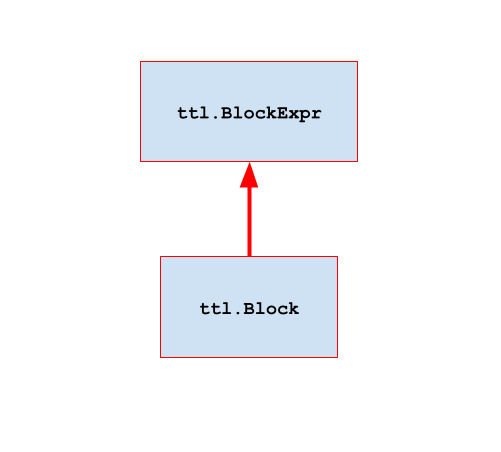
A block represents memory acquired from a dataflow buffer. Block size is determined by the shape of a dataflow buffer and its memory is allocated when a dataflow buffer is created. On a compute thread a block can participate in a block expression with built-in Python operators and TT-Lang math functions as an operand. A block can also be a storage for the result of block expression by using store function. On a data movement thread a block can participate in ttl.copy as a source or a destination.
Tiled element-wise with broadcast and reduce example
# ---------------------
# Tiled element-wise with broadcast and reduce:
#
# y[n] = ∑(√(a[n, m]² + b[n]² + c[m]² + d²))
#        j
#
# z[m] = ∑(√(a[n, m]² - b[n]² - c[m]² - d²))
#        i
#
# Tensor   Torch shape   Note
# a        N, M          N >> M
# b        N, 1          Column-wise vector — broadcast to match a along M
# c        M             Row-wise vector — broadcast to match a along N
# d        ()            Scalar value — broadcast to match a along N and M
# y        N, 1
# z        M
#
# All tensors have tiled layout

# Shape in tiles (N and M are evenly divisible by TILE_SIZE)
N_TILES = N // TILE_SIZE
M_TILES = M // TILE_SIZE

# Shape in blocks (N_TILES is evenly divisible by N_BLOCK_SIZE)
N_BLOCKS = N_TILES // N_BLOCK_SIZE

a_dfb = ttl.make_dataflow_buffer_like(a, shape=(N_BLOCK_SIZE, M_TILES))

# Tiled DFB shape needs to be at least two-dimensional; when tiled, the vector b of
# shape (N, 1) is placed in column 0 of each tile in a column of N_TILES tiles
b_dfb = ttl.make_dataflow_buffer_like(b, shape=(N_BLOCK_SIZE, 1))
# When tiled, the vector c of shape M is placed in row 0 of each tile in a row of M_TILES tiles
c_dfb = ttl.make_dataflow_buffer_like(c, shape=(1, M_TILES))
# When tiled, the scalar value d of shape () is placed at position (0, 0) of a single tile
d_dfb = ttl.make_dataflow_buffer_like(d, shape=(1, 1))
# When untiled, the vector y is formed from column 0 of each tile in a column of N_TILES tiles
y_dfb = ttl.make_dataflow_buffer_like(y, shape=(N_BLOCK_SIZE, 1))
# When untiled, the vector z is formed from row 0 of each tile in a row of M_TILES tiles
z_dfb = ttl.make_dataflow_buffer_like(z, shape=(1, M_TILES))

@ttl.datamovement()
def elwise_read():

    # Reserve c_blk and d_blk blocks
    with (
        c_dfb.reserve() as c_blk,
        d_dfb.reserve() as d_blk,
    ):
        # Load entire (1×M_TILES) of c; when tiled, the vector c of shape M is placed
        # in row 0 of each tile in a row of M_TILES tiles
        c_xf = ttl.copy(c[0, :], c_blk)

        # Load entire (1×1) d; when tiled, the scalar value d of shape () is placed at
        # position (0, 0) of a single tile
        d_xf = ttl.copy(d[0, 0], d_blk)

        c_xf.wait()
        d_xf.wait()

        # End of "with" scope: c_blk and d_blk are pushed implicitly, which makes
        # them ready for elwise_compute

    for n_block in range(N_BLOCKS):

        # Reserve a_blk and b_blk blocks
        with (
            a_dfb.reserve() as a_blk,
            b_dfb.reserve() as b_blk,
        ):
            # Load N_BLOCK_SIZE×M_TILES block of a
            a_xf = ttl.copy(
                a[n_block * N_BLOCK_SIZE : (n_block + 1) * N_BLOCK_SIZE, :], a_blk
            )

            # Load N_BLOCK_SIZE×1 block of b; when tiled, the vector b of shape (N, 1)
            # is placed in column 0 of each tile in a column of N_TILES tiles
            b_xf = ttl.copy(
                b[n_block * N_BLOCK_SIZE : (n_block + 1) * N_BLOCK_SIZE, 0], b_blk
            )

            a_xf.wait()
            b_xf.wait()

            # End of "with" scope: a_blk and b_blk are pushed implicitly, which makes
            # them ready for elwise_compute

@ttl.compute()
def elwise_compute():

    # Wait for c_blk and d_blk to be loaded and pushed by elwise_read; reserve z_blk
    with (
        c_dfb.wait() as c_blk,
        d_dfb.wait() as d_blk,
        z_dfb.reserve() as z_blk,
    ):
        c_squared = c_blk**2
        d_squared = d_blk**2

        # Broadcast c_squared along dimension 0 (first) to get N_BLOCK_SIZE×M_TILES; this
        # first broadcasts column 0 to fill each of M_TILES tiles, then it broadcasts the
        # column of M_TILES tiles to get N_BLOCK_SIZE×M_TILES tiles
        c_squared_bcast = ttl.block.broadcast(
            c_squared, dims=[0], shape=(N_BLOCK_SIZE, M_TILES)
        )

        # Broadcast d_squared along all dimensions (0 and 1) to N_BLOCK_SIZE×M_TILES; this
        # first broadcasts the single scalar value at position (0, 0) to fill a single tile,
        # then it broadcasts that tile to get N_BLOCK_SIZE×M_TILES tiles
        d_squared_bcast = ttl.block.broadcast(
            d_squared, dims=[0, 1], shape=(N_BLOCK_SIZE, M_TILES)
        )

        # Zero-initialize the accumulator z before summing N_BLOCKS partial sums
        z_final = ttl.block.fill(0, shape=(1, M_TILES))

        for _ in range(N_BLOCKS):

            # Wait for a_blk and b_blk to be loaded and pushed by elwise_read; reserve y_blk
            with (
                a_dfb.wait() as a_blk,
                b_dfb.wait() as b_blk,
                y_dfb.reserve() as y_blk,
            ):
                a_squared = a_blk**2
                b_squared = b_blk**2

                # Broadcast b_squared along dim -1 (last) to get N_BLOCK_SIZE×M_TILES; this
                # first broadcasts row 0 to fill each of N_BLOCK_SIZE tiles, then it
                # broadcasts the row of N_BLOCK_SIZE tiles to get N_BLOCK_SIZE×M_TILES tiles
                b_squared_bcast = ttl.block.broadcast(
                    b_squared, dims=[-1], shape=(N_BLOCK_SIZE, M_TILES)
                )

                # Perform elementwise math on N_BLOCK_SIZE×M_TILES tiles
                expanded_y = ttl.math.sqrt(
                    a_squared + b_squared_bcast + c_squared_bcast + d_squared_bcast
                )
                expanded_z = ttl.math.sqrt(
                    a_squared - b_squared_bcast - c_squared_bcast - d_squared_bcast
                )

                # Reduce expanded_y along dim -1 (last) to get N_BLOCK_SIZE×1 row of tiles
                y_final = ttl.math.reduce_sum(
                    expanded_y, dims=[-1], shape=(N_BLOCK_SIZE, 1)
                )

                # Reduce expanded_z along dim 0 (first) to get 1×M_TILES column of tiles;
                z_partial = ttl.math.reduce_sum(
                    expanded_z, dims=[0], shape=(1, M_TILES)
                )

                # Store y_final
                y_blk.store(y_final)

                # Accumulate-add partial z_final
                z_final += z_partial

                # End of "with" scope: a_blk and b_blk are popped implicitly, which makes
                # them available for elwise_read to load and push the next blocks, and
                # y_blk is pushed implicitly, which makes it ready for elwise_write

        # Store z_final
        z_blk.store(z_final)

        # End of "with" scope: c_blk and d_blk are popped implicitly, and z_blk is
        # pushed implicitly, which makes it ready for elwise_write

@ttl.datamovement()
def elwise_write():

    # Wait for elwise_compute to store and push z_blk
    with z_dfb.wait() as z_blk:

        # Store entire (1xM_TILES) of z; when untiled, the vector z is formed from row 0
        # of each tile in a row of M_TILES tiles
        z_xf = ttl.copy(z_blk, z[0, :])
        z_xf.wait()

        # End of "with" scope: z_blk is popped implicitly

    for n_block in range(N_BLOCKS):
        n_slice = slice(n_block * N_BLOCK_SIZE, (n_block + 1) * N_BLOCK_SIZE)

        # Wait for elwise_compute to store and push y_blk
        with y_dfb.wait() as y_blk:

            # Store N_BLOCK_SIZExM_TILES of y; when untiled, the vector y is formed from
            # column 0 of each tile in a column of N_TILES tiles
            y_xf = ttl.copy(y_blk, y[n_slice, :])
            y_xf.wait()

            # End of "with" scope: y_blk is popped implicitly, which makes it available
            # for elwise_compute to store and push the next block
Batched matrix multiplication with bias example
# ---------------------
# Batched matrix multiplication with bias:
#
# y[l, m, n] = ∑(a[l, m, k] * b[k, n]) + c[m, n]
#              k
#
# Tensor   Torch shape   Note
# a        L, M, K       Batched a matrix (e.g. input activations)
# b        K, N          Non-batched b matrix (e.g. weights)
# c        M, N          Non-batched bias matrix c (e.g. weights)
# y        L, M, N       Batched y matrix (e.g. output activations)
#
# All tensors have tiled layout

# Shape in tiles (M, N and K are evenly divisible by TILE_SIZE)
M_TILES = M // TILE_SIZE
N_TILES = N // TILE_SIZE
K_TILES = K // TILE_SIZE

# Shape in blocks (L, M_TILES, N_TILES and K_TILES are evenly
# divisible by L_BLOCK_SIZE, M_BLOCK_SIZE, N_BLOCK_SIZE and K_BLOCK_SIZE)
L_BLOCKS = L // L_BLOCK_SIZE
M_BLOCKS = M_TILES // M_BLOCK_SIZE
N_BLOCKS = N_TILES // N_BLOCK_SIZE
K_BLOCKS = K_TILES // K_BLOCK_SIZE

a_dfb = ttl.make_dataflow_buffer_like(
    a, shape=(L_BLOCK_SIZE, M_BLOCK_SIZE, K_BLOCK_SIZE)
)
b_dfb = ttl.make_dataflow_buffer_like(b, shape=(K_BLOCK_SIZE, N_BLOCK_SIZE))
c_dfb = ttl.make_dataflow_buffer_like(c, shape=(M_BLOCK_SIZE, N_BLOCK_SIZE))
y_dfb = ttl.make_dataflow_buffer_like(
    y, shape=(L_BLOCK_SIZE, M_BLOCK_SIZE, N_BLOCK_SIZE)
)

@ttl.datamovement()
def matmul_read():
    for l_block in range(L_BLOCKS):
        l_slice = slice(l_block * L_BLOCK_SIZE, (l_block + 1) * L_BLOCK_SIZE)

        for m_block in range(M_BLOCKS):
            m_slice = slice(m_block * M_BLOCK_SIZE, (m_block + 1) * M_BLOCK_SIZE)

            for n_block in range(N_BLOCKS):
                n_slice = slice(
                    n_block * N_BLOCK_SIZE, (n_block + 1) * N_BLOCK_SIZE
                )

                # Reserve c_blk
                with c_dfb.reserve() as c_blk:

                    # Load M_BLOCK_SIZE×N_BLOCK_SIZE block of c into c_blk
                    c_xf = ttl.copy(c[m_slice, n_slice], c_blk)
                    c_xf.wait()

                    # End of "with" scope: c_blk is pushed implicitly, which makes it
                    # ready for matmul_compute

                # Repeat for each K block
                for k_block in range(K_BLOCKS):
                    k_slice = slice(
                        k_block * K_BLOCK_SIZE, (k_block + 1) * K_BLOCK_SIZE
                    )

                    # Reserve a_blk and b_blk
                    with (
                        a_dfb.reserve() as a_blk,
                        b_dfb.reserve() as b_blk,
                    ):
                        # Load L_BLOCK_SIZE×M_BLOCK_SIZE×K_BLOCK_SIZE of a into a_blk
                        # and K_BLOCK_SIZE×N_BLOCK_SIZE of b into b_blk
                        a_xf = ttl.copy(a[l_slice, m_slice, k_slice], a_blk)
                        b_xf = ttl.copy(b[k_slice, n_slice], b_blk)

                        a_xf.wait()
                        b_xf.wait()

                        # End of "with" scope: a_blk and b_blk are pushed implicitly,
                        # which makes them ready for matmul_compute

@ttl.compute()
def matmul_compute():
    for _ in range(L_BLOCKS):
        for _ in range(M_BLOCKS):
            for _ in range(N_BLOCKS):

                # Reserve y_blk
                with y_dfb.reserve() as y_blk:

                    # Zero-initialize the accumulator y_final before summing K_BLOCKS partial products
                    y_final = ttl.block.fill(
                        0, shape=(L_BLOCK_SIZE, M_BLOCK_SIZE, N_BLOCK_SIZE)
                    )

                    # Repeat for each K block
                    for _ in range(K_BLOCKS):

                        # Wait for a_blk and b_blk to be loaded and pushed by matmul_read
                        with (
                            a_dfb.wait() as a_blk,
                            b_dfb.wait() as b_blk,
                        ):
                            # b_blk has shape K_BLOCK_SIZE×N_BLOCK_SIZE;
                            # Unsqueeze it to 1×K_BLOCK_SIZE×N_BLOCK_SIZE and then
                            # broadcast it over dim 0 to L_BLOCK_SIZE×K_BLOCK_SIZE×N_BLOCK_SIZE
                            b_bcast = ttl.block.broadcast(
                                ttl.block.unsqueeze(b_blk, dims=[0]),
                                dims=[0],
                                shape=(L_BLOCK_SIZE, K_BLOCK_SIZE, N_BLOCK_SIZE),
                            )

                            # Accumulate dot product between L_BLOCK_SIZE×M_BLOCK_SIZE×K_BLOCK_SIZE a_blk and
                            # L_BLOCK_SIZE×K_BLOCK_SIZE×N_BLOCK_SIZE b_bcast in y_final
                            y_final += a_blk @ b_bcast

                            # End of "with" scope: a_blk and b_blk are popped implicitly,
                            # which makes them available for matmul_read to load and push
                            # the next blocks

                    # Wait for c_blk to be loaded and pushed by matmul_read
                    with c_dfb.wait() as c_blk:

                        # c_blk has shape M_BLOCK_SIZE×N_BLOCK_SIZE;
                        # Unsqueeze it to 1×M_BLOCK_SIZE×N_BLOCK_SIZE and then
                        # broadcast it over dim 0 to L_BLOCK_SIZE×M_BLOCK_SIZE×N_BLOCK_SIZE
                        c_bcast = ttl.block.broadcast(
                            ttl.block.unsqueeze(c_blk, dims=[0]),
                            dims=[0],
                            shape=(L_BLOCK_SIZE, M_BLOCK_SIZE, N_BLOCK_SIZE),
                        )

                        y_final = y_final + c_bcast

                        # End of "with" scope: c_blk is popped implicitly, which makes it
                        # available for matmul_read to load and push the next block

                    y_blk.store(y_final)

                    # End of "with" scope: y_blk is pushed implicitly, which makes it
                    # ready for matmul_write

@ttl.datamovement()
def matmul_write():
    for l_block in range(L_BLOCKS):
        for m_block in range(M_BLOCKS):
            for n_block in range(N_BLOCKS):

                # Wait for matmul_compute to store and push y_blk
                with y_dfb.wait() as y_blk:

                    # Store L_BLOCK_SIZE×M_BLOCK_SIZE×N_BLOCK_SIZE y_blk block into y
                    y_xf = ttl.copy(
                        y_blk,
                        y[
                            l_block * L_BLOCK_SIZE : (l_block + 1) * L_BLOCK_SIZE,
                            m_block * M_BLOCK_SIZE : (m_block + 1) * M_BLOCK_SIZE,
                            n_block * N_BLOCK_SIZE : (n_block + 1) * N_BLOCK_SIZE,
                        ],
                    )
                    y_xf.wait()

                    # End of "with" scope: y_blk is popped implicitly, which makes it
                    # available for matmul_compute to store and push the next block
Function |
Description |
|---|---|
|
This function materializes the result of a block expression and stores it in the block. The shape of |
For ttl.math functions and block operators see Appendix B.
Block states
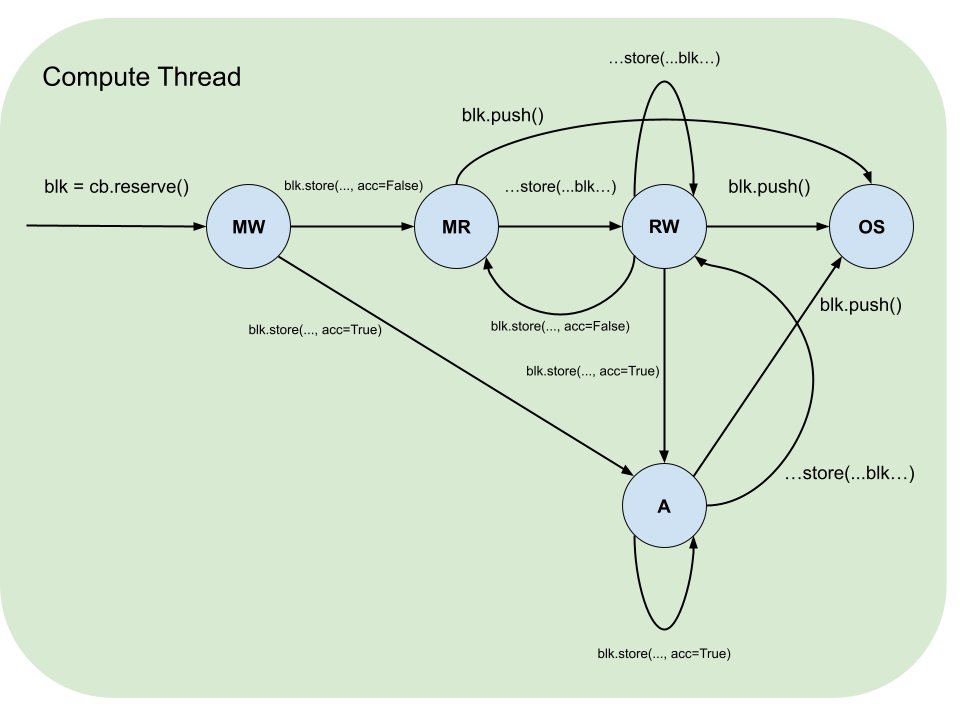
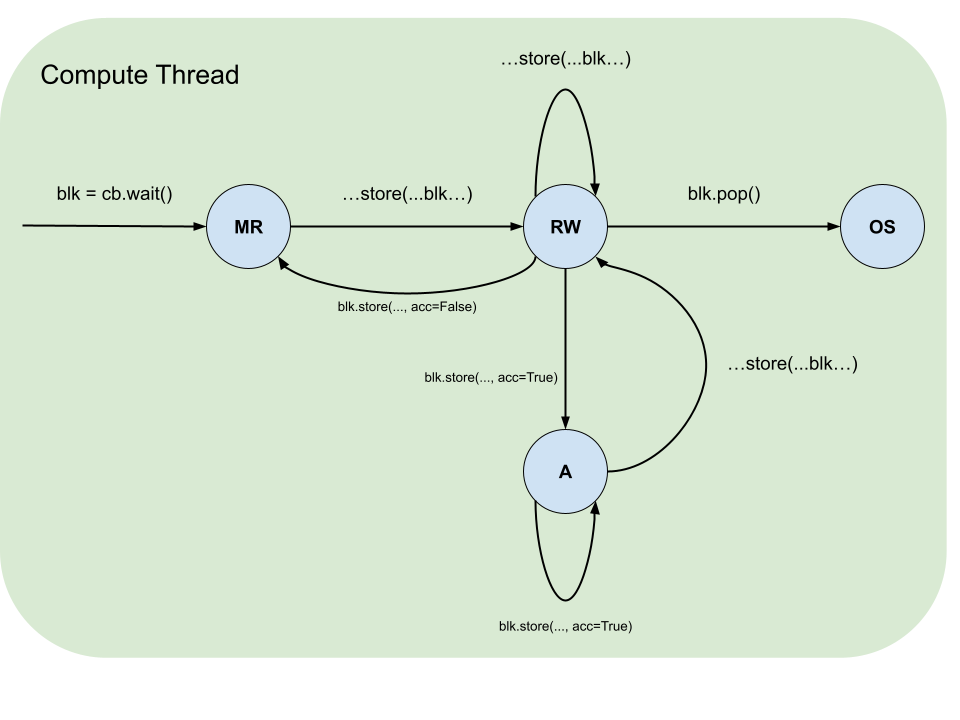
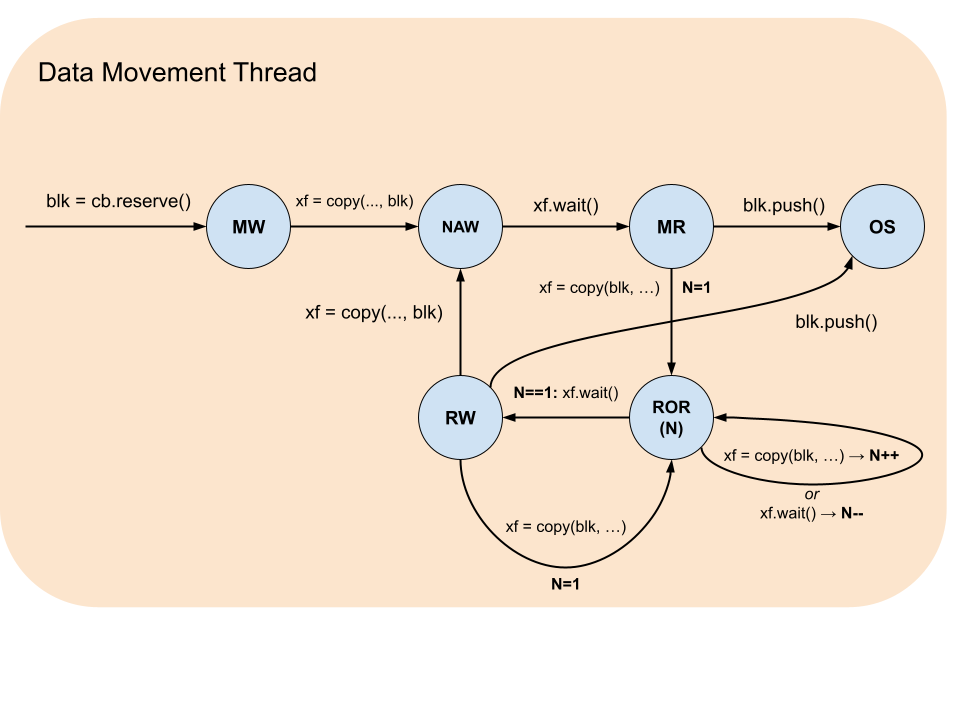
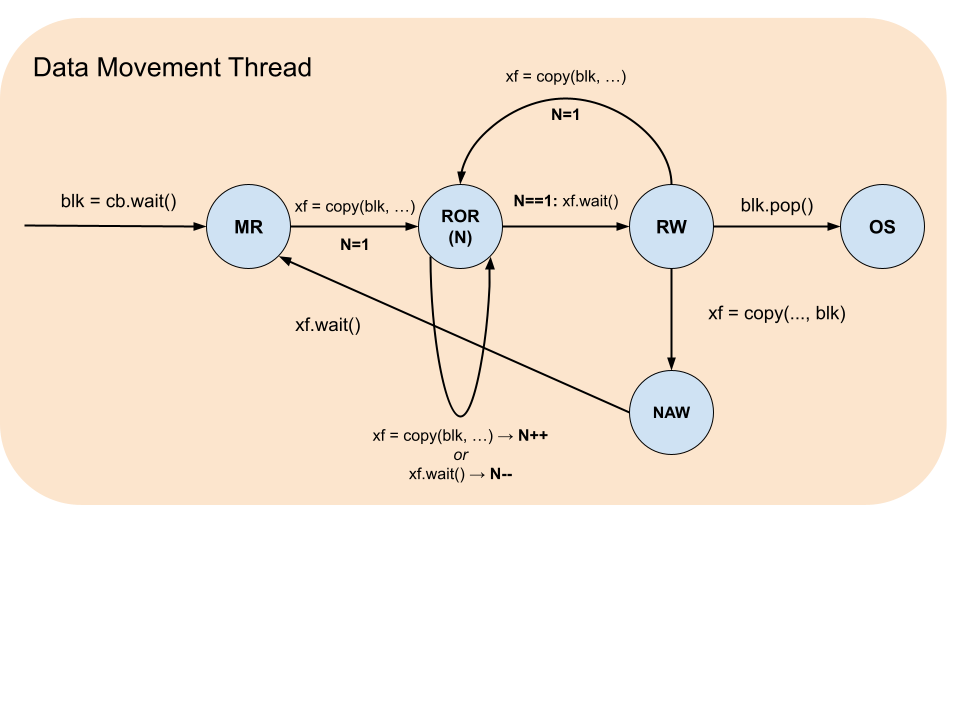
Blocks have a life cycle that starts with acquisition by using dataflow buffer’s reserve or wait functions and ends with release by block’s push and pop functions correspondingly. During this life cycle there are restrictions on what operations and in what sequences a block can participate in. These restrictions are formalized by the table below, which summarizes the states, and the accompanying diagrams, which illustrate the legal transitions.
Block State |
Description |
|---|---|
MW |
Must be Written: the block was reserved and contains garbage data and therefore must be written to. |
MR |
Must be Read: the block was waited on or written to and never read and therefore must be read from or pushed. |
RW |
Read-Write: the block was waited on or written to (MR) and then read from and therefore can be either read from more times or overwritten. |
ROR(N) |
Read Only while Reading: the block is being asynchronously read from by N |
NAW |
No Access while Writing: the block is being asynchronously written to. |
OS |
Out of Scope: the block was pushed or popped. |
Pipe
A pipe is a communication primitive for organizing the passing of data between data movement threads on different nodes. A pipe is used as a source or a destination in the ttl.copy. The pipe is constructed with source node coordinate (src) and destination (dst), which is either a single node coordinate for unicast or node range for multicast. The node range uses a combination of dimension slices and values to describe a contiguous hypercube.
A node range has the same number of dimensions as grid_size(dims=N), and each coordinate c_i lies within the corresponding grid extent G_i (i.e. 0 <= c_i < G_i). The range may be smaller than the grid: pipes are not required to span every node along any dimension.
The launch extent of an operation is the grid on which the operation is launched, selected by the grid= argument of @ttl.operation(grid=...). Pipe coordinates need not span the launch extent: they describe only the nodes that participate as pipe sources or destinations, that is, the operation’s active set (defined under Pipe net below).
For example, consider an operation on a device with a 4x4 compute grid whose pipe sources and destinations together cover at most a 2x3 region: its active set has at most 6 nodes. Under grid="full" it launches on all 16 nodes; every node outside the active set must be guarded out of the pipe-coupled regions by the user.
The launch extent is selected by the value passed to grid=:
Value |
Launch extent |
|---|---|
|
The device compute grid, regardless of pipe coordinates. |
Tuple |
Used verbatim. |
|
Currently the same as |
Whenever the launch extent is wider than the active set (which is always the case under "full" or any explicit tuple, and also currently under "auto"), the user must guard pipe-coupled regions with net.is_src() / net.is_dst() / net.is_active() (or equivalent coordinate predicates) so that nodes outside the corresponding role skip the pipe-coupled work.
Type alias/Function |
Description |
|---|---|
|
A node range. |
|
Constructs pipe description to be used to construct pipe net. The |
Pipe net
A pipe net is a communication primitive that groups pipes into a network. A pipe net is constructed from a list of pipes and encapsulates all necessary information to determine if a given node is source, destination or both and where and from which node or nodes the corresponding transfers will occur. Pipe net object has two functions: if_src and if_dst. Both functions have a single argument: condition body function.
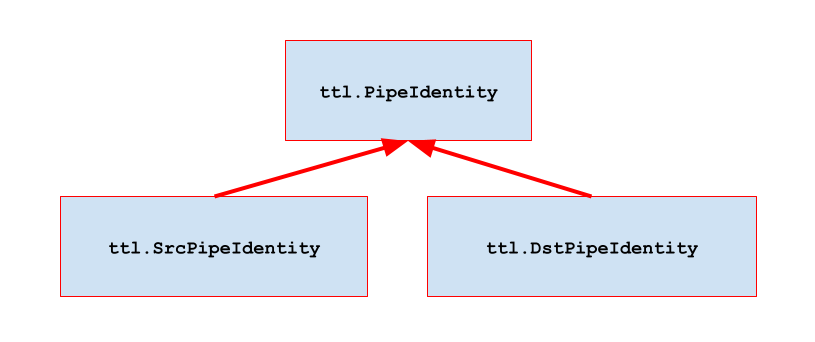
Condition body function is invoked for each pipe in case of if_src if the current node is a source, and in case of if_dst if the current node is a destination. The condition body function has a single argument: a pipe identity that satisfies the condition. Condition body function can identify the source and the destination by its src and dst read-only properties correspondingly.
A pipe net is constructed either in the scope of an operation function or in an enclosing scope and captured by the operation function. It can only be used with its if_src and if_dst functions and is executed on a data movement thread. The corresponding ttl.copy where a pipe is a source or a destination can be called only inside of a condition body function. Calls into if_src and if_dst can be nested within condition functions for different pipe nets.
The active set of an operation is the union, over every pipe in every pipe net in scope of the operation (constructed in its body or captured from an enclosing scope), of the pipe’s source coordinate and its destination coordinate or range. The role domain of a pipe net is its per-net active set; pipe_net.is_src(), pipe_net.is_dst(), and pipe_net.is_active() are predicates that evaluate to True on the source role, destination role, and their union, respectively.
The active predicates are only required for code that includes pipe-coupled computations. Any non-pipe-related code segment can execute on all nodes of the operation’s grid or have its own guards that are independent of pipes.
Function |
Description |
|---|---|
|
Constructs pipe net. |
|
Call condition function for each pipe in the pipe net that is a source. |
|
Call condition function for each pipe in the pipe net that is a destination. |
|
Predicate: |
|
Predicate: |
|
Predicate: |
|
Get destination node or node range for pipe in |
|
Get source node for pipe in |
Gather example
# Grid:
#
# column
# x == 0
#   |
#   V
# (0, 0) (1, 0) (2, 0) (3, 0) <-- row y == 0
# (0, 1) (1, 1) (2, 1) (3, 1)
# (0, 2) (1, 2) (2, 2) (3, 2)
# (0, 3) (1, 3) (2, 3) (3, 3)

# ---------------------
# gather from row y to (0, y) with unicast.
#
# The pipe net is sized from the active set, not the launch extent.
# ROWS and COLS describe the rectangle that bounds the active set.
# Nodes outside the active rectangle (row 0..ROWS-1, column 0..COLS-1)
# skip the operation body.

ROWS = ...  # rows participating in the gather
COLS = ...  # columns participating in the gather

net = ttl.PipeNet(
    [ttl.Pipe(src=(x, y), dst=(0, y)) for x in range(1, COLS) for y in range(ROWS)]
)

# (1, 0) -> (0, 0) |             |
# (2, 0) -> (0, 0) | sequential  |
# (3, 0) -> (0, 0) |             |
# ...              |             | concurrent
#                                |
# (1, 1) -> (0, 1)               |
# ...                            |

@ttl.datamovement()
def dm():
    def pipe_src(pipe):
        with send_dfb.reserve() as producer_block:

            # write data into producer_block
            # ...

        with send_dfb.wait() as send_block:

            # then copy send_block to pipe:

            xf = ttl.copy(send_block, pipe)
            xf.wait()

    def pipe_dst(pipe):
        with recv_dfb.reserve() as receive_block:

            # copy receive_block from pipe:

            xf = ttl.copy(pipe, receive_block)
            xf.wait()

        with recv_dfb.wait() as received_block:

            # then read data from received_block
            # ...

    net.if_src(pipe_src)
    net.if_dst(pipe_dst)
Scatter example
# ---------------------
# scatter from (x, 0) to column x with multicast

grid_x, grid_y = ttl.grid_size()

net = ttl.PipeNet(
    [ttl.Pipe(src=(x, 0), dst=(x, slice(1, grid_y))) for x in range(grid_x)]
)

# (0, 0) => (0, 1) (0, 2) (0, 3) ... |
# (1, 0) => (1, 1) (1, 2) (1, 3) ... | concurrent
# ...                                |

@ttl.datamovement()
def dm():
    def pipe_src(pipe):
        with send_dfb.reserve() as producer_block:

            # write data into producer_block
            # ...

        with send_dfb.wait() as send_block:

            # then copy send_block to pipe:

            xf = ttl.copy(send_block, pipe)
            xf.wait()

    def pipe_dst(pipe):
        with recv_dfb.reserve() as receive_block:

            # copy receive_block from pipe:

            xf = ttl.copy(pipe, receive_block)
            xf.wait()

        with recv_dfb.wait() as received_block:

            # then read data from received_block
            # ...

    net.if_src(pipe_src)
    net.if_dst(pipe_dst)
Scatter-gather example
# ---------------------
# scatter-gather column x with multicast/loopback

grid_x, grid_y = ttl.grid_size()

net = ttl.PipeNet(
    [
        ttl.Pipe(src=(x, y), dst=(x, slice(0, grid_y)))
        for x in range(grid_x)
        for y in range(grid_y)
    ]
)

# (0, 0) => (0, 0) (0, 1) (0, 2) ... |            |
# (0, 1) => (0, 0) (0, 1) (0, 2) ... | sequential |
# (0, 2) => (0, 0) (0, 1) (0, 2) ... |            |
# ...                                |            | concurrent
#                                                 |
# (1, 0) => (1, 0) (1, 1) (1, 2) ...              |
# ...                                             |

@ttl.datamovement()
def dm():
    def pipe_src(pipe):
        with send_dfb.reserve() as producer_block:

            # write data into producer_block
            # ...

        with send_dfb.wait() as send_block:

            # then copy send_block to pipe:

            xf = ttl.copy(send_block, pipe)
            xf.wait()

    def pipe_dst(pipe):
        with recv_dfb.reserve() as receive_block:

            # copy receive_block from pipe:

            xf = ttl.copy(pipe, receive_block)
            xf.wait()

        with recv_dfb.wait() as received_block:

            # then read data from received_block
            # ...

    net.if_src(pipe_src)
    net.if_dst(pipe_dst)
Forward to a +1 neighbor example
# ---------------------
# forward to a +1 neighbor in a column x

grid_x, grid_y = ttl.grid_size()

net = ttl.PipeNet(
    [
        ttl.Pipe(src=(x, y), dst=(x, (y + 1) % grid_y))
        for x in range(grid_x)
        for y in range(grid_y)
    ]
)

# (0, 0) => (0, 1)  |
# (0, 1) => (0, 2)  |
# ...               |
# (0, 7)* => (0, 0) |
# ...               | concurrent
#                   |
# (1, 0) => (1, 1)  |
# ...               |
#
# * - assuming (8, 8) grid

@ttl.datamovement()
def dm():
    def pipe_src(pipe):
        with dfb_to_send.reserve() as producer_block:

            # write data into producer_block
            # ...

        with dfb_to_send.wait() as send_block:

            # then copy send_block to pipe:

            xf = ttl.copy(send_block, pipe)
            xf.wait()

    def pipe_dst(pipe):
        with dfb_received.reserve() as receive_block:

            # copy receive_block from pipe:

            xf = ttl.copy(pipe, receive_block)
            xf.wait()

        with dfb_received.wait() as received_block:

            # then read data from received_block
            # ...

    net.if_src(pipe_src)
    net.if_dst(pipe_dst)
Tensor slice
A tensor slice is a view into a TT-NN tensor defined in terms of a dimension slice or value for each of the tensor’s dimensions. A tensor slice can participate in ttl.copy as a source or a destination with the corresponding destination and source being a block. Tensor slice is executed on a data movement thread.
Function |
Description |
|---|---|
|
Get a tensor slice from a TT-NN tensor. |
Tensor slice example
g = 2  # granularity
a_dfb = ttl.make_dataflow_buffer_like(A, shape=(g, 1))

row_tiles = A.shape[0] // ttl.TILE_SHAPE[0]
col_tiles = A.shape[1] // ttl.TILE_SHAPE[1]
cols_per_node = math.ceil(col_tiles / (grid_size(dims=1)))

node_num = ttl.node(dims=1)
start_ct = node_num * cols_per_node
end_ct = min(start_ct + cols_per_node, col_tiles)

@ttl.datamovement()
def dm():
    for ct in range(start_ct, end_ct):
        for rt in range(row_tiles // g):

            # acquire a_blk from a_dfb:

            with a_dfb.reserve() as a_blk:

                # then copy from a tensor slice of matching shape:

                row_slice = slice(rt * g, (rt + 1) * g)  # explicit row slice
                a_xf = ttl.copy(
                    A[row_slice, ct : ct + 1], a_blk
                )  # in-line col slice
                a_xf.wait()
Copy
The ttl.copy function expresses a variety of data movements that always have two arguments: source and destination. ttl.copy returns a transfer handle object. A transfer handle has a wait function that serves as a barrier. When the wait returns the transfer is complete and data in the destination is safe to use. The ttl.copy is executed on a data movement thread.
A tensor-to-dataflow-buffer copy or Pipe receive writes a block acquired from reserve(). A dataflow-buffer-to-tensor copy reads a block acquired from wait(). A Pipe send may read either kind of block; a reserve-acquired send must still be consumed by another kernel through wait(), and the spec examples send from wait() blocks. To keep a produced block in a tensor as well, publish it and copy it to the tensor from a wait()-acquired block of a second dataflow buffer.
Group transfer
When ttl.copy function is called multiple times, instead of waiting on each transfer handle, it is possible to group handles and wait on all handles at once. This is done by instantiating ttl.GroupTransfer object and then adding handles with its add function. Once all handles are added wait_all function is called to wait for all transfers to complete.
Group transfer example
# ---------------------
# Nearest Neighbor Upsample
#
# Tensor              Torch shape
# input_images        N, HI, WI, C
# output_images       N, HO, WO, C
#
# All tensors have row-major layout

HO = HI * H_SCALE_FACTOR
WO = WI * W_SCALE_FACTOR

io_dfb = ttl.make_dataflow_buffer_like(input_images, shape=(C,), block_count=2)

@ttl.datamovement()
def reader():
    for n in range(N):
        for hi in range(HI):
            for wi in range(WI):
                with io_dfb.reserve() as io_blk:

                    # Load input pixel channels

                    xf = ttl.copy(input_t[n, hi, wi, :], io_blk)

                    xf.wait()

@ttl.datamovement()
def writer():
    for n in range(N):
        for hi in range(HI):
            for wi in range(WI):
                with io_dfb.wait() as io_blk:
                    gxf = ttl.GroupTransfer()

                    for h_scale_index in range(H_SCALE_FACTOR):
                        for w_scale_index in range(W_SCALE_FACTOR):

                            # Copy output pixel channels

                            xf = ttl.copy(
                                io_blk,
                                output[
                                    n,
                                    hi * H_SCALE_FACTOR + h_scale_index,
                                    wi * W_SCALE_FACTOR + w_scale_index,
                                    :,
                                ],
                            )

                            # Add transfer handle to a group

                            gxf.add(xf)

                    # Wait for all transfers to complete

                    gxf.wait_all()
Function |
Description |
|---|---|
|
Copy data between a block, a tensor slice, or a pipe. This function is non-blocking. The compiler statically checks if the shape of block and tensor slice are compatible and if the shape of block sent to a pipe is compatible with the shape of block received from the same pipe. When a pipe is used as a destination there must be a corresponding |
|
Wait for data transfer to complete. Transfer handle cannot be used after this function is called. This function is blocking. |
|
Add transfer handle to a group. This function cannot be called after |
|
Wait for all data transfers in group to complete. Group transfer cannot be used after this function is called. This function is blocking. |
Semaphore
A semaphore is a communication primitive for general synchronization between nodes. Each semaphore has an associated 32-bit unsigned integer semaphore value for each node. This value can be changed (set or incremented) on the local node or on a remote node. When changing a semaphore value remotely, a single node coordinate for a unicast change or a node range for a multicast change is specified. Only setting the semaphore value is supported as a multicast change. A node can wait on its local semaphore value until it satisfies a condition, specified as either an exact value or a minimum value. Semaphore value changes and waits run on data movement threads.
ttl.Semaphore class is constructed with its initial value that defaults to zero. A ttl.Semaphore instance can be constructed in a operation function scope. A ttl.Semaphore instance provides wait_eq, wait_ge and set functions for managing local semaphore value. To change a remote semaphore value an instance of ttl.UnicastRemoteSemaphore or ttl.MulticastRemoteSemaphore is obtained by calling get_remote and get_remote_multicast functions correspondingly. The ttl.UnicastRemoteSemaphore supports inc and set while ttl.MulticastRemoteSemaphore supports only set. The functions that obtain remote semaphores can be used anywhere in an operation.
One-to-many barrier example
node_num = ttl.node(dims=1)
my_barrier = ttl.Semaphore()
all_barrier = my_barrier.get_remote_multicast()

@ttl.datamovement()
def dm():
    if node_num == 0:

        # do something on node 0 while non-0 nodes wait...

        all_barrier.set(1)
    else:
        my_barrier.wait_eq(1)

        # node 0 is done
Many-to-one barrier example
node_num = ttl.node(dims=1)
my_barrier = ttl.Semaphore()
node_0_barrier = my_barrier.get_remote((0, 0))
non_0_node_count = grid_size(dims=1) - 1

@ttl.datamovement()
def dm():
    if node_num != 0:

        # do something on non-0 nodes while node 0 waits...

        node_0_barrier.inc(1)
    else:
        my_barrier.wait_eq(non_0_node_count)

        # non-0 nodes are done
Function |
Description |
|---|---|
|
A type for semaphore value. |
|
Wait until the local semaphore value is equal to specified value. This function is blocking. |
|
Wait until the local semaphore value is greater or equal to specified value. This function is blocking. |
|
Set the local semaphore value to specified value. This function is non-blocking. |
|
Get remote unicast semaphore for specified node coordinate. Returns an instance of |
|
Get remote multicast semaphore for specified node range. When called with no arguments returns remote multicast semaphore for the entire grid. Returns an instance of |
|
Set remote unicast semaphore value to specified value. This function is non-blocking. |
|
Increment remote unicast semaphore value by specified value. This function is non-blocking. |
|
Set remote multicast semaphore value to specified value. This function is non-blocking. |
Performance and debugging
TT-Lang provides a range for facilities to aid performance analisys and debugging. Generally, the description of these tools is outside of the scope of this specification with the exception of language extensions that are needed to support them.
Profiling signpost
Profiling signpost is a language construct that allows the user to specify a block of code that will be measured for performance during the program execution. This is achieved by using Python with statement in conjunction with ttl.signpost function. This function takes a string argument for a signpost name. This way the signpost will be identified in the profiling tool’s user interface.
Signpost example
@ttl.datamovement()
def matmul_read():
    for i_tile in range(I_TILES):
        for m_tile in range(M_TILES):
            for n_tile in range(N_TILES):

                # Measure the entire iteration

                with ttl.signpost("i_m_n iteration"):

                    # Measure from reserve to push

                    with ttl.signpost("push c"):
                        with c_dfb.reserve() as c_blk:

                            # Measure only copy

                            with ttl.signpost("read c"):
                                c_xf = ttl.copy(c[m_tile, n_tile], c_blk)
                                c_xf.wait()

                    for k_tile in range(K_TILES):
                        with ttl.signpost("push a and b"):

                            # Measure from reserve to push

                            with (
                                a_dfb.reserve() as a_blk,
                                b_dfb.reserve() as b_blk,
                            ):

                                # Measure only copy

                                with ttl.signpost("read a and b"):
                                    a_xf = ttl.copy(a[i_tile, m_tile, k_tile], a_blk)
                                    b_xf = ttl.copy(b[k_tile, n_tile], b_blk)

                                    a_xf.wait()
                                    b_xf.wait()
Function |
Description |
|---|---|
|
Declare as signpost. Can be used only with the |
Debug printing
TT-Lang includes ability to print information to the standard output for debugging purpose. This is achieved by using the standard Python print function. In TT-Lang this function can be used with string constants, scalar variables, such as loop indexes or calculated slice bounds, as well as with TT-Lang specific objects, such as tensors and blocks. When print is used with TT-Lang objects there are additional attribute arguments, which enabling better control of the output content. Beacause of this, print is limited to only one TT-Lang object to be printed in conjunction any number of string and scalar variables.
Debug printing example
@ttl.datamovement()
def matmul_read():
    # Print first two pages of c

    print("c: ", c, num_pages=2)

    # Print first page of a and b

    print("a: ", a)
    print("b: ", b)

    for i_tile in range(I_TILES):
        for m_tile in range(M_TILES):
            for n_tile in range(N_TILES):
                with c_dfb.reserve() as c_blk:

                    # Print state of c_dfb dataflow buffer after reserve

                    print("c_dfb after reserve: ", c_dfb)

                    # Print iteration state and the content of c_blk block

                    print(
                        "i_tile=",
                        i_tile,
                        " m_tile=",
                        m_tile,
                        "n_tile=",
                        n_tile,
                        " c_blk: ",
                        c_blk,
                    )

                    c_xf = ttl.copy(c[m_tile, n_tile], c_blk)
                    c_xf.wait()

                # Print state of c_dfb dataflow buffer after push

                print("c_dfb after push: ", c_dfb)

                for k_tile in range(K_TILES):
                    with (
                        a_dfb.reserve() as a_blk,
                        b_dfb.reserve() as b_blk,
                    ):
                        # Print iteration state

                        print("k_tile=", k_tile)

                        # Print the content of a_blk block

                        print("a_blk:")
                        print(a_blk)

                        # Print the content of b_blk block

                        print("b_blk:")
                        print(b_blk)

                        a_xf = ttl.copy(a[i_tile, m_tile, k_tile], a_blk)
                        b_xf = ttl.copy(b[k_tile, n_tile], b_blk)

                        a_xf.wait()
                        b_xf.wait()
Type |
|
|---|---|
|
Print |
|
Print the content of a block. For example, |
|
Print the state of a dataflow buffer, which includes metadata such as |
Appendix A. Glossary
Term |
Description |
|---|---|
Domain specific language (DSL) |
A language based on a constrained subset of the host language, Python in the case of TT-Lang. |
Operation function |
A Python function, decorated with |
Composed operation |
An operation called from the body of another operation. It is expanded in place when the calling operation is defined. |
Expand-only operation |
An operation that takes dataflow buffers or pipe nets as parameters and can therefore only be expanded into another operation, never called directly. |
Runtime argument |
A value supplied at each call of an operation. Runtime arguments are TT-NN tensors. |
Compile-time argument |
A value fixed when an operation is defined, captured from the enclosing Python scope and substituted into the body before compilation. |
Thread |
A unit of concurrent execution on a node. |
Compute thread |
A thread that evaluates block expressions. |
Data movement thread |
A thread that moves data between dataflow buffers, tensor slices, and pipes. |
Kernel function |
In a multi-kernel operation, a Python function defined inside the operation function that encapsulates the behavior of one thread, annotated with |
Data movement kernel function |
A kernel function that encapsulates data movement behavior. |
Compute kernel function |
A kernel function that encapsulates compute behavior. |
TT-NN tensor |
Tensor representation in TT-NN environment. Encapsulates key meta information such as shape, data type, layout, storage and memory configuration. |
Node |
A minimal unit capable of executing a TT-Lang program. |
Grid |
A multidimensional space of nodes. A single chip is represented by a 2D grid. A multichip system is represented by 3D and higher dimensional grids. |
Node coordinates |
Coordinates of a given node within a grid. Each dimension is zero based and contiguous, which corresponds to logical indexing. |
Dataflow buffer |
A communication primitive for synchronizing the passing of data between threads on the same node. Maintains memory space that is written by a producer and read by a consumer as well as synchronization mechanism necessary to communicate between producer and consumer to avoid data races. |
Dataflow buffer’s shape |
A shape of a block of memory acquired from a dataflow buffer to be either written by the producer or read by the consumer. |
Dataflow buffer’s shape unit |
A unit in which dataflow buffer shape is expressed. When a dataflow buffer is created in likeness of tiled TT-NN Tensor the unit is a tile. If it is created in likeness of row-major TT-NN the unit is a scalar element. |
Dataflow buffer’s block count |
A block count determines how many blocks are allocated by the dataflow buffer. In the most common case it is 2 blocks to allow double buffering so that both consumer and producer can make progress by having one acquired block each to work with. |
Dataflow buffer’s acquisition function |
A blocking function that keeps a thread waiting until a block becomes available in the dataflow buffer. |
Dataflow buffer’s release function |
A non-blocking function that releases a block back to the dataflow buffer to make it available to other threads. |
Block |
A block of memory acquired from a dataflow buffer. On a compute thread a block can participate in an expression as input, and also be used to store the expression’s result. On a data movement thread a block can participate in copy operation as a source or destination. |
Block expression |
A block expression is a Python expression using built-in Python operators as well as TT-Lang math functions where operands are either blocks or block expressions. |
Pipe |
A pipe is a communication primitive for organizing the passing of data between data movement threads on different nodes. |
Pipe net |
A pipe net is a communication primitive that groups pipes into a network. While a single pipe is capable of representing the passing of data from a single node, a network of pipes generalizes to a data passing pattern over the entire grid. A pipe net is constructed from the list of pipes, which is typically created by Python list comprehension over one or more aspects of a grid. |
Pipe net’s condition body function |
A Python function passed to be executed conditionally if the current node is a source, a destination, or both in the given pipe net. A condition function can be called multiple times sequentially if the current node participates in multiple pipes. |
Tensor slice |
A Python slice expression used with TT-NN tensor to specify a view to be used as a source or a destination in a copy operation. |
Transfer handle |
A handle to an asynchronous copy operation. A transfer handle is used as a barrier to ensure that operation is finished and the corresponding source or destination block is safe to use. |
Semaphore |
A communication primitive for general synchronization between data movement threads on different nodes. |
Semaphore value |
A 32-bit unsigned integer value associated with a semaphore on each node. This value can be set or incremented by a data movement thread on the local or a remote node. |
Appendix B. Block operators and math functions
Binary operators and math functions
Function |
Description |
|---|---|
|
Add two blocks element-wise. Example: |
|
Two blocks subtracted second from first element-wise. Example: |
|
Multiply two blocks element-wise. Example: |
|
Two blocks divided first by second element-wise. Example: |
|
Dot product of two blocks. If |
|
Element-wise maximum |
|
Element-wise minimum |
In-place operators
| Function | Description |
| ttl.BlockExpr.__iadd__(self, other: ttl.BlockExpr) -> ttl.BlockExpr | Add two blocks element-wise and replace first one with the result. Example: a += b. |
Basic unary math functions
Function |
Description |
|---|---|
|
Absolute value. Example: |
|
Negation. Example: |
|
Power with scalar unsigned integer exponent. Example; |
|
Natural base exponential. Computes |
|
Base 2 exponential ( |
|
Natural base exponential minus one ( |
|
Natural logarithm |
|
Natural logarithm of value plus 1 ( |
|
Square root |
|
Square |
|
Reciprocal square root ( |
|
Reciprocal ( |
|
Subtract a from b where b is scalar unsigned integer ( |
The ttl.math.exp function exposes hardware exponential options. The approx
flag enables approximate exponential evaluation. The scale argument applies
a compile-time scalar multiplier before the exponential. The
skip_clamp_check flag disables clamping of very negative inputs in
approximate mode. This is faster, but inputs below approximately -88.5 can
produce incorrect negative outputs. The iterations argument controls the
number of SFPU lane iterations and defaults to 8.
Trigonometric unary math functions
Function |
Description |
|---|---|
|
Tangent |
|
Hyperbolic tangent |
|
Arctangent |
|
Hyperbolic arctangent |
|
Sine |
|
Arcsine |
|
Hyperbolic arcsine |
|
Cosine |
|
Arccosine |
|
Hyperbolic arccosine |
Activation functions
Function |
Description |
|---|---|
|
|
|
ReLU with upper limit ( |
|
ReLU with lower limit ( |
|
|
|
|
|
|
|
|
|
|
|
SiLU (Swish) |
|
|
|
|
|
|
|
|
|
|
|
Reduction, broadcast and transpose functions
Function |
Description |
|---|---|
|
Reduce a block by summation over specified dimensions. Produces block of specified |
|
Reduce a block by finding maximum over specified dimensions. See details and examples for |
|
Broadcast a block over specified dimensions ( |
|
Transpose a block. For argument block of shape |
Rounding functions
Function |
Description |
|---|---|
|
Fractional portion |
|
Truncated integer portion |
|
Rounds to the number of decimal places specified in |
|
Floor |
|
Ceil |
|
Clamp to specified |
|
For all values greater than specified |
|
Replace positive element with 1, negative elements with -1 and leave zeroes as zero. |
|
Replace positive and positive zero elements with 1 and the rest with 0 |
Fill, mask and where functions
Function |
Description |
|---|---|
|
Fill a block of specified |
|
Mask a block with specified |
|
Mask a block with specified |
|
For each element in specified condition block return the corresponding element from |
Shape manipulation functions
Function |
Description |
|---|---|
|
Remove shape dimension at positions specified by |
|
Add shape dimension of 1 at positions specified by |
Scalar element access functions
Function |
Description |
|---|---|
|
Read a single scalar element from a block at the given coordinates. The block must be in |
|
Write a scalar |
Limitations
Only
ttnn.DataType.FLOAT32andttnn.DataType.BFLOAT16element types are supportedValues written via
ttl.raw_element_writemust originate from one of:A prior
ttl.raw_element_readon the same or another blockA Python float constant
Appendix C. Naming guidelines
Object |
Guideline |
|---|---|
Tensor |
Snake case. Example |
Dataflow buffer |
Snake case with |
Block |
Snake case with |
Transfer handle |
Snake case with |
Pipe net |
Snake case with |
Appendix D. Functionality matrix
Functionality |
Simulator |
Compiler |
|---|---|---|
Single-device grid |
0.1.7 |
0.1.7 |
Single-device grid |
0.1.7 |
N/S |
Multidevice grid |
N/S |
N/S |
0.1.8 |
0.1.8 |
|
0.1.8 |
0.1.8 |
|
|
0.1.7 |
0.1.7 |
|
0.1.7 |
0.1.7 |
|
0.1.8 |
N/S |
|
0.1.7 |
0.1.7 |
Overwriting and accumulation through summation ( |
0.1.7 |
1.0.0 |
|
0.1.7 |
0.1.7 |
|
1.0.0 |
N/S |
|
N/S |
N/S |
|
N/S |
N/S |
|
0.1.7 |
1.0.0 |
|
N/S |
N/S |
|
0.1.7 |
0.1.7 |
Debug printing with |
0.1.7 |
0.1.7 |
Built-in unary math operators: |
0.1.7 |
0.1.7 |
Built-in binary math operators: |
0.1.7 |
0.1.7 |
Built-in binary math operators: |
0.1.7 |
0.1.8 |
Built-in binary math operators: |
0.1.7 |
N/S |
|
0.1.7 |
0.1.7 |
|
0.1.7 |
0.1.8 |
|
0.1.7 |
1.0.0 |
|
0.1.7 |
N/S |
|
0.1.7 |
0.1.7 |
|
0.1.7 |
N/S |
|
0.1.7 |
N/S |
|
0.1.7 |
0.1.7 |
|
0.1.7 |
0.1.8 |
|
0.1.7 |
0.1.8 |
|
0.1.7 |
0.1.8 |
|
0.1.7 |
0.1.8 |
|
N/S |
N/S |
|
1.0.0 |
1.0.0 |
|
1.0.0 |
1.0.0 |
|
N/S |
N/S |
|
N/S |
N/S |
|
N/S |
N/S |
|
N/S |
N/S |
N/S - Not Supported
N/A - Not Applicable
Appendix E. Platform limitations
Description |
Wormhole |
Blackhole |
|---|---|---|
Tile size in scalar elements |
32, 32 |
32, 32 |
Maximum single chip grid size (unharvested) |
8, 9 |
13, 10 |
Size of L1 memory (KB) |
1464 |
1464 |
Maximum number of dataflow buffers |
32 |
64 |