Introduction
The TT-Forge-ONNX is a graph compiler designed to optimize and transform computational graphs for deep learning models on single-chip systems, enhancing their performance and efficiency.
Built on top of the TT-MLIR backend, TT-Forge-ONNX is an integral component of the TT-Forge project, which provides a comprehensive suite of tools for optimizing and deploying deep learning models on Tenstorrent hardware.
The main project goals are:
- Provide abstraction of ONNX, TensorFlow, and PaddlePaddle frontend frameworks
- Compile many kinds of model architectures without custom modification and with great performance (for example, Transformers, CNNs, etc.)
- Abstract all Tenstorrent device architectures (for example, Wormhole, Blackhole, etc.)
Getting Started
This document walks you through how to set up TT-Forge-ONNX. This is the main Getting Started page. There are two additional Getting Started pages depending on what you want to do. They are all described here, with links provided to each.
NOTE: TT-Forge-ONNX is a framework agnostic frontend that can convert any model to a generic Intermediate Representation (IR) that can then be converted to a Tenstorrent specific IR for use with Tenstorrent hardware. TT-Forge-ONNX is for use with single-chip systems only.
The following topics are covered:
- Setup Options
- Configuring Hardware
- Installing a Wheel and Running an Example
- Other Setup Options
- Where to Go Next
NOTE: If you encounter issues, please request assistance on the TT-Forge-ONNX Issues page.
Setup Options
TT-Forge-ONNX can be used to run models from any framework. Because TT-Forge-ONNX is open source, you can also develop and add features to it. Setup instructions differ based on the task. You have the following options, listed in order of difficulty:
- Installing a Wheel and Running an Example - You should choose this option if you want to run models.
- Using a Docker Container to Run an Example - Choose this option if you want to keep the environment for running models separate from your existing environment.
- Building from Source - This option is best if you want to develop TT-Forge-ONNX further. It's a more complex process you are unlikely to need if you want to stick with running a model.
Configuring Hardware
Before setup can happen, you must configure your hardware. You can skip this section if you already completed the configuration steps. Otherwise, this section of the walkthrough shows you how to do a quick setup using TT-Installer.
-
Configure your hardware with TT-Installer using the Quick Installation section here.
-
Reboot your machine.
-
Make sure hugepages is enabled:
sudo systemctl enable --now 'dev-hugepages\x2d1G.mount'
sudo systemctl enable --now tenstorrent-hugepages.service
-
Please ensure that after you run the TT-Installer script, after you complete reboot and set up hugepages, you activate the virtual environment it sets up -
source ~/.tenstorrent-venv/bin/activate. -
After your environment is running, to check that everything is configured, type the following:
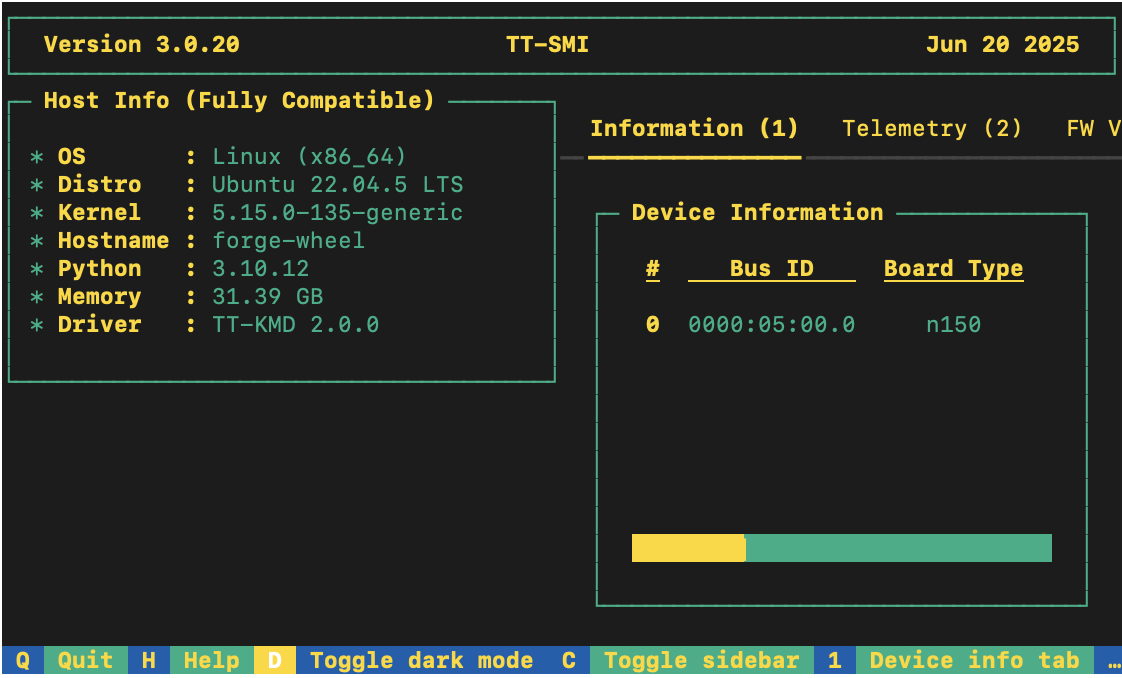
tt-smi
You should see the Tenstorrent System Management Interface. It allows you to view real-time stats, diagnostics, and health info about your Tenstorrent device.
Installing a Wheel and Running an Example
This section walks you through downloading and installing a wheel. You can install the wheel wherever you would like.
-
Make sure you have Python 3.12 installed and you are in an active Python 3.12 virtual environment. This walkthrough uses the same environment you activated to look at TT-SMI in the Configuring Hardware section.
-
Install the required system runtime libraries on Ubuntu 24.04:
sudo apt-get install -y libgomp1 libmpc3
libgomp1— OpenMP runtime (libgomp.so.1), required by PaddlePaddle'slibpaddle.so.libmpc3— GNU MPC library (libmpc.so.3), required by the sfpi RISC-V GCC compiler bundled in the wheel.
- For this walkthrough, TT-Forge-ONNX is used. You need to install the tt_forge_onnx and tt_tvm wheels:
# Install uv if you don't have it yet
curl -LsSf https://astral.sh/uv/install.sh | sh

uv pip install tt_forge_onnx --extra-index-url https://pypi.eng.aws.tenstorrent.com/
uv pip install tt_tvm --extra-index-url https://pypi.eng.aws.tenstorrent.com/
- To test that everything is running correctly, try an example model. You can use nano or another text editor to paste this code into a file named forge_example.py and then run it from the terminal. You should still have your virtual environment running after installing the wheel when running this example:
import numpy as np
import onnx
import onnx.helper as helper
import forge

# Create a minimal ONNX model (elementwise add of two tensors)
X = helper.make_tensor_value_info("X", onnx.TensorProto.FLOAT, [1, 4])
Y = helper.make_tensor_value_info("Y", onnx.TensorProto.FLOAT, [1, 4])
Z = helper.make_tensor_value_info("Z", onnx.TensorProto.FLOAT, [1, 4])

add_node = helper.make_node("Add", inputs=["X", "Y"], outputs=["Z"])
graph = helper.make_graph([add_node], "add_graph", [X, Y], [Z])
onnx_model = helper.make_model(graph)
onnx.checker.check_model(onnx_model)

# Compile and run on Tenstorrent hardware
x = np.random.rand(1, 4).astype(np.float32)
y = np.random.rand(1, 4).astype(np.float32)
compiled_model = forge.compile(onnx_model, sample_inputs=[x, y])

output = compiled_model(x, y)
print("Output:", output)
- You have now set up the latest wheel for TT-Forge-ONNX, and can run any models you want inside your virtual environment.
Other Set up Options
If you want to keep your environment completely separate in a Docker container, or you want to develop TT-Forge-ONNX further, this section links you to the pages with those options:
- Setting up a Docker Container - keep everything for running models in a container
- Building from Source - set up so you can develop TT-Forge-ONNX
Where to Go Next
Now that you have set up TT-Forge-ONNX, you can compile and run other demos or your own code. See the TT-Forge-ONNX folder in the TT-Forge repo for more demo options.
Getting Started with Docker
This document walks you through how to set up TT-Forge-ONNX using a Docker image. There are two other available options for getting started:
- Installing a Wheel - if you do not want to use Docker, and prefer to use a virtual environment by itself instead, use this method.
- Building from Source - if you plan to develop TT-Forge-ONNX further, you must build from source, and should use this method.
NOTE: TT-Forge-ONNX is a framework agnostic frontend that can convert any model to a generic Intermediate Representation (IR) that can then be converted to a Tenstorrent specific IR for use with Tenstorrent hardware. TT-Forge-ONNX is for use with single-chip systems only.
The following topics are covered:
NOTE: If you encounter issues, please request assistance on the TT-Forge-ONNX Issues page.
Configuring Hardware
Before setup can happen, you must configure your hardware. You can skip this section if you already completed the configuration steps. Otherwise, this section of the walkthrough shows you how to do a quick setup using TT-Installer.
-
Configure your hardware with TT-Installer using the Quick Installation section here.
-
Reboot your machine.
-
Make sure hugepages is enabled:
sudo systemctl enable --now 'dev-hugepages\x2d1G.mount'
sudo systemctl enable --now tenstorrent-hugepages.service
-
Please ensure that after you run the TT-Installer script, after you complete reboot and set up hugepages, you activate the virtual environment it sets up -
source ~/.tenstorrent-venv/bin/activate. -
When your environment is running, to check that everything is configured, type the following:
tt-smi
You should see the Tenstorrent System Management Interface. It allows you to view real-time stats, diagnostics, and health info about your Tenstorrent device.
- You can now deactivate the virtual environment.
Setting up the Docker Container
This section walks through the installation steps for using a Docker container for your project.
To install, do the following:
- Install Docker if you do not already have it:
sudo apt update
sudo apt install docker.io -y
sudo systemctl start docker
sudo systemctl enable docker
- Test that Docker is installed:
docker --version
- Add your user to the Docker group:
sudo usermod -aG docker $USER
newgrp docker
- Run the Docker container:
docker run -it --rm \
  --device /dev/tenstorrent \
  -v /dev/hugepages-1G:/dev/hugepages-1G \
  ghcr.io/tenstorrent/tt-forge-slim:latest
NOTE: You cannot isolate devices in containers. You must pass through all devices even if you are only using one. You can do this by passing
--device /dev/tenstorrent. Do not try to pass--device /dev/tenstorrent/1or similar, as this type of device-in-container isolation will result in fatal errors later on during execution.
- If you want to check that it is running, open a new tab with the Same Command option and run the following:
docker ps
- To check that everything is running as expected, try an example model. You can use nano or another text editor to paste this code into a file named forge_example.py and then run it from the terminal:
import numpy as np
import onnx
import onnx.helper as helper
import forge

# Create a minimal ONNX model (elementwise add of two tensors)
X = helper.make_tensor_value_info("X", onnx.TensorProto.FLOAT, [1, 4])
Y = helper.make_tensor_value_info("Y", onnx.TensorProto.FLOAT, [1, 4])
Z = helper.make_tensor_value_info("Z", onnx.TensorProto.FLOAT, [1, 4])

add_node = helper.make_node("Add", inputs=["X", "Y"], outputs=["Z"])
graph = helper.make_graph([add_node], "add_graph", [X, Y], [Z])
onnx_model = helper.make_model(graph)
onnx.checker.check_model(onnx_model)

# Compile and run on Tenstorrent hardware
x = np.random.rand(1, 4).astype(np.float32)
y = np.random.rand(1, 4).astype(np.float32)
compiled_model = forge.compile(onnx_model, sample_inputs=[x, y])

output = compiled_model(x, y)
print("Output:", output)
- If all goes well, you are now ready to move on to the next section, and run your first demo model.
Running Models in Docker
This section shows you how to run a model using Docker. The provided example is from the TT-Forge repo. Do the following:
- Inside your running Docker container, clone the TT-Forge repo:
git clone https://github.com/tenstorrent/tt-forge.git
- Set the path for Python:
export PYTHONPATH=/tt-forge:$PYTHONPATH
- Navigate into TT-Forge and run the following command:
git submodule update --init --recursive
-
Navigate back out of the TT-Forge directory.
-
For this set up, the mobile_netv2_demo.py is used. Navigate into tt-forge and run the following command:
python demos/tt-forge-onnx/cnn/mobile_netv2_demo.py
- If all goes well you will get a prediction stating the best guess for what the image is, and the probability that the model identified the image correctly.
Where to Go Next
Now that you have set up TT-Forge-ONNX, you can compile and run your own models. See the TT-Forge-ONNX folder in the TT-Forge repo for more demo options.
For a quick start about how to compile an ONNX model, here is a code sample. Note the introduction of the forge.compile call:
import numpy as np
import onnx
import forge

# Load any .onnx model (from the ONNX Model Zoo, or exported from Pytorch / TensorFlow / PaddlePaddle)
onnx_model = onnx.load("model.onnx")

# Prepare sample inputs matching the model's input shape
sample_inputs = [np.random.rand(1, 3, 224, 224).astype(np.float32)]

# Compile the model using Forge
compiled_model = forge.compile(onnx_model, sample_inputs=sample_inputs)

# Run compiled model on Tenstorrent hardware
output = compiled_model(*sample_inputs)
Getting Started with Building from Source
This document describes how to build the TT-Forge-ONNX project on your local machine. You must build from source if you want to develop for TT-Forge-ONNX. If you only want to run models, please choose one of the following sets of instructions instead:
- Installing a Wheel and Running an Example - You should choose this option if you want to run models.
- Using a Docker Container to Run an Example - Choose this option if you want to keep the environment for running models separate from your existing environment.
NOTE: TT-Forge-ONNX is a framework agnostic frontend that can convert any model to a generic Intermediate Representation (IR) that can then be converted to a Tenstorrent specific IR for use with Tenstorrent hardware. TT-Forge-ONNX is for use with single-chip systems only.
The topics covered in this document are:
- Configuring Your Hardware
- Prerequisites
- Building the Environment
- Building the Docs
- Build Cleanup
- Useful Build Environment Variables
NOTE: If you encounter issues, please request assistance on the TT-Forge-ONNX Issues page.
Configuring Your Hardware
If you already configured your hardware, you can skip this section. Otherwise do the following:
-
Configure your hardware with TT-Installer using the Quick Installation section here.
-
Reboot your machine.
-
Please ensure that after you run this script, after you complete reboot, you activate the virtual environment it sets up -
source ~/.tenstorrent-venv/bin/activate. -
After your environment is running, to check that everything is configured, type the following:
tt-smi
You should see the Tenstorrent System Management Interface. It allows you to view real-time stats, diagnostics, and health info about your Tenstorrent device.
Prerequisites
The prerequisites for building TT-Forge-ONNX from source are:
- Clang 17
- Ninja
- CMake (latest)
- Python 3.12
uv(Python package manager — used to install CMake and other Python tools)
On Ubuntu 24.04 systems, you can install these dependencies using the following commands:
# Update package list
sudo apt update -y
sudo apt upgrade -y
Installing uv
uv is a fast Python package manager used to install CMake and other Python tools. Install it with:
curl -LsSf https://astral.sh/uv/install.sh | sh
source $HOME/.local/bin/env  # or restart your shell
Verify the installation:
uv --version
Installing Clang
To install Clang if you do not have it already, use the following commands:
wget https://apt.llvm.org/llvm.sh
chmod u+x llvm.sh
sudo ./llvm.sh 17
sudo apt-get install -y libc++-17-dev libc++abi-17-dev
sudo ln -sf /usr/bin/clang-17 /usr/bin/clang
sudo ln -sf /usr/bin/clang++-17 /usr/bin/clang++
sudo ln -sf /usr/bin/FileCheck-17 /usr/bin/FileCheck
NOTE:
ln -sf(force) is used so the command is safe to re-run if symlinks already exist.
You can check the version afterwards with these commands:
clang --version
clang++ --version
If you already have Clang installed and need to choose the appropriate version, you can use these commands:
sudo update-alternatives --install /usr/bin/clang clang /usr/bin/clang-17 100
sudo update-alternatives --install /usr/bin/clang++ clang++ /usr/bin/clang++-17 100
Installing Ninja
Install Ninja with the following command:
sudo apt install ninja-build
Checking Python Version
Make sure you have Python 3.12 installed:
python3 --version
If you do not have Python 3.12 installed:
sudo apt install python3.12
Installing CMake
Install CMake and check the version with the following commands:
uv pip install cmake
Check that it installed:
cmake --version
Installing Additional Dependencies
This section goes over additional required dependencies. You may wish to check if you already have them installed before running installation steps for each item. Run the following commands:
- Install the required development packages:
sudo apt install -y \
    g++ \
    libstdc++-14-dev \
    libgmock-dev \
    libnuma-dev \
    libhwloc-dev \
    doxygen \
    libboost-container-dev
- Download and install the MPI implementation:
wget -q https://github.com/dmakoviichuk-tt/mpi-ulfm/releases/download/v5.0.7-ulfm/openmpi-ulfm_5.0.7-1_amd64.deb -O /tmp/openmpi-ulfm.deb && \
sudo apt install -y /tmp/openmpi-ulfm.deb
- Export environment variables:
export PATH=/opt/openmpi-v5.0.7-ulfm/bin:$PATH
export LD_LIBRARY_PATH=/opt/openmpi-v5.0.7-ulfm/lib:$LD_LIBRARY_PATH
Building the Environment
This is a one off step to build the toolchain and create a virtual environment for TT-Forge-ONNX. Generally, you need to run this step only once, unless you want to update the toolchain. Since TT-Forge-ONNX uses TT-MLIR, this step also builds the TT-MLIR environment (toolchain).
- First, it's required to create toolchain directories. The proposed example creates directories using the default paths. You can change the paths if you want to use different locations (see the Useful Build Environment Variables section below).
# FFE related toolchain (default path)
sudo mkdir -p /opt/ttforge-toolchain
sudo chown -R $USER /opt/ttforge-toolchain

# MLIR related toolchain (default path)
sudo mkdir -p /opt/ttmlir-toolchain
sudo chown -R $USER /opt/ttmlir-toolchain
- Clone the TT-Forge-ONNX repo:
git clone https://github.com/tenstorrent/tt-forge-onnx.git
-
Navigate into the TT-Forge-ONNX repo.
-
Initialize required env variables:
source env/activate
NOTE: You will not see a virtual environment start from this command. That is expected behavior.
- Initialize and update submodules:
sudo git submodule update --init --recursive -f
- Build the environment:
cmake -B env/build env
cmake --build env/build
Expert Tip: If you already have the TT-MLIR toolchain built, you can use the
TTFORGE_SKIP_BUILD_TTMLIR_ENVoption to skip rebuilding the TT-MLIR environment (toolchain) to save time. Like so:cmake -B env/build env -DTTFORGE_SKIP_BUILD_TTMLIR_ENV=ON cmake --build env/buildNOTE: Special care should be taken to ensure that the already built TT-MLIR environment (toolchain) version is compatible with the one TT-Forge-ONNX is using.
- Activate the virtual environment for TT-Forge-ONNX. (This time when you run the command, you should see a running virtual environment):
source env/activate
- Build the TT-Forge-ONNX environment:
cmake -G Ninja -B build -DCMAKE_CXX_COMPILER=clang++-17 -DCMAKE_C_COMPILER=clang-17
cmake --build build
NOTE: Tenstorrent's official compiler is Clang 17.
If you want to try other compilers, while they are not tested, you can do so by changing the
-DCMAKE_CXX_COMPILERand-DCMAKE_C_COMPILERoptions.
You can pass additional options to the cmake command to customize the build. For example, to build everything in debug mode, you can run:
cmake -G Ninja -B build -DCMAKE_BUILD_TYPE=Debug -DCMAKE_CXX_COMPILER=clang++-17 -DCMAKE_C_COMPILER=clang-17
cmake --build build
List of commonly used options:
-DCMAKE_BUILD_TYPE=Debug|Release- Build type (Debug, Release)-DCMAKE_CXX_COMPILER_LAUNCHER=ccache- Useccacheto speed up re-builds-DTTMLIR_RUNTIME_DEBUG=ON|OFF- Build runtime debug tools (more logging, debug environment flags)
Incremental Building
If you have made changes to the C++ sources (of the TT-Forge-ONNX compiler, TT-MLIR or TT-Metal), you might want to do an incremental build to save time. This can be done by running the following command:
# If you are not already inside the virtual environment, activate it
source env/activate

cmake --build build -- install_ttforge
This will build TT-Forge-ONNX C++ sources and the dependencies (TT-MLIR, TT-Metal) and install them in the virtual environment.
Building the Docs
To build documentation, mdBook is required, see the installation guide here.
After installing mdBook, run the following commands to build and serve the documentation:
source env/activate
cmake --build build -- docs

# Serve the documentation
mdbook serve build/docs
Note:
mdbook servewill by default create a local server athttp://localhost:3000.
Note: For a custom port, specify the
-pattribute.
E.g.mdbook serve build/docs -p 5005, and visithttp://localhost:5005.
Build Cleanup
To ensure a clean build environment, follow these steps to remove existing build artifacts:
-
Remove TT-Forge-ONNX build artifacts:
rm -rf buildNOTE: This command removes the
builddirectory and all its contents, effectively cleaning up the build artifacts specific to tt-forge-onnx. -
Clean all TT-Forge-ONNX build artifacts:
./clean_build.shNOTE: This script executes a comprehensive cleanup, removing all build artifacts across the entire Forge project, ensuring a clean slate for subsequent builds.
NOTE: The
clean_build.shscript will not clean toolchain (LLVM) build artifacts and dependencies. -
Clean everything (including the environment):
./clean_build.sh
rm -rf env/build third_party/tt-mlir/env/build
NOTE: This should rarely be needed, as it removes the entire build and environment (consequently entire toolchain will need to be rebuilt).
Useful Build Environment Variables
This section goes over some useful environment variables for use with the Building the Environment section.
TTMLIR_TOOLCHAIN_DIR- Specifies the directory where TTMLIR dependencies will be installed. Defaults to/opt/ttmlir-toolchainif not defined.TTMLIR_VENV_DIR- Specifies the virtual environment directory for TTMLIR. Defaults to/opt/ttmlir-toolchain/venvif not defined.TTFORGE_TOOLCHAIN_DIR- Specifies the directory where tt-forge dependencies will be installed. Defaults to/opt/ttforge-toolchainif not defined.TTFORGE_VENV_DIR- Specifies the virtual environment directory for tt-forge. Defaults to/opt/ttforge-toolchain/venvif not defined.TTFORGE_PYTHON_VERSION- Specifies the Python version to use. Defaults topython3.12if not defined.
Architecture Overview
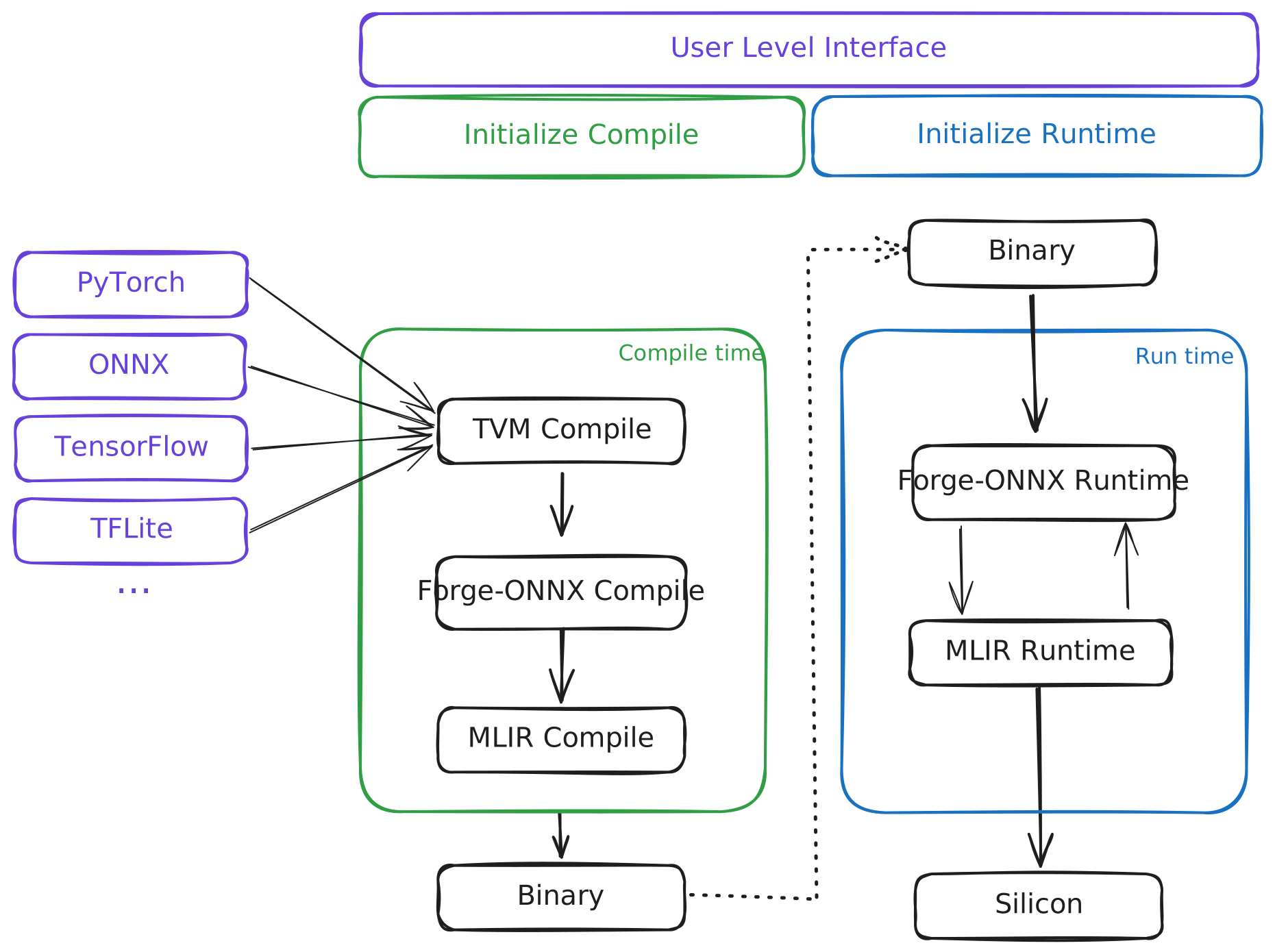
TT-Forge is a comprehensive compiler designed to facilitate the development and optimization of machine learning models. It encompasses various components, each serving a specific purpose in the compiling and running machine learning pipelines. This document provides an overview of the key components with focus on TT-Forge-ONNX.
Table of contents
TT-Forge Overview
TT-TVM Overview
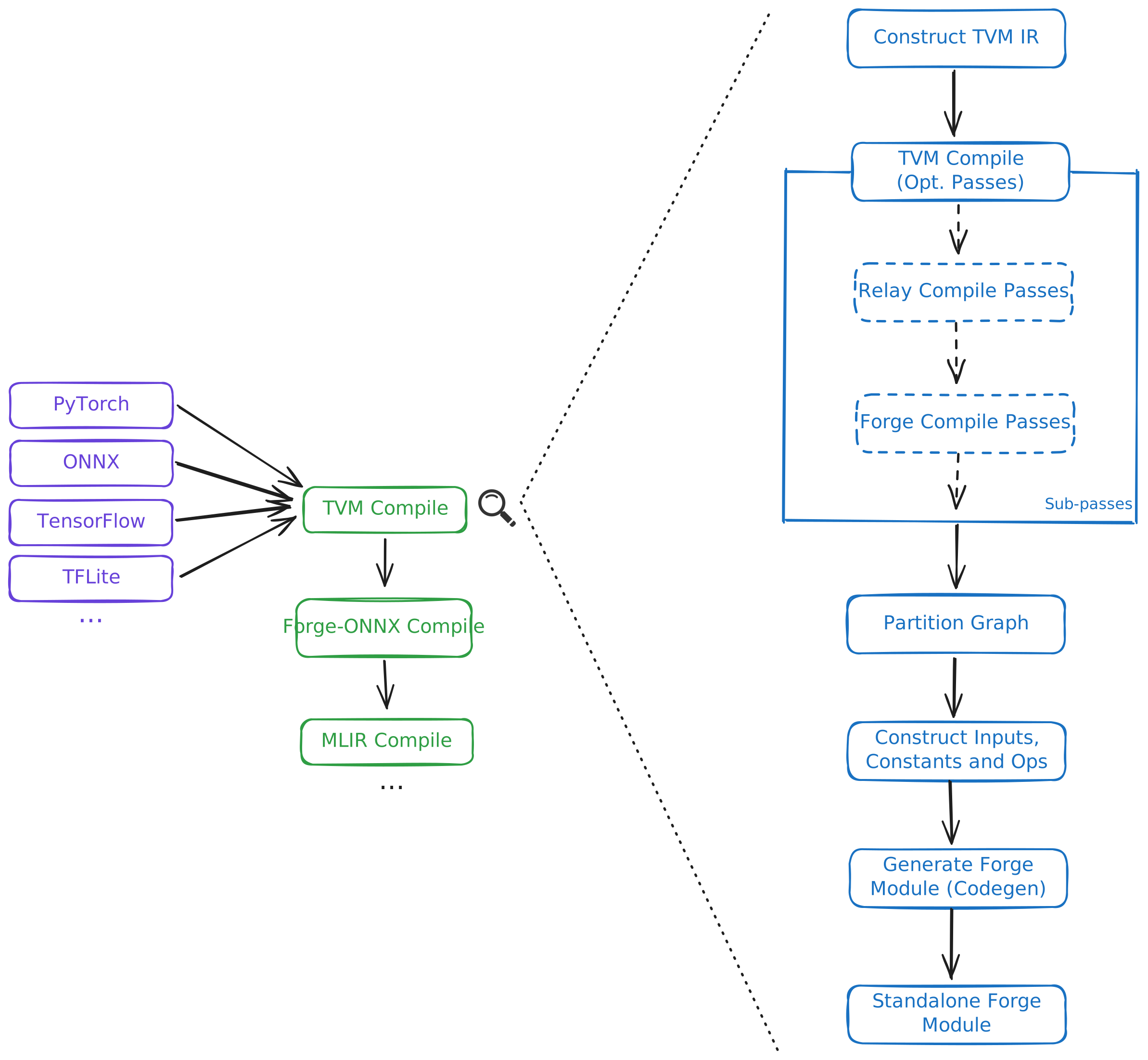
TVM IR
Coming soon!
TVM Compile
Coming soon!
Relay Compile Passes
Coming soon!
Forge Compile Passes
Coming soon!
Partition Graph
Coming soon!
Construct Inputs, Constants and Ops
Coming soon!
Generate Forge-ONNX Module
Coming soon!
Standalone Forge-ONNX Module
Coming soon!
TT-Forge-ONNX Overview

Initialize Compile
Coming soon!
Generate Initial Graph (TT-TVM)
Coming soon!
Post Initial Graph passes
Coming soon!
Consteval
Coming soon!
Autograd
Coming soon!
Post Autograd
Coming soon!
Pre Lowering
Coming soon!
Graph Split
Coming soon!
Compiler TTIR
Coming soon!
Output Binary
Coming soon!
Testing
This page describes how to run different kinds of tests in the tt-forge-onnx project. If you haven't built the project yet,
please refer to the Build page.
Unit tests
To build the unit tests, run the following command:
cmake --build build -- build_unit_tests
To run the unit tests (this will also build the tests if they are not built):
cmake --build build -- run_unit_tests
Note: The unit tests are built in the
build/forge/csrc/testdirectory. From there, you can run targeted tests directly.
- For example, to run all the tests defined in
forge/csrc/test/passes/use:./build/forge/csrc/test/test_passes- You can further filter the tests by using the
--gtest_filterflag:./build/forge/csrc/test/test_passes --gtest_filter=MMFuseBias/MMFuseBias.mm_fuse_bias/3
End to end tests
For running the end-to-end tests we use the pytest framework. To run these tests, you need to be on a machine with a Tenstorrent
Wormhole device. Also, we are still in the process of cleaning up the old tests, so not all tests are working. For a list of green
tests, consult pytest.ini.
Note: Make sure that you have activated the python environment before running the tests.
To run all tests defined in /test/mlir/test_ops.py use:
pytest -svv forge/test/mlir/test_ops.py
To run a specific test, use the following:
pytest -svv forge/test/mlir/test_ops.py::test_add
- The
-svvflag is optional and used to display more information about the test run.
Single operator E2E tests
Single operator E2E tests consists of pre configured collections of in-depth tests for each operator according to test plan. Tests include small models consisting of single operator with or without combination with few other operators. More details about test plan available on Test template page
To start interacting with test sweeps framework load helper commands via
source forge/test/operators/pytorch/test_commands.sh
Available commands
| Command | Description |
|---|---|
print_help | Print commands and current query parameters. |
print_query_docs | Print docs for all available query parameters. |
print_params | Print current query parameters values. |
select_test_query | Select test_query pytest function. |
select_test_push | Select test_push pytest function. |
pytest | Run all tests or subset of test plan based on a query parameters. |
with-params pytest | Print params before and after test run. |
export_tests | Export tests from test plan to JSON file based on a query parameters. |
Full list of supported query parameters
| Parameter | Description | Supported by commands |
|---|---|---|
| OPERATORS | List of operators | test_query |
| FILTERS | List of lambda filters | test_query |
| INPUT_SOURCES | List of input sources | test_query |
| INPUT_SHAPES | List of input shapes | test_query |
| DEV_DATA_FORMATS | List of dev data formats | test_query |
| MATH_FIDELITIES | List of math fidelities | test_query |
| KWARGS | List of kwargs dictionaries. | test_query |
| FAILING_REASONS | List of failing reasons | test_query |
| SKIP_REASONS | List of skip reasons | test_query |
| RANGE | Limit number of results | test_query |
| RANDOM_SEED | Seed for random number generator | test_query |
| SAMPLE | Percentage of results to sample | test_query |
| TEST_ID | Id of a single test to run containing all test parameters | test_query |
| ID_FILES | Paths to files containing test ids instead of tests from test plan | test_query |
| ID_FILES_IGNORE | Paths to files containing test ids to be ignored | test_query |
Test configuration parameters
| Parameter | Description | Supported by commands |
|---|---|---|
| SKIP_FORGE_VERIFICATION | Skip Forge model verification including model compiling and inference | all |
To check supported values and options for each query parameter please run command print_query_docs.
Usage examples
Run all tests
with-params pytest
Run all tests for few operators
export OPERATORS=add,div
with-params pytest
Run subset of tests based on query criteria
export OPERATORS=div
export FILTERS=HAS_DATA_FORMAT,QUICK
export INPUT_SOURCES=FROM_HOST,FROM_DRAM_QUEUE
export DEV_DATA_FORMATS=Float16_b,Int8
export MATH_FIDELITIES=HiFi4,HiFi3
export KWARGS="[{'rounding_mode': 'trunc'},{'rounding_mode': 'floor'}]"
with-params pytest
Print representative tests ids of all operators with examples for kwargs values
FILTERS=UNIQUE_KWARGS with-params pytest --collect-only
Print representative tests ids of few operators
OPERATORS=add,div FILTERS=UNIQUE_KWARGS with-params pytest --collect-only
Each test can be uniquely identified via a test id. Format of test id is {operator}-{input_source}-{kwargs}-{input_shape}[-{number_of_operands)-]{dev_data_format}-{math_fidelity}.
Kwarg is a mandatory or optional attribute of an operator. See framework (PyTorch, Forge, ...) operator documentation for each operator or use filter UNIQUE_KWARGS to find examples.
Run single test based on a test id. Test id may be from a test plan or constructed custom by specifying custom values for kwargs and input_shapes.
TEST_ID='ge-FROM_HOST-None-(1, 2, 3, 4)-Float16_b-HiFi4' with-params pytest
Pytest
Pytest is a powerful testing framework for Python that simplifies writing and executing test cases. It supports features like test discovery, fixtures, parameterized testing, and detailed assertions. For more details, visit the official Pytest Documentation.
Testing with multiple input sets
The @pytest.mark.parametrize decorator allows you to run a single test function with multiple sets of inputs.
Example
@pytest.mark.parametrize("arg1, arg2, expected", [
    (1, 2, 3),
    (2, 3, 5),
    (3, 5, 8),
])
def test_addition(arg1, arg2, expected):
    assert arg1 + arg2 == expected
Explanation
- This is particularly useful for testing a function with various combinations of arguments
Marking specific parameters
You can use pytest.param to mark specific parameter combinations with additional metadata, such as expected failures (xfail).
Example
@pytest.mark.parametrize("inputs", [
    pytest.param(
        ((1, 2, 3), (4, 5, 6)), marks=pytest.mark.xfail(reason="reason"))
])
Explanation
- In this example, the first parameter combination is marked as
xfailwith a reason provided, indicating it is expected to fail. - This is useful when only some parameter sets are failing or not working correctly.
Skipping tests
Use the @pytest.mark.skip decorator to skip a test.
Example
@pytest.mark.skip(reason="Causes segmentation fault")
def test_future_feature():
    assert some_function() == "expected result"
Explanation
- Skipping tests is particularly useful when a test is causing crashes (e.g., segmentation faults) or breaking the CI pipeline.
Marking tests as expected to fail
The @pytest.mark.xfail decorator marks a test that is expected to fail.
Example
@pytest.mark.xfail(reason="Known bug in version 1.2.3")
def test_known_bug():
    assert buggy_function() == "expected"
Explanation
- If the test passes unexpectedly, pytest will flag it as
XPASS. - If the test
XPASS, it indicates an unexpected pass and will be reported as an error. - This is helpful when we need a reminder that a particular test is passing, especially in cases where it previously failed and we want to review all related instances or areas that experienced issues.
Avoid adding decorators inside tests
Example
@pytest.mark.parametrize("model_path", ["<path>/model_path1", "<path>/model_path2"])
def test_model(model_path):
    if model_path == "<path>/model_path1":
        pytest.xfail("reason")
Explanation
- In this example, one of the models fails a test. Using an
ifstatement to applyxfailis problematic because it will always mark the test as failing, even if it passes. - Instead, use
pytest.paramto explicitly define expected outcomes as shown in the recommended approach above. This ensures more accurate and reliable test behavior.
Performance Benchmarks
Performance benchmark tests are located under forge/test/benchmark/ and are marked with @pytest.mark.perf. These tests measure end-to-end inference throughput on Tenstorrent device by compiling the model with Forge, running timed device iterations, and verifying numerical accuracy against a CPU reference.
Directory layout
forge/test/benchmark/
├── conftest.py               # CLI options + forge_benchmark_options fixture
├── options.py                # ForgeBenchmarkOptions dataclass
├── utils.py                  # Console reporting + JSON result helpers
├── test_vision.py            # pytest entry points (ResNet-50, etc.)
└── benchmarks/
    └── vision_benchmark.py   # compile / warmup / timed loop / PCC logic
Running benchmarks locally
To run all benchmark tests:
pytest -m perf forge/test/benchmark
To run a specific model:
pytest -svv -m perf forge/test/benchmark/test_vision.py::test_resnet50
To save results to a JSON file:
pytest -m perf forge/test/benchmark --output-file results.json
CLI options
These flags are registered in conftest.py and apply to any test under forge/test/benchmark. All overrides are optional; each test defines its own defaults.
| Option | Default | Description |
|---|---|---|
--output-file PATH | None | Path to write benchmark results as JSON. If omitted, no file is written. |
--batch-size N | per-test default | Number of samples per inference call (positive integer). |
--loop-count N | per-test default | Number of timed iterations after warmup (positive integer). |
--warmup-count N | min(32, loop_count) | Number of warmup iterations before timing begins (positive integer). |
--data-format | bfloat16 | Data format for model inputs and compiler config: float32 or bfloat16. |
--training | False | Run in training mode. Not supported by current benchmarks; raises an error if set. |
Example:
pytest -svv -m perf forge/test/benchmark/test_vision.py::test_resnet50 \
    --batch-size 8 \
    --loop-count 128 \
    --warmup-count 32 \
    --data-format bfloat16 \
    --output-file resnet50_results.json
Adding a new benchmark model
Add a parametrized test in test_vision.py for the same model family, or create a new test_<family>.py for a different category. Each test must be marked with @pytest.mark.perf and accept the forge_benchmark_options and forge_tmp_path fixtures.
Example:
from third_party.tt_forge_models.<model>.pytorch.loader import ModelLoader, ModelVariant
from forge.forge_property_utils import Framework, Source, Task, ModelArch, record_model_properties

variants = [ModelVariant.MY_MODEL]

@pytest.mark.perf
@pytest.mark.parametrize("variant", variants)
def test_my_model(variant, forge_benchmark_options, forge_tmp_path):
    model_name = record_model_properties(
        framework=Framework.ONNX,
        model=ModelArch.MY_ARCH,
        variant=variant.value,
        source=Source.HUGGINGFACE,
        task=Task.CV_IMAGE_CLASSIFICATION,
    )

    batch_size = forge_benchmark_options.batch_size or DEFAULT_BATCH_SIZE
    loader = ModelLoader(variant=variant)
    pytorch_model = loader.load_model().eval()
    inputs = loader.load_inputs(batch_size=batch_size)
    onnx_model = export_torch_model_to_onnx(
        pytorch_model, str(forge_tmp_path), inputs, model_name, opset_version=17
    )

    def load_inputs_fn(batch_size, dtype_override=None):
        return loader.load_inputs(batch_size=batch_size, dtype_override=dtype_override)

    test_vision(
        model=forge.OnnxModule(model_name, onnx_model),
        model_name=model_name,
        forge_benchmark_options=forge_benchmark_options,
        load_inputs_fn=load_inputs_fn,
        extract_output_tensor_fn=lambda o: o,
        batch_size=batch_size,
    )
Tools
This page covers setup of various tools that can help you with development of TT-Forge-ONNX. The sections include:
- Pre-commit
- mdbook
- Cross Correlate Models and Ops and Export Model Variants Unique Op Configuration
- Usage
Pre-commit
TT-Forge-ONNX defines various pre-commit hooks that check the code for formatting, licensing issues, etc.
To install pre-commit, run the following command:
source env/activate
uv tool install pre-commit
After installing pre-commit, you can install the hooks by running:
pre-commit install
Now, each time you run git commit the pre-commit hooks (checks) will be executed.
If you already committed before installing the pre-commit hooks, you can run it on all files to catch up:
pre-commit run --all-files
For more information visit pre-commit.
mdbook
TT-Forge-ONNX uses mdbook to generate the documentation. To install mdbook on Ubuntu, run the following commands:
sudo apt install cargo
cargo install mdbook
NOTE: If you do not want to install
mdbookvia cargo (Rust package manager), consult the Official mdbook Installation Guide.
Gather Unique Ops Configuration
The model's unique ops configuration can be gathered, and the results can be printed to the console and saved as a CSV or XLSX file.
-
FORGE_EXTRACT_UNIQUE_OP_CONFIG_AT
-
By setting this flag to one of the following options, the model's unique ops configuration can be extracted at a specific compilation stage or across all stages:
-
FORGE_EXTRACT_UNIQUE_OP_CONFIG_AT = ALLExtracts all the unique ops configurations present in the graph at every compilation stage. -
FORGE_EXTRACT_UNIQUE_OP_CONFIG_AT = {GENERATE_INITIAL_GRAPH / POST_INITIAL_GRAPH_PASS / OPTIMIZED_GRAPH / AUTOGRAD / POST_AUTOGRAD_PASS / PRE_LOWERING_GRAPH}Extracts the unique ops configuration only at the specified compilation stage.
-
-
-
FORGE_PRINT_UNIQUE_OP_CONFIG
- By setting this flag to
1, all unique configurations will be printed to the console.
- By setting this flag to
-
FORGE_EXPORT_UNIQUE_OP_CONFIG_FILE_TYPE
- By setting this flag to
csvorxlsx, all unique configurations will be exported as CSV or XLSX file. The file can be saved to the default path (for example, the current directory), or it can be saved to a specific path by setting theFORGE_EXPORT_UNIQUE_OP_CONFIG_DIR_PATHenvironment variable.
- By setting this flag to
-
FORGE_EXPORT_UNIQUE_OP_CONFIG_CSV_DELIMITER
- The delimiter for the csv file can be set by using this flag. Default delimiter : slash (i.e
/)
- The delimiter for the csv file can be set by using this flag. Default delimiter : slash (i.e
Note: The delimiter used in the CSV file will be a slash (
/) to avoid potential parsing issues. Commas (,) and hyphen (-) may appear in the op shapes and attributes, which could lead to misinterpretation of the data.
Cross Correlate Models and Ops and Export Model Variants Unique Op Configuration
The models and ops can be cross-correlated and model variants unique op configuration are exported as an XLSX file by running the scripts/export_models_ops_correlation.py Python script.
The script performs the following tasks:
- Run all models until the compile depth specified by the user.
- Export unique op requirements to a file (each model variants has its own directory, in that directory each compile depth has its own file).
- Parse those unique op requirements and create a XLSX file that can be loaded into a google sheet.
- The XLSX file will contain list of models on X axis (i.e. columns) and list of ops on Y axis (i.e. rows/indices).
- Elements in between will contain a checkmark if the desired op from the Y axis (i.e., rows/indices) exists in the model on X axis (i.e., columns).
- Models will be sorted alphabetically.
- Ops will be sorted by the number of occurrences in the models.
Usage
To run the script, use the following command:
python scripts/export_models_ops_correlation.py
Required Options:
| Option | Description |
|---|---|
-c, --compile_depth (GENERATE_INITIAL_GRAPH, PRE_LOWERING_PASS, etc.) | Choose the compilation depth for extracting ops configuration for the models present in pytest_directory_path. |
-i, --pytest_directory_path | Specify the directory path containing models to test. |
Optional Options:
| Option | Description |
|---|---|
--cross_correlation_output_file_name | Specify the output XLSX file name for saving the cross correlation data between model variants and unique ops. |
--models_unique_op_configs_output_file_name | Specify the output XLSX file name for saving the Models unique op configurations. |
-o, --output_directory_path | Specify the output directory path for saving the XLSX/CSV file. |
--export_unique_op_config_file_type (CSV, XLSX) | Specify the export unique op configuration file type |
Example:
python scripts/export_models_ops_correlation.py --compile_depth GENERATE_INITIAL_GRAPH --pytest_directory_path forge/test/model_demos/high_prio/nlp/pytorch
Operations Documentation Generator
The operations documentation generator automatically creates documentation for all Forge operations by parsing the source files in forge/forge/op/*.py.
Quick Start
# Generate all operation documentation
python scripts/generate_ops_docs.py
How It Works
-
Automatic Discovery: The generator scans
forge/forge/op/*.pyfiles to discover all operations (functions starting with uppercase letters). -
Docstring Parsing: It parses NumPy-style docstrings to extract:
- Operation overview/description
- Parameter descriptions with types
- Return value descriptions
- Mathematical definitions
- Related operations
-
Enhancement Layer: Additional documentation (e.g., mathematical formulas, related ops) can be added via
scripts/operation_enhancements.json. -
Markdown Generation: Creates clean markdown files for each operation and an index page.
Command-Line Options
The generator supports the following command-line arguments:
| Option | Description | Default |
|---|---|---|
--op-dir | Source directory for operations | forge/forge/op/ |
--output-dir | Output directory for operation docs | docs/src/operations/ |
--index-file | Output path for index page | docs/src/operations.md |
--enhancements | Path to enhancements JSON file | scripts/operation_enhancements.json |
--no-cleanup | Skip cleanup of stale documentation files | (cleanup enabled by default) |
Example with custom paths:
python scripts/generate_ops_docs.py --op-dir forge/forge/op --output-dir docs/src/operations
Adding New Operations
No manual documentation needed! Simply:
- Add your operation function to
forge/forge/op/*.py - Write a proper docstring following the standard format (see
docs/FORGE_DOCSTRING_STANDARD.md) - Run
python scripts/generate_ops_docs.py
The documentation will be automatically generated.
Docstring Standard
See docs/FORGE_DOCSTRING_STANDARD.md for the complete docstring format. Here's a quick example:
def MyOperation(
    name: str,
    operandA: Tensor,
    param: int = 1,
) -> Tensor:
    """
    Brief one-line description of the operation.

    Detailed description with more context about the operation,
    its use cases, and important behavior notes.

    Parameters
    ----------
    name : str
        Name identifier for this operation in the computation graph.

    operandA : Tensor
        Input tensor of shape `(N, C, H, W)`.

    param : int, optional
        Description of the parameter.
        Default: `1`

    Returns
    -------
    Tensor
        Output tensor with description of shape and meaning.

    Mathematical Definition
    -----------------------
    output[i] = f(input[i])

    See Also
    --------
    forge.op.RelatedOp : Description of related operation
    """
Output Files
The generator creates:
docs/src/operations.md- Index page with all operations by categorydocs/src/operations/*.md- Individual operation documentation pages
Stale File Cleanup
The generator automatically removes documentation files for operations that no longer exist in the source code. This ensures the documentation stays in sync with the codebase. To disable this behavior, use the --no-cleanup flag.
Enhancements File
The scripts/operation_enhancements.json file allows adding extra documentation that can't be extracted from docstrings:
{
  "operations": {
    "Abs": {
      "description": "Enhanced description for the operation overview",
      "mathematical_definition": "abs(x) = |x|",
      "parameters": {
        "operandA": "Enhanced description for operandA parameter"
      },
      "related_operations": [
        {"name": "Relu", "description": "ReLU activation"}
      ]
    }
  }
}
Supported enhancement types:
description: Override or supplement the operation overviewparameters: Object mapping parameter names to enhanced descriptionsmathematical_definition: Mathematical formula for the operationrelated_operations: List of related operations with descriptions
Note: The goal is to migrate all documentation to source docstrings. Use this file only when necessary.
Error Handling
The generator will fail fast if:
- The operation directory doesn't exist
- No operations are discovered
- Critical parsing errors occur
Warnings are issued for:
- Missing docstrings
- Non-critical parsing issues
Forge Operations Reference
Welcome to the Forge Operations Reference. This page provides a comprehensive guide to all supported operations in the Forge framework.
Overview
Forge operations are organized into logical categories based on their functionality. Each operation is documented with detailed information including function signatures, parameters, examples, and usage notes.
Quick Navigation
- Elementwise Operations - Mathematical operations applied element-wise
- Convolution Operations - Convolution and related transformations
- Pooling Operations - Pooling and downsampling operations
- Normalization Operations - Batch and layer normalization
- Tensor Manipulation - Reshaping, slicing, and tensor operations
- Reduction Operations - Aggregation and reduction operations
- Linear Operations - Matrix multiplication and linear transformations
- Activation Functions - Non-linear activation functions
- Memory Operations - Cache and memory management operations
- Other Operations - Miscellaneous operations
Elementwise Operations
Mathematical operations applied element-wise.
| Operation | Description | Link |
|---|---|---|
| Abs | Computes the elementwise absolute value of the input tensor. | forge.op.Abs |
| Add | Elementwise add of two tensors | forge.op.Add |
| Atan | Elementwise arctangent (atan) | forge.op.Atan |
| BitwiseAnd | Bitwise and operation. | forge.op.BitwiseAnd |
| Cast | Cast | forge.op.Cast |
| Clip | Clips tensor values between min and max | forge.op.Clip |
| Concatenate | Concatenate tensors along axis | forge.op.Concatenate |
| Cosine | Elementwise cosine | forge.op.Cosine |
| Divide | Elementwise divide of two tensors | forge.op.Divide |
| Equal | Elementwise equal of two tensors | forge.op.Equal |
| Erf | Error function (erf) | forge.op.Erf |
| Exp | Exponent operation. | forge.op.Exp |
| Greater | Elementwise greater of two tensors | forge.op.Greater |
| GreaterEqual | Elementwise greater or equal of two tensors | forge.op.GreaterEqual |
| Heaviside | Elementwise max of two tensors | forge.op.Heaviside |
| Identity | Identity operation. | forge.op.Identity |
| IndexCopy | Copies the elements of value into operandA at index along dim | forge.op.IndexCopy |
| Less | Elementwise less of two tensors | forge.op.Less |
| LessEqual | Elementwise less or equal of two tensors | forge.op.LessEqual |
| Log | Log operation: natural logarithm of the elements of operandA | forge.op.Log |
| LogicalAnd | Logical and operation. | forge.op.LogicalAnd |
| LogicalNot | Logical not operation. | forge.op.LogicalNot |
| Max | Elementwise max of two tensors | forge.op.Max |
| Min | Elementwise min of two tensors | forge.op.Min |
| Multiply | Elementwise multiply of two tensors | forge.op.Multiply |
| NotEqual | Elementwise equal of two tensors | forge.op.NotEqual |
| Pow | Pow operation: operandA to the power of exponent | forge.op.Pow |
| Power | OperandA to the power of OperandB | forge.op.Power |
| Reciprocal | Reciprocal operation. | forge.op.Reciprocal |
| Remainder | forge.op.Remainder | |
| Sine | Elementwise sine | forge.op.Sine |
| Sqrt | Square root. | forge.op.Sqrt |
| Stack | Stack tensors along new axis | forge.op.Stack |
| Subtract | Elementwise subtraction of two tensors | forge.op.Subtract |
| Where | forge.op.Where |
Convolution Operations
Convolution and related transformations.
| Operation | Description | Link |
|---|---|---|
| Conv2d | Conv2d transformation on input activations, with optional bias. | forge.op.Conv2d |
| Conv2dTranspose | Conv2dTranspose transformation on input activations, with optional bias. | forge.op.Conv2dTranspose |
Pooling Operations
Pooling and downsampling operations.
| Operation | Description | Link |
|---|---|---|
| AvgPool1d | Avgpool1d transformation on input activations | forge.op.AvgPool1d |
| AvgPool2d | Avgpool2d transformation on input activations | forge.op.AvgPool2d |
| MaxPool1d | MaxPool1d transformation on input activations | forge.op.MaxPool1d |
| MaxPool2d | Maxpool2d transformation on input activations | forge.op.MaxPool2d |
Normalization Operations
Batch and layer normalization.
| Operation | Description | Link |
|---|---|---|
| Batchnorm | Batch normalization. | forge.op.Batchnorm |
| Dropout | Dropout | forge.op.Dropout |
| Layernorm | Layer normalization. | forge.op.Layernorm |
| LogSoftmax | LogSoftmax operation. | forge.op.LogSoftmax |
| Softmax | Softmax operation. | forge.op.Softmax |
Tensor Manipulation
Reshaping, slicing, and tensor operations.
| Operation | Description | Link |
|---|---|---|
| AdvIndex | TM | forge.op.AdvIndex |
| Broadcast | TM | forge.op.Broadcast |
| ConstantPad | TM - Direct TTIR constant padding operation. | forge.op.ConstantPad |
| Downsample2d | Downsample 2D operation | forge.op.Downsample2d |
| Index | TM | forge.op.Index |
| Pad | TM | forge.op.Pad |
| PixelShuffle | Pixel shuffle operation. | forge.op.PixelShuffle |
| Repeat | Repeats this tensor along the specified dimensions. | forge.op.Repeat |
| RepeatInterleave | Repeat elements of a tensor. | forge.op.RepeatInterleave |
| Reshape | TM | forge.op.Reshape |
| Resize1d | Resize input activations, with default mode 'nearest' | forge.op.Resize1d |
| Resize2d | Resizes the spatial dimensions of a 2D input tensor using interpolation. | forge.op.Resize2d |
| Select | TM | forge.op.Select |
| Squeeze | TM | forge.op.Squeeze |
| Transpose | Tranpose X and Y (i.e. rows and columns) dimensions. | forge.op.Transpose |
| Unsqueeze | TM | forge.op.Unsqueeze |
| Upsample2d | Upsample 2D operation | forge.op.Upsample2d |
Reduction Operations
Aggregation and reduction operations.
| Operation | Description | Link |
|---|---|---|
| Argmax | Argmax | forge.op.Argmax |
| ReduceAvg | Reduce by averaging along the given dimension | forge.op.ReduceAvg |
| ReduceMax | Reduce by taking maximum along the given dimension | forge.op.ReduceMax |
| ReduceSum | Reduce by summing along the given dimension | forge.op.ReduceSum |
Linear Operations
Matrix multiplication and linear transformations.
| Operation | Description | Link |
|---|---|---|
| Matmul | Matrix multiplication transformation on input activations, with optional bias. y... | forge.op.Matmul |
Activation Functions
Non-linear activation functions.
| Operation | Description | Link |
|---|---|---|
| Gelu | GeLU | forge.op.Gelu |
| LeakyRelu | Leaky ReLU | forge.op.LeakyRelu |
| Relu | Applies the Rectified Linear Unit (ReLU) activation function elementwise. | forge.op.Relu |
| Sigmoid | Sigmoid | forge.op.Sigmoid |
| Tanh | Tanh operation. | forge.op.Tanh |
Memory Operations
Cache and memory management operations.
| Operation | Description | Link |
|---|---|---|
| FillCache | FillCache op writes the input into the cache tensor starting at the specified up... | forge.op.FillCache |
| UpdateCache | UpdateCache writes a single token (S=1) slice into the cache tensor on specified... | forge.op.UpdateCache |
Other Operations
Miscellaneous operations.
| Operation | Description | Link |
|---|---|---|
| Constant | Op representing user-defined constant | forge.op.Constant |
| CumSum | Cumulative sum operation. | forge.op.CumSum |
| Embedding | Embedding lookup | forge.op.Embedding |
Operation Details
Abs
Computes the elementwise absolute value of the input tensor.
The Abs operation returns the magnitude of each element without regard
to its sign. For real numbers, it returns the non-negative value.
This operation is idempotent: abs(abs(x)) = abs(x).
Function Signature
forge.op.Abs(name: str, operandA: Tensor) -> Tensor
Parameters
-
name (
str): str Name identifier for this operation in the computation graph. Use empty string to auto-generate. -
operandA (
Tensor): Tensor Input tensor of any shape. All elements will have absolute value computed independently.
Returns
- result (
Tensor): Tensor Output tensor with same shape as input. Each element is the absolute value of the corresponding input element.
Mathematical Definition
abs(x) = |x| = { x if x ≥ 0, -x if x < 0 }
Add
Elementwise add of two tensors
Function Signature
forge.op.Add(
    name: str,
    operandA: Tensor,
    operandB: Union[(Tensor, Parameter)]
) -> Tensor
Parameters
-
name (
str): str Op name, unique to the module, or leave blank to autoset -
operandA (
Tensor): Tensor First operand -
operandB (
Union[(Tensor, Parameter)]): Tensor Second operand
Returns
- result (
Tensor): Tensor Forge tensor
AdvIndex
TM
Function Signature
forge.op.AdvIndex(
    name: str,
    operandA: Tensor,
    operandB: Tensor,
    dim: int = 0
) -> Tensor
Parameters
-
name (
str): str Op name, unique to the module, or leave blank to autoset -
operandA (
Tensor): Tensor Input operand B - indices -
operandB (
Tensor): operandB tensor -
dim (
int, default:0): int Dimension to fetch indices over
Returns
- result (
Tensor): Tensor Forge tensor
Argmax
Argmax
Function Signature
forge.op.Argmax(
    name: str,
    operandA: Tensor,
    dim: int = None,
    keep_dim = False
) -> Tensor
Parameters
-
name (
str): str Op name, unique to the module, or leave blank to autoset -
operandA (
Tensor): Tensor First operand -
dim (
int, default:None): int The dimension to reduce (if None, the output is the argmax of the whole tensor) -
keep_dim (
Any, default:False): bool If True, retains the dimension that is reduced, with size 1. If False (default), the dimension is removed from the output shape.
Returns
- result (
Tensor): Tensor Forge tensor
Atan
Elementwise arctangent (atan)
Function Signature
forge.op.Atan(name: str, operandA: Tensor) -> Tensor
Parameters
-
name (
str): str Op name, unique to the module, or leave blank to autoset -
operandA (
Tensor): Tensor First operand
Returns
- result (
Tensor): Tensor Forge tensor
AvgPool1d
Avgpool1d transformation on input activations
Function Signature
forge.op.AvgPool1d(
    name: str,
    activations: Tensor,
    kernel_size: Union[(int, Tuple[(int, int)])],
    stride: int = 1,
    padding: Union[(int, str)] = 'same',
    ceil_mode: bool = False,
    count_include_pad: bool = True
) -> Tensor
Parameters
-
name (
str): str Op name, unique to the module, or leave blank to autoset -
activations (
Tensor): Tensor Input activations of shape (N, Cin, iW) -
kernel_size (
Union[(int, Tuple[(int, int)])]): Size of pooling region -
stride (
int, default:1): stride parameter -
padding (
Union[(int, str)], default:'same'): padding parameter -
ceil_mode (
bool, default:False): ceil_mode parameter -
count_include_pad (
bool, default:True): count_include_pad parameter
Returns
- result (
Tensor): Output tensor
AvgPool2d
Avgpool2d transformation on input activations
Function Signature
forge.op.AvgPool2d(
    name: str,
    activations: Tensor,
    kernel_size: Union[(int, Tuple[(int, int)])],
    stride: int = 1,
    padding: Union[(int, str)] = 'same',
    ceil_mode: bool = False,
    count_include_pad: bool = True,
    divisor_override: float = None,
    channel_last: bool = False
) -> Tensor
Parameters
-
name (
str): str Op name, unique to the module, or leave blank to autoset -
activations (
Tensor): Tensor Input activations of shape (N, Cin, iH, iW) -
kernel_size (
Union[(int, Tuple[(int, int)])]): Size of pooling region -
stride (
int, default:1): stride parameter -
padding (
Union[(int, str)], default:'same'): padding parameter -
ceil_mode (
bool, default:False): ceil_mode parameter -
count_include_pad (
bool, default:True): count_include_pad parameter -
divisor_override (
float, default:None): divisor_override parameter -
channel_last (
bool, default:False): channel_last parameter
Returns
- result (
Tensor): Output tensor
Batchnorm
Batch normalization.
Function Signature
forge.op.Batchnorm(
    name: str,
    operandA: Tensor,
    weights: Union[(Tensor, Parameter)],
    bias: Union[(Tensor, Parameter)],
    running_mean: Union[(Tensor, Parameter)],
    running_var: Union[(Tensor, Parameter)],
    epsilon: float = 1e-05
) -> Tensor
Parameters
-
name (
str): str Op name, unique to the module, or leave blank to autoset -
operandA (
Tensor): Tensor First operand -
weights (
Union[(Tensor, Parameter)]): weights tensor -
bias (
Union[(Tensor, Parameter)]): bias tensor -
running_mean (
Union[(Tensor, Parameter)]): running_mean tensor -
running_var (
Union[(Tensor, Parameter)]): running_var tensor -
epsilon (
float, default:1e-05): epsilon parameter
Returns
- result (
Tensor): Tensor Forge tensor
BitwiseAnd
Bitwise and operation.
Function Signature
forge.op.BitwiseAnd(
    name: str,
    operandA: Tensor,
    operandB: Union[(Tensor, Parameter)]
) -> Tensor
Parameters
-
name (
str): str Op name, unique to the module, or leave blank to autoset -
operandA (
Tensor): Tensor First operand -
operandB (
Union[(Tensor, Parameter)]): Tensor Second operand
Returns
- result (
Tensor): Tensor Forge tensor
Broadcast
TM
Function Signature
forge.op.Broadcast(name: str, operandA: Tensor, dim: int, shape: int) -> Tensor
Parameters
-
name (
str): str Op name, unique to the module, or leave blank to autoset -
operandA (
Tensor): Tensor Input operand A -
dim (
int): int Dimension to broadcast -
shape (
int): int Output length of dim
Returns
- result (
Tensor): Tensor Forge tensor
Cast
Cast
Function Signature
forge.op.Cast(
    name: str,
    operandA: Tensor,
    dtype: Union[(torch.dtype, DataFormat)]
) -> Tensor
Parameters
-
name (
str): str Op name, unique to the module, or leave blank to autoset -
operandA (
Tensor): Tensor First operand -
dtype (
Union[(torch.dtype, DataFormat)]): Union[torch.dtype, DataFormat] Specify Torch datatype / Forge DataFormat to convert operandA
Returns
- result (
Tensor): Tensor Forge tensor
Clip
Clips tensor values between min and max
Function Signature
forge.op.Clip(name: str, operandA: Tensor, min: float, max: float) -> Tensor
Parameters
-
name (
str): str Op name, unique to the module, or leave blank to autoset -
operandA (
Tensor): Tensor First operand -
min (
float): float Minimum value -
max (
float): float Maximum value
Returns
- result (
Tensor): Tensor Forge tensor
Concatenate
Concatenate tensors along axis
Function Signature
forge.op.Concatenate(name: str) -> Tensor
Parameters
- name (
str): str Op name, unique to the module, or leave blank to autoset
Returns
- result (
Tensor): Tensor Forge tensor
Constant
Op representing user-defined constant
Function Signature
forge.op.Constant(name: str) -> Tensor
Parameters
- name (
str): str Op name, unique to the module, or leave blank to autoset
Returns
- result (
Tensor): Tensor Forge tensor
ConstantPad
TM - Direct TTIR constant padding operation.
Function Signature
forge.op.ConstantPad(
    name: str,
    operandA: Tensor,
    padding: List[int],
    value: float = 0.0
) -> Tensor
Parameters
-
name (
str): str Op name, unique to the module, or leave blank to autoset -
operandA (
Tensor): Tensor Input operand A to which padding will be applied. -
padding (
List[int]): List[int] Padding values in TTIR format: [dim0_low, dim0_high, dim1_low, dim1_high, ...] Length must be 2 * rank of input tensor. -
value (
float, default:0.0): float, optional The constant value to use for padding. Default is 0.0.
Returns
- result (
Tensor): Tensor A tensor with the specified constant padding applied to the input tensor.
Conv2d
Conv2d transformation on input activations, with optional bias.
Function Signature
forge.op.Conv2d(
    name: str,
    activations: Tensor,
    weights: Union[(Tensor, Parameter)],
    bias: Optional[Union[(Tensor, Parameter)]] = None,
    stride: Union[(int, List[int])] = 1,
    padding: Union[(int, str, List[int])] = 'same',
    dilation: Union[(int, List[int])] = 1,
    groups: int = 1,
    channel_last: bool = False
) -> Tensor
Parameters
-
name (
str): str Op name, unique to the module, or leave blank to autoset -
activations (
Tensor): Tensor Input activations of shape (N, Cin, iH, iW) -
weights (
Union[(Tensor, Parameter)]): Tensor Input weights of shape (Cout, Cin / groups, kH, kW) [Tensor] Internal Use pre-split Optional Input weights list of shape [(weight_grouping, Cin / groups, Cout)] of length: (K*K // weight_grouping) -
bias (
Optional[Union[(Tensor, Parameter)]]): Optional bias tensor of shape(C_out,). Added to each output channel. -
stride (
Union[(int, List[int])], default:1): stride parameter -
padding (
Union[(int, str, List[int])], default:'same'): padding parameter -
dilation (
Union[(int, List[int])], default:1): dilation parameter -
groups (
int, default:1): groups parameter -
channel_last (
bool, default:False): channel_last parameter
Returns
- result (
Tensor): Output tensor
Mathematical Definition
For input x of shape (N, C_in, H, W) and kernel k of shape (C_out, C_in, K_H, K_W):
output[n, c_out, h, w] = Σ_{c_in} Σ_{kh} Σ_{kw} x[n, c_in, h*s + kh*d, w*s + kw*d] * k[c_out, c_in, kh, kw] + bias[c_out]
Where s is stride and d is dilation.
Conv2dTranspose
Conv2dTranspose transformation on input activations, with optional bias.
Function Signature
forge.op.Conv2dTranspose(
    name: str,
    activations: Tensor,
    weights: Union[(Tensor, Parameter)],
    bias: Optional[Union[(Tensor, Parameter)]] = None,
    stride: int = 1,
    padding: Union[(int, str, Tuple[(int, int, int, int)])] = 'same',
    dilation: int = 1,
    groups: int = 1,
    channel_last: bool = False,
    output_padding: Union[(int, Tuple[(int, int)])] = 0
) -> Tensor
Parameters
-
name (
str): str Op name, unique to the module, or leave blank to autoset -
activations (
Tensor): Tensor Input activations of shape (N, Cin, iH, iW) -
weights (
Union[(Tensor, Parameter)]): Tensor Input weights of shape (Cout, Cin / groups, kH, kW) [Tensor] Internal Use pre-split Optional Input weights list of shape [(weight_grouping, Cin / groups, Cout)] of length: (K*K // weight_grouping) -
bias (
Optional[Union[(Tensor, Parameter)]]): Tenor, optional Optional bias tensor of shape (Cout) -
stride (
int, default:1): stride parameter -
padding (
Union[(int, str, Tuple[(int, int, int, int)])], default:'same'): padding parameter -
dilation (
int, default:1): dilation parameter -
groups (
int, default:1): groups parameter -
channel_last (
bool, default:False): channel_last parameter -
output_padding (
Union[(int, Tuple[(int, int)])], default:0): output_padding parameter
Returns
- result (
Tensor): Output tensor
Cosine
Elementwise cosine
Function Signature
forge.op.Cosine(name: str, operandA: Tensor) -> Tensor
Parameters
-
name (
str): str Op name, unique to the module, or leave blank to autoset -
operandA (
Tensor): Tensor First operand
Returns
- result (
Tensor): Tensor Forge tensor
CumSum
Cumulative sum operation.
Function Signature
forge.op.CumSum(name: str, operandA: Tensor, dim: int) -> Tensor
Parameters
-
name (
str): str Op name, unique to the module, or leave blank to autoset -
operandA (
Tensor): Tensor First operand -
dim (
int): dim parameter
Returns
- result (
Tensor): Tensor Forge tensor
Divide
Elementwise divide of two tensors
Function Signature
forge.op.Divide(
    name: str,
    operandA: Tensor,
    operandB: Union[(Tensor, Parameter)]
) -> Tensor
Parameters
-
name (
str): str Op name, unique to the module, or leave blank to autoset -
operandA (
Tensor): Tensor First operand -
operandB (
Union[(Tensor, Parameter)]): Tensor Second operand
Returns
- result (
Tensor): Tensor Forge tensor
Downsample2d
Downsample 2D operation
Function Signature
forge.op.Downsample2d(
    name: str,
    operandA: Tensor,
    scale_factor: Union[(int, List[int], Tuple[(int, int)])],
    mode: str = 'nearest',
    channel_last: bool = False
) -> Tensor
Parameters
-
name (
str): str Op name, unique to the module, or leave blank to autoset -
operandA (
Tensor): Tensor Input operand A -
scale_factor (
Union[(int, List[int], Tuple[(int, int)])]): Union[int, List[int], Tuple[int, int]] Divider for spatial size. -
mode (
str, default:'nearest'): str The downsampling algorithm -
channel_last (
bool, default:False): bool Whether the input is in channel-last format (NHWC)
Returns
- result (
Tensor): Tensor Forge tensor
Dropout
Dropout
Function Signature
forge.op.Dropout(
    name: str,
    operandA: Tensor,
    p: float = 0.5,
    training: bool = True,
    seed: int = 0
) -> Tensor
Parameters
-
name (
str): str Op name, unique to the module, or leave blank to autoset -
operandA (
Tensor): Tensor First operand -
p (
float, default:0.5): float Probability of an element to be zeroed. -
training (
bool, default:True): bool Apply dropout if true -
seed (
int, default:0): int RNG seed
Returns
- result (
Tensor): Tensor Forge tensor
Embedding
Embedding lookup
Function Signature
forge.op.Embedding(
    name: str,
    indices: Tensor,
    embedding_table: Union[(Tensor, Parameter)]
) -> Tensor
Parameters
-
name (
str): str Op name, unique to the module, or leave blank to autoset -
indices (
Tensor): Tensor Integer tensor, the elements of which are used to index into the embedding table -
embedding_table (
Union[(Tensor, Parameter)]): Tensor Dictionary of embeddings
Returns
- result (
Tensor): Output tensor
Equal
Elementwise equal of two tensors
Function Signature
forge.op.Equal(
    name: str,
    operandA: Tensor,
    operandB: Union[(Tensor, Parameter)]
) -> Tensor
Parameters
-
name (
str): str Op name, unique to the module, or leave blank to autoset -
operandA (
Tensor): Tensor First operand -
operandB (
Union[(Tensor, Parameter)]): Tensor Second operand
Returns
- result (
Tensor): Tensor Forge tensor
Erf
Error function (erf)
Function Signature
forge.op.Erf(name: str, operandA: Tensor) -> Tensor
Parameters
-
name (
str): str Op name, unique to the module, or leave blank to autoset -
operandA (
Tensor): Tensor First operand
Returns
- result (
Tensor): Tensor Forge tensor
Exp
Exponent operation.
Function Signature
forge.op.Exp(name: str, operandA: Tensor) -> Tensor
Parameters
-
name (
str): str Op name, unique to the module, or leave blank to autoset -
operandA (
Tensor): Tensor First operand
Returns
- result (
Tensor): Tensor Forge tensor
FillCache
FillCache op writes the input into the cache tensor starting at the specified update index.
Function Signature
forge.op.FillCache(
    name: str,
    cache: Tensor,
    input: Tensor,
    batch_offset: int = 0
) -> Tensor
Parameters
-
name (
str): str Unique op name. -
cache (
Tensor): Tensor 4D cache tensor of shape [B, H, S_total, D] -
input (
Tensor): Tensor 4D input tensor of shape [B, H, S_input, D] -
batch_offset (
int, default:0): int Offset in the batch dimension.
Returns
- result (
Tensor): Output tensor
Gelu
GeLU
Function Signature
forge.op.Gelu(name: str, operandA: Tensor, approximate = 'none') -> Tensor
Parameters
-
name (
str): str Op name, unique to the module, or leave blank to autoset -
operandA (
Tensor): Tensor First operand -
approximate (
Any, default:'none'): str The gelu approximation algorithm to use: 'none' | 'tanh'. Default: 'none'
Returns
- result (
Tensor): Tensor Forge tensor
Mathematical Definition
gelu(x) = x * Φ(x)
Where Φ(x) is the cumulative distribution function of the standard normal distribution.
For 'tanh' approximation:
gelu(x) ≈ 0.5 * x * (1 + tanh(sqrt(2/π) * (x + 0.044715 * x³)))
Greater
Elementwise greater of two tensors
Function Signature
forge.op.Greater(
    name: str,
    operandA: Tensor,
    operandB: Union[(Tensor, Parameter)]
) -> Tensor
Parameters
-
name (
str): str Op name, unique to the module, or leave blank to autoset -
operandA (
Tensor): Tensor First operand -
operandB (
Union[(Tensor, Parameter)]): Tensor Second operand
Returns
- result (
Tensor): Tensor Forge tensor
GreaterEqual
Elementwise greater or equal of two tensors
Function Signature
forge.op.GreaterEqual(
    name: str,
    operandA: Tensor,
    operandB: Union[(Tensor, Parameter)]
) -> Tensor
Parameters
-
name (
str): str Op name, unique to the module, or leave blank to autoset -
operandA (
Tensor): Tensor First operand -
operandB (
Union[(Tensor, Parameter)]): Tensor Second operand
Returns
- result (
Tensor): Tensor Forge tensor
Heaviside
Elementwise max of two tensors
Function Signature
forge.op.Heaviside(
    name: str,
    operandA: Tensor,
    operandB: Union[(Tensor, Parameter)]
) -> Tensor
Parameters
-
name (
str): str Op name, unique to the module, or leave blank to autoset -
operandA (
Tensor): Tensor First operand -
operandB (
Union[(Tensor, Parameter)]): Tensor Second operand
Returns
- result (
Tensor): Tensor Forge tensor
Identity
Identity operation.
Function Signature
forge.op.Identity(
    name: str,
    operandA: Tensor,
    unsqueeze: str = None,
    unsqueeze_dim: int = None
) -> Tensor
Parameters
-
name (
str): str Op name, unique to the module, or leave blank to autoset -
operandA (
Tensor): Tensor First operand -
unsqueeze (
str, default:None): str If set, the operation returns a new tensor with a dimension of size one inserted at the specified position. -
unsqueeze_dim (
int, default:None): int The index at where singleton dimenion can be inserted
Returns
- result (
Tensor): Tensor Forge tensor
Index
TM
Function Signature
forge.op.Index(
    name: str,
    operandA: Tensor,
    dim: int,
    start: int,
    stop: int = None,
    stride: int = 1
) -> Tensor
Parameters
-
name (
str): str Op name, unique to the module, or leave blank to autoset -
operandA (
Tensor): Tensor Input operand A -
dim (
int): int Dimension to slice -
start (
int): int Starting slice index (inclusive) -
stop (
int, default:None): int Stopping slice index (exclusive) -
stride (
int, default:1): int Stride amount along that dimension
Returns
- result (
Tensor): Tensor Forge tensor
IndexCopy
Copies the elements of value into operandA at index along dim
Function Signature
forge.op.IndexCopy(
    name: str,
    operandA: Tensor,
    index: Tensor,
    value: Tensor,
    dim: int
) -> Tensor
Parameters
-
name (
str): str Op name, unique to the module, or leave blank to autoset -
operandA (
Tensor): Tensor Input operand A -
index (
Tensor): Tensor Index at which to write into operandA -
value (
Tensor): Tensor Value to write out -
dim (
int): int Dimension to broadcast
Returns
- result (
Tensor): Tensor Forge tensor
Layernorm
Layer normalization.
Function Signature
forge.op.Layernorm(
    name: str,
    operandA: Tensor,
    weights: Union[(Tensor, Parameter)],
    bias: Union[(Tensor, Parameter)],
    dim: int = -1,
    epsilon: float = 1e-05
) -> Tensor
Parameters
-
name (
str): str Op name, unique to the module, or leave blank to autoset -
operandA (
Tensor): Tensor First operand -
weights (
Union[(Tensor, Parameter)]): weights tensor -
bias (
Union[(Tensor, Parameter)]): bias tensor -
dim (
int, default:-1): dim parameter -
epsilon (
float, default:1e-05): epsilon parameter
Returns
- result (
Tensor): Tensor Forge tensor
LeakyRelu
Leaky ReLU
Function Signature
forge.op.LeakyRelu(name: str, operandA: Tensor, alpha: float) -> Tensor
Parameters
-
name (
str): str Op name, unique to the module, or leave blank to autoset -
operandA (
Tensor): Tensor First operand -
alpha (
float): float Controls the angle of the negative slope
Returns
- result (
Tensor): Tensor Forge tensor
Less
Elementwise less of two tensors
Function Signature
forge.op.Less(
    name: str,
    operandA: Tensor,
    operandB: Union[(Tensor, Parameter)]
) -> Tensor
Parameters
-
name (
str): str Op name, unique to the module, or leave blank to autoset -
operandA (
Tensor): Tensor First operand -
operandB (
Union[(Tensor, Parameter)]): Tensor Second operand
Returns
- result (
Tensor): Tensor Forge tensor
LessEqual
Elementwise less or equal of two tensors
Function Signature
forge.op.LessEqual(
    name: str,
    operandA: Tensor,
    operandB: Union[(Tensor, Parameter)]
) -> Tensor
Parameters
-
name (
str): str Op name, unique to the module, or leave blank to autoset -
operandA (
Tensor): Tensor First operand -
operandB (
Union[(Tensor, Parameter)]): Tensor Second operand
Returns
- result (
Tensor): Tensor Forge tensor
Log
Log operation: natural logarithm of the elements of operandA.
yi = log_e(xi) for all xi in operandA tensor
Function Signature
forge.op.Log(name: str, operandA: Tensor) -> Tensor
Parameters
-
name (
str): str Op name, unique to the module, or leave blank to autoset -
operandA (
Tensor): Tensor First operand
Returns
- result (
Tensor): Tensor Forge tensor
LogicalAnd
Logical and operation.
Function Signature
forge.op.LogicalAnd(
    name: str,
    operandA: Tensor,
    operandB: Union[(Tensor, Parameter)]
) -> Tensor
Parameters
-
name (
str): str Op name, unique to the module, or leave blank to autoset -
operandA (
Tensor): Tensor First operand -
operandB (
Union[(Tensor, Parameter)]): Tensor Second operand
Returns
- result (
Tensor): Tensor Forge tensor
LogicalNot
Logical not operation.
Function Signature
forge.op.LogicalNot(name: str, operandA: Tensor) -> Tensor
Parameters
-
name (
str): str Op name, unique to the module, or leave blank to autoset -
operandA (
Tensor): Tensor First operand
Returns
- result (
Tensor): Tensor Forge tensor
LogSoftmax
LogSoftmax operation.
Function Signature
forge.op.LogSoftmax(name: str, operandA: Tensor) -> Tensor
Parameters
-
name (
str): str Op name, unique to the module, or leave blank to autoset -
operandA (
Tensor): Tensor First operand
Returns
- result (
Tensor): Tensor Forge tensor
Matmul
Matrix multiplication transformation on input activations, with optional bias. y = ab + bias
Function Signature
forge.op.Matmul(
    name: str,
    operandA: Tensor,
    operandB: Union[(Tensor, Parameter)],
    bias: Optional[Union[(Tensor, Parameter)]] = None
) -> Tensor
Parameters
-
name (
str): str Op name, unique to the module, or leave blank to autoset -
operandA (
Tensor): Tensor Input operand A -
operandB (
Union[(Tensor, Parameter)]): Tensor Input operand B -
bias (
Optional[Union[(Tensor, Parameter)]]): Tenor, optional Optional bias tensor
Returns
- result (
Tensor): Output tensor
Mathematical Definition
For matrices A of shape (M, K) and B of shape (K, N):
output[i, j] = Σ_k A[i, k] * B[k, j]
For batched inputs, the operation is applied to the last two dimensions.
Max
Elementwise max of two tensors
Function Signature
forge.op.Max(
    name: str,
    operandA: Tensor,
    operandB: Union[(Tensor, Parameter)]
) -> Tensor
Parameters
-
name (
str): str Op name, unique to the module, or leave blank to autoset -
operandA (
Tensor): Tensor First operand -
operandB (
Union[(Tensor, Parameter)]): Tensor Second operand
Returns
- result (
Tensor): Tensor Forge tensor
MaxPool1d
MaxPool1d transformation on input activations
Function Signature
forge.op.MaxPool1d(
    name: str,
    activations: Tensor,
    kernel_size: Union[(int, Tuple[(int, int)])],
    stride: int = 1,
    padding: Union[(int, str)] = 0,
    dilation: int = 1,
    ceil_mode: bool = False,
    return_indices: bool = False
) -> Tensor
Parameters
-
name (
str): str Op name, unique to the module, or leave blank to autoset -
activations (
Tensor): Tensor Input activations of shape (N, Cin, iW) -
kernel_size (
Union[(int, Tuple[(int, int)])]): Size of pooling region -
stride (
int, default:1): stride parameter -
padding (
Union[(int, str)], default:0): padding parameter -
dilation (
int, default:1): dilation parameter -
ceil_mode (
bool, default:False): ceil_mode parameter -
return_indices (
bool, default:False): return_indices parameter
Returns
- result (
Tensor): Output tensor
MaxPool2d
Maxpool2d transformation on input activations
Function Signature
forge.op.MaxPool2d(
    name: str,
    activations: Tensor,
    kernel_size: Union[(int, Tuple[(int, int)])],
    stride: int = 1,
    padding: Union[(int, str)] = 'same',
    dilation: int = 1,
    ceil_mode: bool = False,
    return_indices: bool = False,
    max_pool_add_sub_surround: bool = False,
    max_pool_add_sub_surround_value: float = 1.0,
    channel_last: bool = False
) -> Tensor
Parameters
-
name (
str): str Op name, unique to the module, or leave blank to autoset -
activations (
Tensor): Tensor Input activations of shape (N, Cin, iH, iW) -
kernel_size (
Union[(int, Tuple[(int, int)])]): Size of pooling region -
stride (
int, default:1): stride parameter -
padding (
Union[(int, str)], default:'same'): padding parameter -
dilation (
int, default:1): dilation parameter -
ceil_mode (
bool, default:False): ceil_mode parameter -
return_indices (
bool, default:False): return_indices parameter -
max_pool_add_sub_surround (
bool, default:False): max_pool_add_sub_surround parameter -
max_pool_add_sub_surround_value (
float, default:1.0): max_pool_add_sub_surround_value parameter -
channel_last (
bool, default:False): channel_last parameter
Returns
- result (
Tensor): Output tensor
Min
Elementwise min of two tensors
Function Signature
forge.op.Min(
    name: str,
    operandA: Tensor,
    operandB: Union[(Tensor, Parameter)]
) -> Tensor
Parameters
-
name (
str): str Op name, unique to the module, or leave blank to autoset -
operandA (
Tensor): Tensor First operand -
operandB (
Union[(Tensor, Parameter)]): Tensor Second operand
Returns
- result (
Tensor): Tensor Forge tensor
Multiply
Elementwise multiply of two tensors
Function Signature
forge.op.Multiply(
    name: str,
    operandA: Tensor,
    operandB: Union[(Tensor, Parameter)]
) -> Tensor
Parameters
-
name (
str): str Op name, unique to the module, or leave blank to autoset -
operandA (
Tensor): Tensor First operand -
operandB (
Union[(Tensor, Parameter)]): Tensor Second operand
Returns
- result (
Tensor): Tensor Forge tensor
NotEqual
Elementwise equal of two tensors
Function Signature
forge.op.NotEqual(
    name: str,
    operandA: Tensor,
    operandB: Union[(Tensor, Parameter)]
) -> Tensor
Parameters
-
name (
str): str Op name, unique to the module, or leave blank to autoset -
operandA (
Tensor): Tensor First operand -
operandB (
Union[(Tensor, Parameter)]): Tensor Second operand
Returns
- result (
Tensor): Tensor Forge tensor
Pad
TM
Function Signature
forge.op.Pad(
    name: str,
    operandA: Tensor,
    pad: Tuple[(int, Ellipsis)],
    mode: str = 'constant',
    value: float = 0.0,
    channel_last: bool = False
) -> Tensor
Parameters
-
name (
str): str Op name, unique to the module, or leave blank to autoset -
operandA (
Tensor): Tensor Input operand A to which padding will be applied. -
pad (
Tuple[(int, Ellipsis)]): Tuple[int, ...] A tuple of padding values. The tuple should correspond to padding values for the tensor, such as [left, right, top, bottom]. -
mode (
str, default:'constant'): str, optional The padding mode. Default is "constant". Other modes can be supported depending on the implementation (e.g., "reflect", "replicate"). -
value (
float, default:0.0): float, optional The value to use for padding when the mode is "constant". Default is 0. -
channel_last (
bool, default:False): bool, optional Whether the channel dimension is the last dimension of the tensor. Default is False.
Returns
- result (
Tensor): Tensor A tensor with the specified padding applied to the input tensor.
PixelShuffle
Pixel shuffle operation.
Function Signature
forge.op.PixelShuffle(
    name: str,
    operandA: Tensor,
    upscale_factor: int
) -> Tensor
Parameters
-
name (
str): str Op name, unique to the module, or leave blank to autoset -
operandA (
Tensor): Tensor First operand -
upscale_factor (
int): upscale_factor parameter
Returns
- result (
Tensor): Tensor Forge tensor
Pow
Pow operation: operandA to the power of exponent.
yi = pow(xi, exponent) for all xi in operandA tensor
Function Signature
forge.op.Pow(
    name: str,
    operandA: Tensor,
    exponent: Union[(int, float)]
) -> Tensor
Parameters
-
name (
str): str Op name, unique to the module, or leave blank to autoset -
operandA (
Tensor): Tensor First operand -
exponent (
Union[(int, float)]): exponent parameter
Returns
- result (
Tensor): Tensor Forge tensor
Power
OperandA to the power of OperandB
Function Signature
forge.op.Power(
    name: str,
    operandA: Tensor,
    operandB: Union[(Tensor, Parameter)]
) -> Tensor
Parameters
-
name (
str): str Op name, unique to the module, or leave blank to autoset -
operandA (
Tensor): Tensor First operand -
operandB (
Union[(Tensor, Parameter)]): Tensor Second operand
Returns
- result (
Tensor): Tensor Forge tensor
Reciprocal
Reciprocal operation.
Function Signature
forge.op.Reciprocal(name: str, operandA: Tensor) -> Tensor
Parameters
-
name (
str): str Op name, unique to the module, or leave blank to autoset -
operandA (
Tensor): Tensor First operand
Returns
- result (
Tensor): Tensor Forge tensor
ReduceAvg
Reduce by averaging along the given dimension
Function Signature
forge.op.ReduceAvg(
    name: str,
    operandA: Tensor,
    dim: int,
    keep_dim: bool = True
) -> Tensor
Parameters
-
name (
str): str Op name, unique to the module, or leave blank to autoset -
operandA (
Tensor): Tensor First operand -
dim (
int): int Dimension along which to reduce. A positive number 0 - 3 or negative from -1 to -4. -
keep_dim (
bool, default:True): keep_dim parameter
Returns
- result (
Tensor): Tensor Forge tensor
ReduceMax
Reduce by taking maximum along the given dimension
Function Signature
forge.op.ReduceMax(
    name: str,
    operandA: Tensor,
    dim: int,
    keep_dim: bool = True
) -> Tensor
Parameters
-
name (
str): str Op name, unique to the module, or leave blank to autoset -
operandA (
Tensor): Tensor First operand -
dim (
int): int Dimension along which to reduce. A positive number 0 - 3 or negative from -1 to -4. -
keep_dim (
bool, default:True): keep_dim parameter
Returns
- result (
Tensor): Tensor Forge tensor
ReduceSum
Reduce by summing along the given dimension
Function Signature
forge.op.ReduceSum(
    name: str,
    operandA: Tensor,
    dim: int,
    keep_dim: bool = True
) -> Tensor
Parameters
-
name (
str): str Op name, unique to the module, or leave blank to autoset -
operandA (
Tensor): Tensor First operand -
dim (
int): int Dimension along which to reduce. A positive number 0 - 3 or negative from -1 to -4. -
keep_dim (
bool, default:True): keep_dim parameter
Returns
- result (
Tensor): Tensor Forge tensor
Relu
Applies the Rectified Linear Unit (ReLU) activation function elementwise.
ReLU sets all negative values to zero while keeping positive values
unchanged. This introduces non-linearity to neural networks and is one
of the most commonly used activation functions due to its simplicity
and effectiveness.
Function Signature
forge.op.Relu(name: str, operandA: Tensor) -> Tensor
Parameters
-
name (
str): str Name identifier for this operation in the computation graph. Use empty string to auto-generate. -
operandA (
Tensor): Tensor Input tensor of any shape. The ReLU function is applied independently to each element.
Returns
- result (
Tensor): Tensor Output tensor with same shape as input. Each element is max(0, x) where x is the corresponding input element.
Mathematical Definition
relu(x) = max(0, x) = { x if x > 0, 0 if x ≤ 0 }
Remainder
Function Signature
forge.op.Remainder(
    name: str,
    operandA: Tensor,
    operandB: Union[(Tensor, Parameter)]
) -> Tensor
Parameters
-
name (
str): name parameter -
operandA (
Tensor): operandA tensor -
operandB (
Union[(Tensor, Parameter)]): operandB tensor
Returns
- result (
Tensor): Output tensor
Repeat
Repeats this tensor along the specified dimensions.
x = torch.tensor([1, 2, 3])
x.repeat(4, 2)
tensor([[ 1, 2, 3, 1, 2, 3],
[ 1, 2, 3, 1, 2, 3],
[ 1, 2, 3, 1, 2, 3],
[ 1, 2, 3, 1, 2, 3]])
NOTE:
This Forge.Repeat is equivalent to torch.repeat, numpy.tile, tvm.tile, and ttnn.repeat
Function Signature
forge.op.Repeat(name: str, operandA: Tensor, repeats: List[int]) -> Tensor
Parameters
-
name (
str): str Op name, unique to the module, or leave blank to autoset -
operandA (
Tensor): Tensor Input operand A -
repeats (
List[int]): repeats parameter
Returns
- result (
Tensor): Tensor Forge tensor
RepeatInterleave
Repeat elements of a tensor.
x = torch.tensor([1, 2, 3])
x.repeat_interleave(2)
tensor([1, 1, 2, 2, 3, 3])
NOTE:
This Forge.RepeatInterleave is equivalent to torch.repeat_interleave, numpy.repeat, tvm.repeat, and ttnn.repeat_interleave
Function Signature
forge.op.RepeatInterleave(
    name: str,
    operandA: Tensor,
    repeats: int,
    dim: int
) -> Tensor
Parameters
-
name (
str): str Op name, unique to the module, or leave blank to autoset -
operandA (
Tensor): Tensor Input operand A -
repeats (
int): int The number of repetitions for each element. -
dim (
int): int The dimension along which to repeat values.
Returns
- result (
Tensor): Tensor Forge tensor
Reshape
TM
Function Signature
forge.op.Reshape(
    name: str,
    operandA: Tensor,
    shape: Tuple[(int, Ellipsis)]
) -> Tensor
Parameters
-
name (
str): str Op name, unique to the module, or leave blank to autoset -
operandA (
Tensor): Tensor Input operand A -
shape (
Tuple[(int, Ellipsis)]): shape parameter
Returns
- result (
Tensor): Tensor Forge tensor
Resize1d
Resize input activations, with default mode 'nearest'
Function Signature
forge.op.Resize1d(
    name: str,
    operandA: Tensor,
    size: int,
    mode: str = 'nearest',
    align_corners: bool = False,
    channel_last: bool = False
) -> Tensor
Parameters
-
name (
str): str Op name, unique to the module, or leave blank to autoset -
operandA (
Tensor): Tensor Input operand A -
size (
int): int The target size to extrapolate -
mode (
str, default:'nearest'): str Interpolation mode -
align_corners (
bool, default:False): align_corners parameter -
channel_last (
bool, default:False): bool Whether the input is in channel-last format (NWC)
Returns
- result (
Tensor): Output tensor
Resize2d
Resizes the spatial dimensions (height and width) of a 2D input tensor using interpolation. This operation is commonly used in computer vision tasks for image resizing, upsampling, and downsampling.
Function Signature
forge.op.Resize2d(
    name: str,
    operandA: Tensor,
    sizes: Union[(List[int], Tuple[(int, int)])],
    mode: str = 'nearest',
    align_corners: bool = False,
    channel_last: bool = False
) -> Tensor
Parameters
-
name (
str): str Name identifier for this operation in the computation graph. Use empty string to auto-generate. -
operandA (
Tensor): Input tensor of shape(N, C, H, W)for channel-first or(N, H, W, C)for channel-last format. -
sizes (
Union[(List[int], Tuple[(int, int)])]): Target output spatial dimensions as[height, width]. The output tensor will have these exact height and width values. -
mode (
str, default:'nearest'): Interpolation mode:'nearest'for nearest neighbor (fast) or'bilinear'for bilinear interpolation (smoother). -
align_corners (
bool, default:False): IfTrue, corner pixels are aligned. Only affects bilinear mode. -
channel_last (
bool, default:False): IfTrue, input is(N, H, W, C)format; ifFalse, input is(N, C, H, W)format.
Returns
- result (
Tensor): Tensor Output tensor with resized spatial dimensions: - Shape(N, C, H_out, W_out)ifchannel_last=False- Shape(N, H_out, W_out, C)ifchannel_last=TruewhereH_out, W_outare the values specified insizes.
Mathematical Definition
Nearest Neighbor Interpolation
For nearest neighbor interpolation, each output pixel value is taken from the nearest input pixel:
output[i, j] = input[round(i * H_in / H_out), round(j * W_in / W_out)]
Bilinear Interpolation
For bilinear interpolation, each output pixel is computed as a weighted average of the four nearest input pixels:
output[i, j] = Σ(weight_k * input[k]) for k in {top-left, top-right, bottom-left, bottom-right}
The weights are computed based on the distance from the output pixel to the surrounding input pixels.
Select
TM
Function Signature
forge.op.Select(
    name: str,
    operandA: Tensor,
    dim: int,
    index: Union[(int, Tuple[(int, int)])],
    stride: int = 0
) -> Tensor
Parameters
-
name (
str): str Op name, unique to the module, or leave blank to autoset -
operandA (
Tensor): Tensor Input operand A -
dim (
int): int Dimension to slice -
index (
Union[(int, Tuple[(int, int)])]): int int: Index to select from that dimension [start: int, length: int]: Index range to select from that dimension -
stride (
int, default:0): int Stride amount along that dimension
Returns
- result (
Tensor): Tensor Forge tensor
Sigmoid
Sigmoid
Function Signature
forge.op.Sigmoid(name: str, operandA: Tensor) -> Tensor
Parameters
-
name (
str): str Op name, unique to the module, or leave blank to autoset -
operandA (
Tensor): Tensor First operand
Returns
- result (
Tensor): Tensor Forge tensor
Mathematical Definition
sigmoid(x) = 1 / (1 + exp(-x))
The output is always in the range (0, 1).
Sine
Elementwise sine
Function Signature
forge.op.Sine(name: str, operandA: Tensor) -> Tensor
Parameters
-
name (
str): str Op name, unique to the module, or leave blank to autoset -
operandA (
Tensor): Tensor First operand
Returns
- result (
Tensor): Tensor Forge tensor
Softmax
Softmax operation.
Function Signature
forge.op.Softmax(name: str, operandA: Tensor) -> Tensor
Parameters
-
name (
str): str Op name, unique to the module, or leave blank to autoset -
operandA (
Tensor): Tensor First operand
Returns
- result (
Tensor): Tensor Forge tensor
Sqrt
Square root.
Function Signature
forge.op.Sqrt(name: str, operandA: Tensor) -> Tensor
Parameters
-
name (
str): str Op name, unique to the module, or leave blank to autoset -
operandA (
Tensor): Tensor First operand
Returns
- result (
Tensor): Tensor Forge tensor
Squeeze
TM
Function Signature
forge.op.Squeeze(name: str, operandA: Tensor, dim: int) -> Tensor
Parameters
-
name (
str): str Op name, unique to the module, or leave blank to autoset -
operandA (
Tensor): Tensor Input operand A -
dim (
int): int Dimension to broadcast
Returns
- result (
Tensor): Tensor Forge tensor
Stack
Stack tensors along new axis
Function Signature
forge.op.Stack(name: str) -> Tensor
Parameters
- name (
str): str Op name, unique to the module, or leave blank to autoset
Returns
- result (
Tensor): Tensor Forge tensor
Subtract
Elementwise subtraction of two tensors
Function Signature
forge.op.Subtract(name: str, operandA: Tensor, operandB: Tensor) -> Tensor
Parameters
-
name (
str): str Op name, unique to the module, or leave blank to autoset -
operandA (
Tensor): Tensor First operand -
operandB (
Tensor): Tensor Second operand
Returns
- result (
Tensor): Tensor Forge tensor
Tanh
Tanh operation.
Function Signature
forge.op.Tanh(name: str, operandA: Tensor) -> Tensor
Parameters
-
name (
str): str Op name, unique to the module, or leave blank to autoset -
operandA (
Tensor): Tensor First operand
Returns
- result (
Tensor): Tensor Forge tensor
Mathematical Definition
tanh(x) = (exp(x) - exp(-x)) / (exp(x) + exp(-x))
The output is always in the range (-1, 1).
Transpose
Tranpose X and Y (i.e. rows and columns) dimensions.
Function Signature
forge.op.Transpose(name: str, operandA: Tensor, dim0: int, dim1: int) -> Tensor
Parameters
-
name (
str): str Op name, unique to the module, or leave blank to autoset -
operandA (
Tensor): Tensor First operand -
dim0 (
int): dim0 parameter -
dim1 (
int): dim1 parameter
Returns
- result (
Tensor): Tensor Forge tensor
Unsqueeze
TM
Function Signature
forge.op.Unsqueeze(name: str, operandA: Tensor, dim: int) -> Tensor
Parameters
-
name (
str): str Op name, unique to the module, or leave blank to autoset -
operandA (
Tensor): Tensor Input operand A -
dim (
int): int Dimension to broadcast
Returns
- result (
Tensor): Tensor Forge tensor
UpdateCache
UpdateCache writes a single token (S=1) slice into the cache tensor on specified index.
Function Signature
forge.op.UpdateCache(
    name: str,
    cache: Tensor,
    input: Tensor,
    update_index: int,
    batch_offset: int = 0
) -> Tensor
Parameters
-
name (
str): str Unique op name. -
cache (
Tensor): Tensor 4D cache tensor of shape [B, H, S_total, D] -
input (
Tensor): Tensor 4D input tensor of shape [B, H, 1, D] -
update_index (
int): update_index parameter -
batch_offset (
int, default:0): int Offset in the batch dimension.
Returns
- result (
Tensor): Output tensor
Upsample2d
Upsample 2D operation
Function Signature
forge.op.Upsample2d(
    name: str,
    operandA: Tensor,
    scale_factor: Union[(int, List[int], Tuple[(int, int)])],
    mode: str = 'nearest',
    channel_last: bool = False
) -> Tensor
Parameters
-
name (
str): str Op name, unique to the module, or leave blank to autoset -
operandA (
Tensor): Tensor Input operand A -
scale_factor (
Union[(int, List[int], Tuple[(int, int)])]): Union[int, List[int], Tuple[int, int]] multiplier for spatial size. -
mode (
str, default:'nearest'): str the upsampling algorithm -
channel_last (
bool, default:False): channel_last parameter
Returns
- result (
Tensor): Tensor Forge tensor
Where
Function Signature
forge.op.Where(name: str, condition: Tensor, x: Tensor, y: Tensor) -> Tensor
Parameters
-
name (
str): str Op name, unique to the module, or leave blank to autoset -
condition (
Tensor): Tensor When True (nonzero), yield x, else y -
x (
Tensor): Tensor value(s) if true -
y (
Tensor): Tensor value(s) if false
Returns
- result (
Tensor): Parameters name: str Op name, unique to the module, or leave blank to autoset condition: Tensor When True (nonzero), yield x, else y x: Tensor value(s) if true y: Tensor value(s) if false Tensor Forge tensor
This documentation is automatically generated from operation definitions in forge/forge/op/*.py. For the most up-to-date information, refer to the source code.
How to run standalone MLIR, based on generated Forge-ONNX MLIR graphs
-
Change Directory to tt-mlir repo in tt-forge-onnx third parties
$ cd tt-forge-onnx/third_party/tt-mlir -
Build TTRT (once) - (Inside tt-mlir repo)
$ uv pip install patchelf $ cmake --build build -- ttrt -
Save system descriptor artifacts file. For more info, refer ttrt docs
$ ttrt query --save-artifacts -
Convert TTIR MLIR to TTNN MLIR
-
Save ttir mlir from logs in <some_name>_ttir.mlir . Ex: softmax_check_ttir.mlir
-
The first line of TTIR MLIR should be like below.
module attributes {} {Ex. softmax_check_ttir.mlir
module attributes {} { func.func @forward(%arg0: tensor<13x89x3xf32> {ttir.name = "x"}, %arg1: tensor<13x89x3xf32> {ttir.name = "y"}, %arg2: tensor<1x89x3xf32> {ttir.name = "input_0_multiply_1"}, %arg3: tensor<1x89x3xf32> {ttir.name = "input_0_reciprocal_0"}) -> (tensor<13x89x3xf32> {ttir.name = "ModelConstEvalPass.output_add_3"}) { %0 = tensor.empty() : tensor<1x89x3xf32> %1 = "ttir.reciprocal"(%arg3, %0) : (tensor<1x89x3xf32>, tensor<1x89x3xf32>) -> tensor<1x89x3xf32> %2 = tensor.empty() : tensor<1x89x3xf32> %3 = "ttir.multiply"(%arg2, %1, %2) : (tensor<1x89x3xf32>, tensor<1x89x3xf32>, tensor<1x89x3xf32>) -> tensor<1x89x3xf32> %4 = tensor.empty() : tensor<13x89x3xf32> %5 = "ttir.add"(%arg0, %arg1, %4) : (tensor<13x89x3xf32>, tensor<13x89x3xf32>, tensor<13x89x3xf32>) -> tensor<13x89x3xf32> %6 = tensor.empty() : tensor<13x89x3xf32> %7 = "ttir.add"(%3, %5, %6) : (tensor<1x89x3xf32>, tensor<13x89x3xf32>, tensor<13x89x3xf32>) -> tensor<13x89x3xf32> return %7 : tensor<13x89x3xf32> } } -
Generate TTNN MLIR from TTIR MLIR
- Replace path to
system_desc.ttsysto your corresponding path.
$ ./build/bin/ttmlir-opt --ttir-load-system-desc="path=/proj_sw/user_dev/akannan/forge/tt-forge-onnx/third_party/tt-mlir/ttrt-artifacts/system_desc.ttsys" --ttir-to-ttnn-backend-pipeline softmax_check_ttir.mlir -o softmax_check_ttnn.mlir - Replace path to
-
-
Create Flatbuffers Serialized Binary
- Generate flatbuffer binary from TTNN MLIR
$ ./build/bin/ttmlir-translate --ttnn-to-flatbuffer softmax_check_ttnn.mlir -o softmax_check.ttnn
- Generate flatbuffer binary from TTNN MLIR
-
Run TTNN Binary
$ ttrt run softmax_check.ttnn
Verification
General Overview
When comparing our compiled model with the framework model (e.g., PyTorch model running on host), we aim to verify whether the output from the compiled model is sufficiently similar to the output from the framework model (where required degree of similarity is configurable).
So generally we want to perform the following steps:
- Create a framework model.
- Run a forward pass through the framework model.
- Compile the framework model using
Forge. - Run a forward pass through the compiled model.
- Compare the outputs.
Most of the above steps verify() function does for us:
- Handles forward passes for both framework and compiled models
- Compares results using a combination of comparison methods
- Supports customization through the
VerifyConfigclass.
Example of usage
def test_add():

	class Add(nn.Module):
		def __init__(self):
			super().__init__()

		def forward(self, a, b):
			return a + b


	inputs = [torch.rand(2, 32, 32), torch.rand(2, 32, 32)]

	framework_model = Add()
	compiled_model = forge.compile(framework_model, sample_inputs=inputs)

	verify(inputs, framework_model, compiled_model)
Notes:
- If you only want to compile model and perform forward pass without comparing outputs you can just:
framework_model = Add()
compiled_model = forge.compile(framework_model, sample_inputs=inputs)

fw_out = framework_model(*inputs)
co_out = compiled_model(*inputs)
Verify Config Overview
If VerifyConfig isn't passed as a param, default one will be used. Currently through VerifyConfig you can disable/enable:
| Feature | Name | Enabled (default) |
|---|---|---|
| Verification as a method | enabled | True |
| Number of output tensors check | verify_size | True |
| Output tensor data type check | verify_dtype | True |
| Output tensor shape check | verify_shape | True |
For more information about VerifyConfig you can check forge/forge/verify/config.py.
Example of usage
framework_model = Add()
compiled_model = forge.compile(framework_model, sample_inputs=inputs)

verify(inputs, framework_model, compiled_model, VerifyConfig(verify_dtype=False))
Besides that, config also includes value checker. There are 3 types of checker:
AutomaticValueChecker(default)AllCloseValueCheckerFullValueChecker
For more information about Checkers you can look at forge/forge/verify/value_checkers.py.
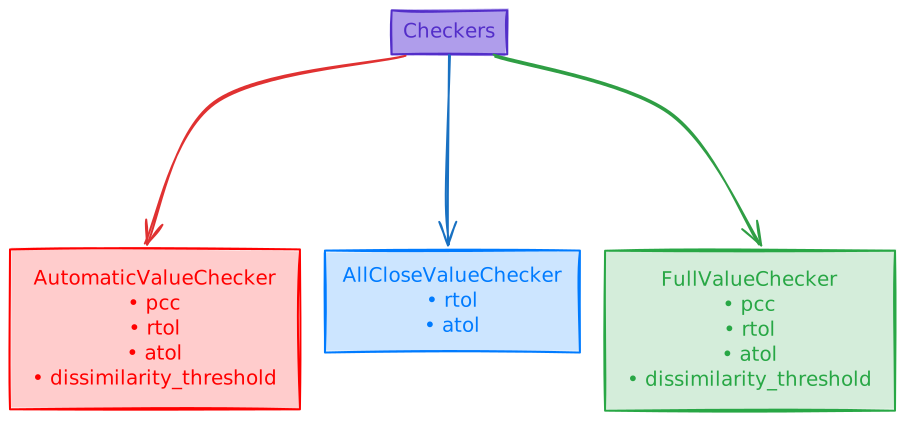
AutomaticValueChecker
This checker performs tensor checks based on the shape and type of tensor (e.g. for scalars it will perform torch.allclose as pcc shouldn't be applied to the scalars)
For this checker you can set:
pccrtolatoldissimilarity_threshold
Example of usage:
# default behavior
verify(inputs, framework_model, compiled_model)
# this will result same as the default behavior
verify(inputs, framework_model, compiled_model, VerifyConfig(value_checker=AutomaticValueChecker()))
# setting pcc and rtol
verify(inputs, framework_model, compiled_model, VerifyConfig(value_checker=AutomaticValueChecker(pcc=0.95, rtol=1e-03)))
AllCloseValueChecker
This checker checks tensors using torch.allclose method.
For this checker you can set:
rtolatol
Example of usage:
# setting allclose checker with default values
verify(inputs, framework_model, compiled_model, VerifyConfig(value_checker=AllCloseValueChecker()))
# setting allclose checker with custom values
verify(inputs, framework_model, compiled_model, VerifyConfig(value_checker=AllCloseValueChecker(rtol=1e-03)))
FullValueChecker
This checker is combination of AutomaticValueChecker and AllCloseValueChecker.
For this checker you can set:
pccrtolatoldissimilarity_threshold
Examples of usage:
# setting full checker with default values
verify(inputs, framework_model, compiled_model, VerifyConfig(value_checker=FullValueChecker()))
# setting full checker with custom values
verify(inputs, framework_model, compiled_model, VerifyConfig(value_checker=FullValueChecker(pcc=0.95, rtol=1e-03)))
Forge Operation Docstring Standard
This document defines the standard structure for Forge operation docstrings. All operation functions in forge/forge/op/*.py should follow this format to enable automatic documentation generation.
Standard Docstring Structure
def OperationName(
    name: str,
    operandA: Tensor,
    param1: Type = default,
    ...
) -> Tensor:
    """
    Brief one-line description of what the operation does.

    Detailed description providing more context about the operation,
    its use cases, and any important behavior notes. This can span
    multiple lines.

    Parameters
    ----------
    name : str
        Name identifier for this operation in the computation graph.
        Use empty string to auto-generate.

    operandA : Tensor
        Input tensor of shape `(N, C, H, W)` where:
        - `N` is the batch size
        - `C` is the number of channels
        - `H` is the height
        - `W` is the width

    param1 : Type, optional
        Description of the parameter including valid values.
        Default: `default_value`

    Returns
    -------
    Tensor
        Output tensor of shape `(N, C, H_out, W_out)`.
        Description of what the output represents.

    Mathematical Definition
    -----------------------
    For each element x in the input:
        output[i] = f(x[i])

    Where f(x) = mathematical_formula

    Notes
    -----
    - Important implementation detail 1
    - Constraint or limitation 2

    Examples
    --------
    >>> import forge
    >>> input_tensor = forge.Tensor(...)
    >>> result = forge.op.OperationName("op1", input_tensor, param1=value)

    See Also
    --------
    forge.op.RelatedOp1 : Description of related operation
    forge.op.RelatedOp2 : Description of another related operation
    """
Required Sections
-
Brief Description (Required)
- First line, one sentence describing the operation
- Should be informative, not just the operation name
-
Detailed Description (Required for complex operations)
- Explains use cases, behavior, and context
- Can span multiple paragraphs
-
Parameters (Required)
- NumPy-style format:
name : type - Include shape information for tensors
- Specify default values and valid ranges
- NumPy-style format:
-
Returns (Required)
- Document return type and shape
- Describe what the output represents
Optional Sections
-
Mathematical Definition (Recommended for mathematical operations)
- Use plain text or LaTeX-style notation
- Show the formula applied to each element
-
Notes (When applicable)
- Implementation details
- Constraints and limitations
- Performance considerations
-
Examples (Recommended)
- Working code examples
- Show common use cases
-
See Also (Recommended)
- Links to related operations
- Brief description of relationship
Example: Complete Docstring
def Resize2d(
    name: str,
    operandA: Tensor,
    sizes: Union[List[int], Tuple[int, int]],
    mode: str = "nearest",
    align_corners: bool = False,
    channel_last: bool = False,
) -> Tensor:
    """
    Resizes the spatial dimensions of a 2D input tensor using interpolation.

    The Resize2d operation resizes the height and width dimensions of a 4D
    input tensor to specified target sizes. This operation is commonly used
    in computer vision tasks for image resizing, upsampling, and downsampling.

    Parameters
    ----------
    name : str
        Name identifier for this operation in the computation graph.
        Use empty string to auto-generate.

    operandA : Tensor
        Input tensor of shape `(N, C, H, W)` (channel-first) or
        `(N, H, W, C)` (channel-last) where:
        - `N` is the batch size
        - `C` is the number of channels
        - `H` is the input height
        - `W` is the input width

    sizes : Union[List[int], Tuple[int, int]]
        Target output spatial dimensions as `[height, width]` or
        `(height, width)`. The output tensor will have these exact
        height and width values.

    mode : str, optional
        Interpolation mode. Supported values:
        - `'nearest'`: Nearest neighbor interpolation
        - `'bilinear'`: Bilinear interpolation
        Default: `'nearest'`

    align_corners : bool, optional
        If True, align corner pixels of input and output tensors.
        Only affects bilinear mode.
        Default: `False`

    channel_last : bool, optional
        If True, input is in channel-last format `(N, H, W, C)`.
        If False, input is in channel-first format `(N, C, H, W)`.
        Default: `False`

    Returns
    -------
    Tensor
        Output tensor with resized spatial dimensions:
        - Shape `(N, C, H_out, W_out)` if `channel_last=False`
        - Shape `(N, H_out, W_out, C)` if `channel_last=True`
        where `H_out, W_out` are the values from `sizes`.

    Mathematical Definition
    -----------------------
    For nearest neighbor interpolation:
        output[i, j] = input[round(i * H_in / H_out), round(j * W_in / W_out)]

    For bilinear interpolation:
        output[i, j] = weighted average of 4 nearest input pixels

    See Also
    --------
    forge.op.Resize1d : Resize 1D tensors
    forge.op.Upsample2d : Upsample using scale factors
    forge.op.Downsample2d : Downsample operation
    """
Parsing Notes
The documentation generator parses docstrings using these rules:
- Brief description: First non-empty line(s) before "Parameters"
- Parameters section: Starts with "Parameters" followed by dashes
- Returns section: Starts with "Returns" followed by dashes
- Other sections: Identified by section headers followed by dashes
Best Practices
- Be specific: Avoid vague descriptions like "TM" or just the operation name
- Include shapes: Always document tensor shapes with dimension meanings
- Document defaults: Explicitly state default values in descriptions
- Use consistent terminology: Use "Tensor" not "tensor", "Forge" not "TTIR"
- Keep it concise: Balance detail with readability