Tinker with models and the software & hardware stack
TTNN, TT-Lang, and TT-Forge from the ground up.
6 chapters · 59 min read time
The TT-Metal Architecture
Before you write a single line of kernel code, you should understand what you’re writing it for. The Blackhole chip is not a GPU wearing a different nametag. The memory model is different. The execution model is different. The abstraction layers are deliberately transparent. Once you see the architecture clearly, the API choices stop being arbitrary and start being obvious.
The Stack From Top to Bottom
Four layers sit between your Python and the chip. Each layer is real and each layer compiles:
TT-Lang        →  Python DSL, looks like Python, compiles to assembly
TTNN           →  Python ops, tensor API, calls into Metalium
TT-Metalium    →  C++ kernel API, explicit data movement, JIT compile
Kernel Driver  →  firmware, PCIe dispatch, ring buffers
You can enter this stack at any level. TTNN is the right entry point for standard ops. TT-Lang is the right entry point when you need a custom pattern and want AI-assisted development. Metalium is where you go when the abstraction has to disappear.
Blackhole Grid Anatomy
The Blackhole chip is a 17-column by 12-row network-on-chip (NoC) grid. Every cell in that grid is a node. Not every node is a compute core. The grid has four distinct zones:
Tensix cores — columns 1-7 and 9-15, rows 1-10. One hundred and forty physical tiles, of which 120 are enabled on QB2’s chips (two columns are harvested). These are the compute nodes. Each Tensix core is itself a small computer.
DRAM controllers — rows 0 and 11, running the full width of the chip. 32 GB of GDDR6 per chip (64 GB per p300c card). The chip’s main memory lives here, physically along the chip edges, close to the NoC’s routing paths.
ETH ports — column 0 and column 16. These connect chips together. On a QB2’s four Blackhole chips, the ETH ports form the chip-to-chip fabric used by CreateDevices when you open a multi-chip mesh.
PCIe interface — column 8, the center column. Every command from your Python application crosses here. ttnn.open_device(0) sends a dispatch message through this column.
One Blackhole chip. Four of these — on two p300c cards — live in your QB2.
Inside a Tensix Core
Zoom in on any one of those Tensix nodes. Each Tensix core contains:
- RISC-V control processor — a small general-purpose CPU that executes your kernel logic
- Matrix engine (FPU) — hardware-accelerated matrix multiply and elementwise ops; this is what makes it fast
- Register tile files — SRCA, SRCB, and DST registers that hold 32×32 element tiles during computation
- L1 SRAM — fast on-core scratchpad memory; your kernel reads data here before the FPU touches it
- Two NoC endpoints — one for reads (inbound), one for writes (outbound); both can operate independently and concurrently
The L1 SRAM is crucial. Moving data from DRAM to a Tensix core’s L1 is an explicit operation you control. Nothing is cached automatically. This sounds like a burden and becomes a superpower: you know exactly where every byte is.
The Three-Kernel Model
Every Metalium operation on a Tensix core involves three co-running kernels. All three run on the same core, concurrently:
- Data-movement-reader (BRISC) — reads tiles from DRAM or another core’s L1 into this core’s L1 via the read NoC endpoint
- Compute — pops tiles from L1 into the SRCA/SRCB registers, runs the matrix engine, writes results to DST, pushes results back to L1
- Data-movement-writer (NCRISC) — takes finished tiles from L1 and sends them to DRAM or another core’s L1 via the write NoC endpoint
Tiles: The Native Unit
TTNN doesn’t think in terms of individual floats or rows. It thinks in 32×32 tiles. A tensor of shape (64, 64) becomes 4 tiles of shape (32, 32). The tile format — BFP8, BFP16, or FP32 — is set when you create a tensor:
tt-metalium (see Your First Kernel). torch isn't preinstalled there — bootstrap it once per container session with uv pip install --python /opt/venv/bin/python3 torch --index-url https://download.pytorch.org/whl/cpu (the CPU wheel, since TTNN does the actual chip work).
import ttnn, torch

device = ttnn.open_device(device_id=0)

# Create a tensor — TTNN tiles it automatically on device transfer
t = torch.randn(64, 64)
t_tt = ttnn.from_torch(t, dtype=ttnn.bfloat16, layout=ttnn.TILE_LAYOUT, device=device)

# t_tt is now four 32x32 BF16 tiles distributed in the chip's DRAM
print(t_tt.shape)   # torch.Size([64, 64])
print(t_tt.dtype)   # bfloat16

ttnn.close_device(device)
The 32×32 tile size is not adjustable — it is the hardware’s register file size. Every operation on the matrix engine processes one tile at a time. Kernels are written to process tiles, readers fetch tiles, writers send tiles.
The NoC Fabric
The two-dimensional mesh NoC lets any core read from or write to any other core’s L1, or any DRAM bank, by address. There is no coherence protocol, no cache hierarchy. You own the data movement. The routing is deterministic and the bandwidth is high — but contention is possible, which is why the profiler shows per-link NoC traffic.
For a single-chip operation, you’re moving tiles from DRAM row-0 or row-11 nodes, across the mesh, to your compute cores’ L1. For a multi-chip operation via CreateDevices, tiles cross the ETH columns at the chip edges and appear at another chip’s ETH columns before continuing across that chip’s mesh.
A Minimal TTNN Example
This is the entire open-device-matmul-close pattern, which you’ll recognize from every tutorial:
import ttnn, torch

# Open chip 0
device = ttnn.open_device(device_id=0)

# Move data onto the chip
a = ttnn.from_torch(torch.randn(64, 64), dtype=ttnn.bfloat16,
                    layout=ttnn.TILE_LAYOUT, device=device)
b = ttnn.from_torch(torch.randn(64, 64), dtype=ttnn.bfloat16,
                    layout=ttnn.TILE_LAYOUT, device=device)

# Dispatch the matmul kernel — compiles JIT on first run
c = ttnn.matmul(a, b)

# Pull result back to CPU
result = ttnn.to_torch(c)
print(result.shape)

ttnn.close_device(device)
Nothing in this example is magic. Each step maps to a real chip operation: the from_torch calls dispatch DMA transfers through the PCIe column to DRAM; matmul dispatches reader/compute/writer kernels to a set of Tensix cores; to_torch moves the result tiles back through PCIe to host RAM.
Next: Your First Kernel →
Your First Kernel
Reading about architecture is preparation. Writing code is proof. This chapter takes you from zero to a dispatched, JIT-compiled, hardware-executed kernel, written in about fifteen lines of Python. You don’t need to clone anything or build anything — just write one short script and run it.
Setting Up the Environment
Everything runs inside the TT-Metalium container. There’s no venv to activate and no
~/tt-metal on the host — the tt-metalium wrapper is the door:
tt-metaliumYou’re now in a shell inside the container, with your home directory mounted at /home/user
(so ~ still means your files). TTNN is on the default interpreter — check before you export
anything:
which python3            # → /opt/venv/bin/python3
echo "$TT_METAL_ARCH_NAME"
TT_METAL_ARCH_NAME must be blackhole. Without it the runtime defaults to Wormhole and
dispatches incorrect kernel variants; the QB2 has Blackhole chips. Set it if that last command
printed nothing (it isn’t baked into the image — confirmed empty in a real container):
export TT_METAL_ARCH_NAME=blackholeThe container’s ttnn is a runtime-only install — no torch, and no pip to fetch it with
(only uv, and ensurepip). Bootstrap torch once per container session; the CPU wheel is
what you want here, since TTNN — not torch — is doing the actual chip work, and the default
index otherwise pulls a multi-GB CUDA build you’ll never use on this hardware:
uv pip install --python /opt/venv/bin/python3 torch --index-url https://download.pytorch.org/whl/cpuBoth that export and this pip install are gone when you exit — the container is --rm.
Only edits under your home directory survive, so keep scripts in ~/tt-scratchpad/ and re-run
the exports/install each session (or put them in a small script under your home directory and
source it after tt-metalium).
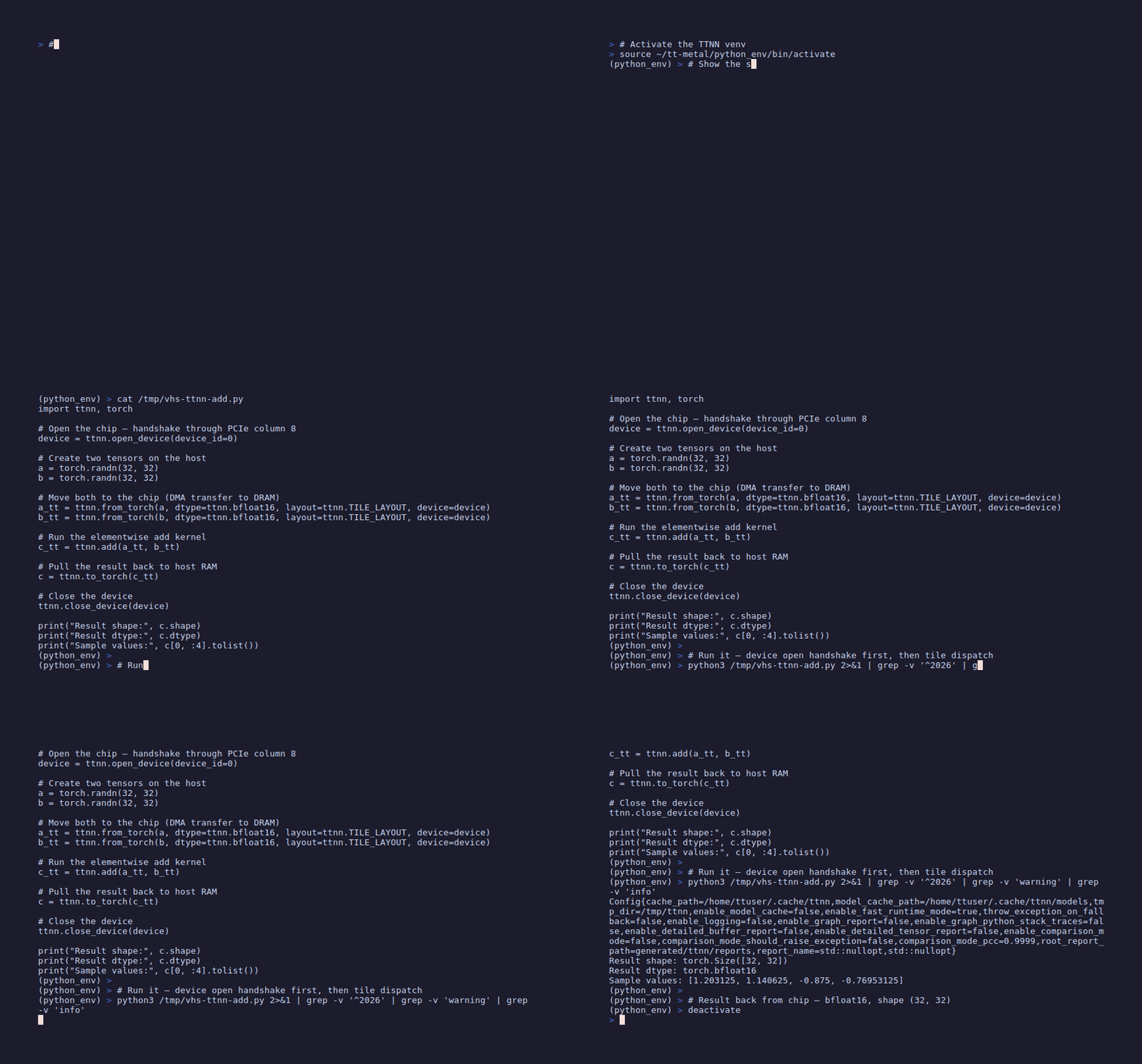
Your First Run: Tensor Addition
Write the script yourself — it’s short, and typing it once is worth more than running someone
else’s copy. Save this as ~/tt-scratchpad/ttnn_add_tensors.py:
import ttnn, torch

# 1. Open the chip — handshake through PCIe column 8
device = ttnn.open_device(device_id=0)

# 2. Create two tensors on the host
a = torch.randn(32, 32)
b = torch.randn(32, 32)

# 3. Move both to the chip (DMA transfer to DRAM)
a_tt = ttnn.from_torch(a, dtype=ttnn.bfloat16, layout=ttnn.TILE_LAYOUT, device=device)
b_tt = ttnn.from_torch(b, dtype=ttnn.bfloat16, layout=ttnn.TILE_LAYOUT, device=device)

# 4. Run the elementwise add kernel
c_tt = ttnn.add(a_tt, b_tt)

# 5. Pull the result back to host RAM
c = ttnn.to_torch(c_tt)

# 6. Close the device — flushes all pending work and releases the chip
ttnn.close_device(device)

print("Result shape:", c.shape)
Then run it:
python3 ~/tt-scratchpad/ttnn_add_tensors.pyFirst run: expect 30 to 60 seconds of compile time before any output. This is the JIT compiler building the addition kernel from LLVM IR down to Tensix assembly, then writing the binary to the kernel cache.
Second run: fast. The cache is warm. Recompilation only happens when kernel parameters change.
Tensors Become Tiles
A key conceptual shift: TTNN does not operate on individual elements. It operates on 32×32 tiles. When you pass a (32, 32) tensor, that’s one tile. When you pass a (64, 64) tensor, that becomes four tiles.
The tile transformation happens automatically during from_torch with layout=ttnn.TILE_LAYOUT. You can inspect the layout:
print(a_tt.layout)   # Layout.TILE
print(a_tt.dtype)    # DataType.BFLOAT16
print(a_tt.shape)    # Shape([32, 32])
Larger tensors spread across more tiles, and those tiles get dispatched to more cores concurrently. A (512, 512) tensor becomes 256 tiles; the dispatch system assigns each tile to a Tensix core. The parallelism is automatic at the tile level.
Reader → L1 → FPU → L1 → writer. The three-kernel pipeline at work.
Understanding JIT Compilation
The first run is slow for a specific reason: Metalium compiles kernels just-in-time. Here’s what happens during that 60-second wait:
- TTNN resolves the op’s dtype, shape, and memory layout to a kernel variant
- The kernel variant (C++ source) is templated with those parameters
- LLVM compiles C++ to RISC-V assembly for the Tensix host processor
- The Tensix-specific FPU operations are lowered to assembly for the matrix engine
- Both binaries are written to the kernel cache at
~/.cache/ttnn/
Subsequent calls with the same parameters skip all of this. The compiled binary is reused. If you change tensor shapes or dtypes, partial recompilation fires for the changed variants only.
Matmul: Putting the FPU to Real Work
Elementwise addition barely exercises the matrix engine. Matrix multiplication does. The call is minimal:
device = ttnn.open_device(device_id=0)

a = ttnn.from_torch(torch.randn(256, 256), dtype=ttnn.bfloat16,
                    layout=ttnn.TILE_LAYOUT, device=device)
b = ttnn.from_torch(torch.randn(256, 256), dtype=ttnn.bfloat16,
                    layout=ttnn.TILE_LAYOUT, device=device)

c = ttnn.matmul(a, b)
result = ttnn.to_torch(c)
print(result.shape)   # torch.Size([256, 256])

ttnn.close_device(device)
A (256, 256) matmul is 64 output tiles. The dispatch system maps those 64 output tiles to 64 compute cores, running in parallel. The reader for each core fetches the relevant row tiles from A and column tiles from B. The FPU accumulates. The writer ships results to DRAM. All of this runs concurrently across 64 Tensix cores.
Keeping Tensors in L1
By default, tensors live in DRAM. Every op reads from DRAM and writes results to DRAM. For chained operations, this incurs unnecessary round-trips. You can pin a tensor to L1 memory instead:
# Keep the tensor in L1 between ops — avoid the DRAM round-trip
a_l1 = ttnn.to_memory_config(a, ttnn.L1_MEMORY_CONFIG)
b_l1 = ttnn.to_memory_config(b, ttnn.L1_MEMORY_CONFIG)

c = ttnn.matmul(a_l1, b_l1)
This works when the tensor fits in L1. For large tensors it won’t — DRAM is 32 GB per chip, L1 is small per-core scratchpad. Use L1 pinning for intermediate results in tight compute loops.
Kernel Fusion: Chaining Ops
TTNN supports kernel fusion when you chain ops. The compiler detects the dependency and merges compute kernels:
# These three ops may fuse into a single kernel dispatch
c = ttnn.relu(ttnn.matmul(a, b))
Whether fusion fires depends on shape compatibility and the current kernel fusion rules. When it fires, the reader runs once, the fused compute kernel does matmul + relu on each tile, and the writer runs once. When it doesn’t fire, each op dispatches separately. The profiler tells you which happened (see Chapter 4).
Next: TT-Lang Introduction →
TT-Lang Introduction
TTNN covers a large territory of standard ops — matmul, attention, layernorm, convolution. But ML research moves faster than op libraries. The moment you want a fusion pattern that TTNN doesn’t expose, a non-standard attention variant, a custom activation function with a specific numerical property, you need to go lower. TT-Lang is that lower level, without requiring C++.
What TT-Lang Is
TT-Lang is a Python DSL that compiles to Tensix assembly. You write Python-like syntax with decorators that declare data-movement intent. The compiler translates that intent into reader kernels, compute kernels, and writer kernels. The three-kernel model you read about in Chapter 1 becomes the explicit structure of every TT-Lang program.
The key design principle: explicit data movement. Where TTNN hides the read/compute/write split, TT-Lang exposes it as the primary vocabulary. You declare what the reader fetches from where, what compute does to tiles in registers, what the writer sends where. No implicit sharing. No hidden transfers.
This explicitness is intentional and strategic. It makes TT-Lang programs easy for AI coding agents to generate, verify, and debug — because the spec is complete in the source code. The reader section tells you exactly what arrives. The compute section is pure math on those arrivals. The writer section is exactly what leaves. No ambiguity remains.
The Kernel Decorators
TT-Lang programs are organized around the ttl module’s decorators — verified against the
real, installed package rather than assumed. ttl is not part of the factory tooling venv
(~/.tenstorrent-venv holds only tt-smi/tt-flash, as elsewhere in this guide) or the
TT-Metalium container (confirmed absent from both, live) — it comes from pip install tt-lang
into a venv of your own, the same way the tt-lang-intro lesson
sets one up (python3 -m venv ttlang-venv && ... && pip install tt-lang tt-lang-setup):
@ttl.operation(grid=...)— the outer program;grid="auto"lets the compiler size it@ttl.compute()— runs on the FPU; consumes filled dataflow buffers, does the math, fills the output buffer@ttl.datamovement()— runs on a data-movement RISC core; there’s one decorator for both directions, not separate reader/writer ones — a function’s role (producer vs. consumer) comes from whether it calls.reserve()(fill a slot) or.wait()(drain a slot) on a given buffer, not from its decorator
A minimal vector addition kernel in TT-Lang looks like this:
import ttl
import ttnn

TILE_SIZE = 32

@ttl.operation(grid="auto")
def eltwise_add(a_in: ttnn.Tensor, b_in: ttnn.Tensor, out: ttnn.Tensor) -> None:
    row_tiles = a_in.shape[0] // TILE_SIZE
    col_tiles = a_in.shape[1] // TILE_SIZE

    # Typed dataflow buffers (DFBs) — one slot per tile, depth 2 (double-buffer)
    a_dfb = ttl.make_dataflow_buffer_like(a_in, shape=(1, 1), block_count=2)
    b_dfb = ttl.make_dataflow_buffer_like(b_in, shape=(1, 1), block_count=2)
    out_dfb = ttl.make_dataflow_buffer_like(out, shape=(1, 1), block_count=2)

    @ttl.compute()
    def compute():
        for row in range(row_tiles):
            for col in range(col_tiles):
                with a_dfb.wait() as a_blk, b_dfb.wait() as b_blk, out_dfb.reserve() as o_blk:
                    o_blk.store(a_blk + b_blk)   # element-wise add in L1

    @ttl.datamovement()
    def read():
        for row in range(row_tiles):
            for col in range(col_tiles):
                with a_dfb.reserve() as a_blk, b_dfb.reserve() as b_blk:
                    ttl.copy(a_in[row:row+1, col:col+1], a_blk).wait()
                    ttl.copy(b_in[row:row+1, col:col+1], b_blk).wait()

    @ttl.datamovement()
    def write():
        for row in range(row_tiles):
            for col in range(col_tiles):
                with out_dfb.wait() as o_blk:
                    ttl.copy(o_blk, out[row:row+1, col:col+1]).wait()
Three functions, three processors, one core. They run concurrently. The dataflow buffers
between them are the synchronization mechanism — reserve() blocks until a slot is free to
fill, wait() blocks until a slot is filled and ready to drain. This backpressure propagation
means the pipeline self-regulates. Every tile makes one DRAM read (read) and one DRAM write
(write); the + happens entirely in L1, inside compute.
Single-Core Data Flow
Here is what happens at the hardware level when vector_add runs on one Tensix core:
One Tensix core running all three TT-Lang sections concurrently.
TT-Lang vs TTNN: When to Use Which
They are not competing tools. They are different entry points into the same hardware, appropriate for different problems:
| Situation | Use |
|---|---|
| Standard ops: matmul, attention, layernorm, conv | TTNN — highly optimized, already there |
| Custom op that TTNN doesn’t expose | TT-Lang — write it in Python, no C++ required |
| Performance-critical custom fusion | TT-Metalium C++ — maximum control, no Python overhead |
| AI-agent-generated kernels | TT-Lang — explicit structure, agent-verifiable output |
| Production inference serving | TTNN via vLLM — already integrated |
The usual path: start with TTNN. When you hit a wall — a pattern that TTNN can’t express, a fusion the compiler misses, a numerical property you need to enforce — drop to TT-Lang. Write the custom section in TT-Lang, combine it with TTNN for the standard sections.
The TT-Lang Playground
You don’t need a QB2 to experiment with TT-Lang. The ttlang-sim browser-based simulator lets you write kernels, inspect the circular buffer state, and verify correctness without hardware.
For the structured lesson with exercises and a graded environment:
The lesson runs inside VS Code with the TT-VSCode Toolkit extension. It uses a local simulator so compilation is instant. After the lesson, running the same kernel on QB2 hardware is a one-line change.
read data-movement function and compute, and between compute and write, is organized as dataflow buffers (DFBs) — fixed-size ring structures, made with ttl.make_dataflow_buffer_like(). When a producer fills a slot (.reserve()), it stalls until a consumer drains one (.wait()) if the ring is full. This backpressure propagation is how three concurrent functions stay synchronized without explicit locks. The hardware implements the buffer arbitration; you just see reserve() and wait(). Understanding this explains why tile count and L1 size set the performance envelope: a kernel that fully pipelines needs at least two blocks in each buffer simultaneously — hence block_count=2 above.
Profiling & Optimization
A kernel that runs is not necessarily a kernel that runs well. The Blackhole chip has 120 enabled Tensix cores per chip and 480 across your four-chip QB2. If your kernel is using 12 of them, the other 468 are idle and the machine is waiting. Profiling tells you which case you’re in.
tt-toplike: Your Primary Monitoring Tool
While your kernel runs, run tt-toplike in a second terminal. It is the most direct window into what the chip is doing right now.
# Open a second terminal, then:
tt-toplike --mode starfield
In starfield mode, each star represents a chip. Brightness is proportional to power draw, which correlates with active compute. A bright, dense star field means cores are working. A dim star means most cores are idle.
Switch modes for different views:
tt-toplike --mode flow        # NOC traffic visualization — data movement patterns
tt-toplike --mode arcade      # per-core utilization as a game-style display
tt-toplike --mode castle      # stacked bar view, useful for multi-chip comparisons
Leave flow mode running while you tune a kernel for DRAM bandwidth. The NOC traffic pattern tells you whether data is moving in a spread-out mesh pattern (good: parallel fetch from multiple DRAM banks) or a narrow column (bad: serial bottleneck).
tt-smi Snapshots
For point-in-time metrics in JSON format, use tt-smi -s. This is safe to pipe, parse, and log:
tt-smi -sThe output includes per-chip:
aiclk— current clock frequency in MHz (Blackhole target: ~1000-1200 MHz under load)power— board power in wattsasic_temperature— ASIC die temperature in °Cvoltage— core voltage
Temperature bands to know:
| Range | State |
|---|---|
| 40–60°C | Idle / light load — normal |
| 60–80°C | Sustained load — normal, expected during inference |
| 80–90°C | High load — fans at full speed, performance still normal |
| >90°C | Throttle zone — aiclk drops automatically to protect the chip |
If tt-smi -s shows aiclk significantly below spec during a compute-heavy run, thermal throttling is occurring. Check airflow around the QB2, confirm the fans are unobstructed, and check ambient temperature.
TTNN Op Profiling
For per-operation timing at the Python level, TTNN exposes a profiler — it lives at top-level ttnn.profiler, not ttnn.experimental.profiler (that namespace doesn’t have a profiler at all), and it’s a Tracy-based interface rather than a start/stop/get_report cycle:
import ttnn

device = ttnn.open_device(device_id=0)

# ... your ops here ...
a = ttnn.from_torch(...)
b = ttnn.from_torch(...)
c = ttnn.matmul(a, b)

# Pull the perf data TTNN has already been collecting for dispatched ops
report = ttnn.profiler.get_all_programs_perf_data()

for entry in report:
    print(entry)

ttnn.close_device(device)tt-metalium container, this runs without error but report comes back empty — confirmed live: get_all_programs_perf_data() returns {} after a real dispatched matmul. Real per-op data needs a Tracy-enabled tt-metal build, which the release image isn't; setting TT_METAL_DEVICE_PROFILER=1 to force it doesn't unlock anything either — it crashes outright (TT_FATAL: TT_METAL_DEVICE_PROFILER requires a Tracy-enabled build of tt-metal), confirmed live. For a stock QB2, wrap ops in wall-clock timing instead (below) or use tt-toplike for a live device-level view (aiclk/power, not per-op) — Tracy profiling is a from-source-build topic, out of scope for a factory image.
import time, ttnn

device = ttnn.open_device(device_id=0)

a = ttnn.from_torch(...)
b = ttnn.from_torch(...)

ttnn.synchronize_device(device)   # drain anything still in flight first
start = time.perf_counter()
c = ttnn.matmul(a, b)
ttnn.synchronize_device(device)   # block until the dispatched op actually finishes
elapsed = time.perf_counter() - start
print(f"matmul: {elapsed * 1000:.2f} ms")

ttnn.close_device(device)
Wall-clock timing without the synchronize_device calls measures dispatch latency, not
execution time — TTNN queues ops asynchronously, so the Python call returns before the
chip has necessarily finished the work.
What the Numbers Mean
The profiler report gives you op-level durations. Here’s how to interpret the patterns:
DRAM bandwidth bottleneck: Your matmul shows kernel dispatch time far below theoretical, but actual throughput is slow. The FPU is fast; the bottleneck is feeding it. Solution: increase L1 reuse with ttnn.to_memory_config(t, ttnn.L1_MEMORY_CONFIG) for intermediate tensors, or increase tile size so each DRAM fetch covers more compute.
Core underutilization: A large fraction of dispatch time is kernel launch overhead rather than compute. This means you have many small tiles dispatched serially. Solution: increase tensor dimensions (more tiles, more parallel cores) or batch multiple inputs together.
aiclk drops during profiling: Thermal throttling. The profiler timestamps are wall-clock accurate, but the kernel is running slower than its rated frequency. Fix the thermal situation before optimizing the kernel.
Kernel fusion mismatch: You expected relu(matmul(a, b)) to fuse but the profiler shows two separate dispatches. Check that both tensors have compatible memory configs and dtypes — fusion won’t fire across memory config mismatches.
Utilization: Sparse vs Dense
The visual version of the profiling story is utilization — how many cores are active at once:
Sparse = parallelism opportunity. Dense = machine at work.
Tiling Strategy
The 32×32 tile size is fixed by hardware. But the number of tiles in flight, and how they map to cores, is under your control through tensor dimensions and batch size.
Larger input tensors mean more tiles, more core parallelism, better amortization of kernel launch overhead. A single (32, 32) matmul uses one output core. A (1024, 1024) matmul uses 1024 output cores.
Larger batch sizes mean more independent inputs processed simultaneously. Each input in a batch can be dispatched to a different set of cores. Throughput increases linearly until you run out of cores or L1 capacity.
The tradeoff: larger batches increase first-token latency. The chip has to buffer the full batch before returning any result. For interactive latency, keep batches small. For throughput benchmarks, fill the chip.
The Optimization Loop
A practical profiling workflow for a new kernel:
- Run the kernel once to warm the JIT cache
- Run
tt-smi -sto check thermal baseline - Start
tt-toplike --mode flowin a second terminal - Run the kernel with the profiler enabled
- Find the longest op in the profiler report
- Check its utilization in
tt-toplike— sparse means increase batch or tensor size; dense with slow throughput means DRAM bandwidth is the limit - Adjust one variable, re-run, compare durations
Do not optimize what you haven’t measured. The chip’s actual bottleneck is rarely the one you’d guess from first principles.
Next: Going Deep →
Going Deep
You’ve seen the architecture, dispatched a kernel, written a TT-Lang program, and read a profiler report. The surface area ahead is larger than any guide can cover in full. This chapter points you at the productive edges of that surface — the things worth building toward.
Next Lessons
These four structured lessons continue from where this track ends. They are interactive, run inside VS Code with the TT-VSCode Toolkit, and include real code you run on your QB2:
Build tt-metal from source if you’re serious about optimization. The pre-built environment is a complete API surface; the source-built environment adds per-cycle profiling, kernel modification, and the ability to send patches upstream.
Projects Worth Building
Custom attention variant in TT-Lang. Standard multi-head attention is in TTNN. But sliding window attention, linear attention, grouped-query attention with non-standard head dimensions, or a custom masking pattern — these require a TT-Lang kernel. Write it using ttl.operation with one @ttl.compute() function and two @ttl.datamovement() functions (see TT-Lang Introduction for the real, current decorator set — not @reader/@writer, which earlier drafts of this guide used and which don’t exist in the actual ttl module). One data-movement function fetches Q, K, V tile blocks into dataflow buffers; the compute function runs the tile-level matmul and softmax; the other data-movement function drains results out. The explicit tile arithmetic forces you to understand exactly what attention is doing at the register level.
Profile a TTNN cookbook pattern end-to-end. Pick any TTNN recipe from the cookbook-overview lesson — a transformer block, a convolution layer, an embedding lookup. Run it on QB2 with the profiler enabled. Find the bottleneck op. Try to shrink it: L1 memory configs, batch size changes, dtype changes. Document the before-and-after numbers. This produces a reusable reference for the specific pattern on Blackhole hardware.
Explore tt-awesome. The community kernel repository collects implementations, benchmarks, and examples contributed by the Tenstorrent community. It is the fastest way to see what other builders are doing on the same hardware. Read a kernel you didn’t write, run it, profile it, try to improve it.
tt-toplike as a Permanent Companion
Keep tt-toplike running in a tmux pane during all development. The modes give you different lenses on the same hardware:
# Split your tmux: kernel in the top pane, monitoring below
tmux split-window -v 'tt-toplike --mode flow'
When you dispatch a new kernel and the starfield or flow display changes noticeably, you know the chip responded. When you make an optimization change and the display looks the same, the optimization may not have landed the way you thought. The visual feedback is faster than reading profiler output for qualitative iteration.
The Other Tracks
This track focused on kernel writing and architecture. Two other paths cover complementary territory:
The Abstraction Goes All the Way Down
The thing worth remembering is this: every layer of the TT-Metal stack is real and reachable. TTNN is not a black box above a black box. TT-Lang compiles to assembly you can disassemble. The three-kernel model maps to three RISC-V programs running on three processors embedded in each Tensix core. The NoC is a real two-dimensional mesh and you can observe individual links. The DRAM banks are physical rows on the chip grid and you can pin data to specific banks.
Most tools hide the machine. This one doesn’t. The abstraction stack is a ladder, not a ceiling. Climb as far as the problem requires.
← Profiling & Optimization | TT-Forge: The Compiler Pipeline →
TT-Forge: The Compiler Pipeline
TTNN is a hardware API. TT-Lang is a hardware DSL. Both give you explicit control over tiles, kernels, and data movement. Both speak fluent Tensix. Both require you to think in terms of the chip’s actual execution model.
TT-Forge is a different kind of animal. It is a compiler. You give it a PyTorch model or a JAX model. It traces, lowers, compiles, and hands you back something that runs natively on Tensix cores. No tiles. No kernels. No data-movement-reader configuration. The compiler handles the translation. Your model runs.
Neither approach is better. They expose different truths about the hardware. TTNN and TT-Lang are surgical instruments. TT-Forge is a factory floor. Knowing when to pick each one is the actual skill.
The Compilation Pipeline
Two entry points converge on the same Tensix machine code. Understanding both helps you understand TT-Forge’s architecture.
The PyTorch path:
Your nn.Module → torch.compile(backend="tt") → torch-xla trace → StableHLO → TT-MLIR dialect → Tensix kernels
torch.compile(model, backend="tt") routes the model through torch-xla, which traces it into a StableHLO graph — a stable, framework-neutral IR. The TT-XLA PJRT plugin hands that StableHLO to TT-MLIR, the Tenstorrent MLIR dialect that describes ops in terms the Tensix pipeline understands. The MLIR pipeline compiles that representation all the way to Tensix machine code.
The JAX path:
Your JAX function → @jax.jit → PJRT plugin → StableHLO → TT-MLIR dialect → Tensix kernels
JAX JIT compilation traces the decorated function to StableHLO. The PJRT plugin registered by import pjrt_plugin_tt routes that representation through the same TT-MLIR pipeline. Both paths land on the same compiler backend. Both produce the same class of Tensix kernels.
The convergence is intentional — and it’s why both frameworks share one frontend, TT-XLA, built on the PJRT interface and StableHLO. Model-framework choice doesn’t divide the ecosystem: PyTorch users and JAX users compile to the same machine. (ONNX, TensorFlow, and PaddlePaddle take a separate TVM-based frontend, TT-Forge-ONNX, which still exposes the forge.compile() API and is single-chip only.)
The compile pipeline in motion. Weights arrive via PCIe, buffer in DRAM, dispatch to Tensix.
Prerequisite: Install Forge
Forge is not installed by default — a stock tt-installer run gives you the driver and the hardware-tooling environment, not Forge. The TT-Forge docs install it as a pip wheel from Tenstorrent’s package index; for the PyTorch/JAX work in this chapter that’s the TT-XLA frontend. Give it a venv of its own rather than putting it in ~/.tenstorrent-venv, which exists to hold tt-smi and tt-flash:
python3 -m venv ~/.venvs/forge
source ~/.venvs/forge/bin/activate
pip install pjrt-plugin-tt --extra-index-url https://pypi.eng.aws.tenstorrent.com/
tt-forge-install
Confirm it imports:
python3 -c "import torch_xla, tt_torch; print('TT-XLA ready')"Building from source (tt-forge-fe, ~/tt-forge-fe/env/activate) is still an option, but the docs are clear it’s for developing the compiler itself — not a prerequisite for running models. The ML-practitioner TT-Forge chapter covers the wheel, Docker-image, and ONNX install paths in detail.
Compiling a Model in Practice
Here is a complete BEiT image classification example using the tt-forge-models zoo, compiled through TT-XLA:
import torch
import torch_xla.core.xla_model as xm
import torch_xla.runtime as xr
import tt_torch  # registers "tt" as a torch.compile backend
from third_party.tt_forge_models.beit.pytorch import ModelLoader

# Point PyTorch/XLA at the Tenstorrent device
xr.set_device_type("TT")
device = xm.xla_device()

# load_model()/load_inputs() are instance methods, not static — instantiate
# first (confirmed live: ModelLoader.load_model(...) raises TypeError:
# missing 1 required positional argument: 'self')
loader = ModelLoader()

# Load the BEiT-base-patch16-224 model at bfloat16 precision
model = loader.load_model(dtype_override=torch.bfloat16).eval()
inputs = loader.load_inputs(dtype_override=torch.bfloat16)

# Compile to Tensix machine code and move onto the device.
# First call: torch-xla traces to StableHLO, the TT-MLIR pipeline compiles it
# (seconds to minutes depending on model size). Later calls hit the cache.
compiled = torch.compile(model, backend="tt").to(device)
output = compiled(inputs.to(device))

# Same output structure as the original model
print(output.logits.argmax(-1))
Walk through what happens at each line. loader.load_model() fetches BEiT-base from HuggingFace and returns a standard PyTorch nn.Module. The dtype_override=torch.bfloat16 argument casts weights to bfloat16, the Blackhole chip’s native float format.
torch.compile(model, backend="tt") is where the work happens. torch-xla traces the model into a StableHLO graph; the TT-MLIR pipeline tunes tile shapes, assigns cores, schedules data movement, and emits Tensix machine code. The compiled callable is API-identical to the original nn.Module — call it with inputs, get outputs — except the computation now executes on Blackhole hardware instead of your CPU.
First-call JIT time is real. BEiT compiles in a few seconds; a large vision transformer can take a few minutes. Subsequent calls with the same input shapes skip compilation and hit the cached kernels directly.
Always load in torch.bfloat16 for Blackhole deployment. The chip has hardware-accelerated BFP8 and BFP16 math. FP32 works but runs slower.
See the TT-Forge intro lesson for compilation flags and caching options.
The ForgeModel Interface
The tt-forge-models zoo at ~/code/tt-forge-models defines a standardized interface for 800+ model variants. Every loader implements the ForgeModel abstract base class from base.py, as instance methods (confirmed live, both in base.py’s abstract signatures and in every concrete loader checked — load_model/load_inputs all take self):
__init__(self, variant=None)— picks the checkpoint variant at construction time, not at load timeload_model(self, *, dtype_override=None, **kwargs)— fetches, instantiates, and returns a ready-to-compilenn.Moduleload_inputs(self, **kwargs)— returns sample tensors that match the model’s expected input shape and dtype
Each loader module exports a ModelVariant enum naming its specific checkpoints — as a
separate top-level name, not an attribute of ModelLoader (confirmed live:
ModelLoader.ModelVariant raises AttributeError; the module’s own __init__.py does
from .loader import ModelLoader, ModelVariant, two independent imports). BEiT’s loader has
variants for different patch sizes and training configurations. ResNet’s loader offers:
from third_party.tt_forge_models.resnet.pytorch import ModelLoader, ModelVariant

ModelVariant.RESNET_50_HF    # HuggingFace checkpoint
ModelVariant.RESNET_50_TIMM  # timm checkpoint
The ModelTask taxonomy in config.py organizes models by task type: NLP_CAUSAL_LM, CV_IMAGE_CLS, CV_OBJECT_DETECTION, and others. ModelGroup classifies models by family — Vision Transformers, CNNs, generative language models. The taxonomy is machine-readable, which matters for the compiletron game (more below).
This standardization exists so you can swap models without rewriting your compilation harness. The compilation loop is always:
import torch
from third_party.tt_forge_models.<model>.pytorch import ModelLoader, ModelVariant

loader = ModelLoader(variant=ModelVariant.SOME_VARIANT)
model = loader.load_model(dtype_override=torch.bfloat16)
inputs = loader.load_inputs()
compiled = torch.compile(model, backend="tt").to(device)
Read the full forge-models zoo lesson for traversal patterns and custom variant registration.
The JAX path requires one extra step before the compile call: import pjrt_plugin_tt at the top of your script. This import registers the TT PJRT plugin as a JAX backend. After that, @jax.jit decorated functions trace and compile through the same TT-MLIR pipeline.
import jax
import jax.numpy as jnp
import pjrt_plugin_tt  # registers TT as JAX backend

@jax.jit
def forward(x):
    return jnp.sin(x) + jnp.cos(x)

x = jnp.ones((128, 128))
result = forward(x)  # compiles to Tensix on first call
Full details at the TT-XLA JAX lesson.
Forge vs. TTNN — When to Use Which
Three layers of the stack are now in front of you. They are not competing alternatives. They solve different problems at different altitudes.
| Use | When |
|---|---|
| TT-Forge | You have an existing PyTorch or JAX model and want Tensix execution without rewriting ops |
| TTNN | You need control over tiling strategy, memory placement, or custom tensor ops within a larger model |
| TT-Lang | You are writing a new compute kernel, optimizing an existing one, or need instruction-level control |
The most common pattern in practice: use TT-Forge for whole-model compilation. Drop to TTNN for custom ops that TT-Forge doesn’t yet support or where you need tiling control. Drop to TT-Lang for the one inner loop that the profiler says dominates your runtime.
Forge and TTNN are composable. A compiled model can call into TTNN ops, and a TTNN program can lean on torch.compile(backend="tt") for the transformer backbone while hand-tuning specialized attention variants in TTNN. The layers were designed to coexist.
TT-Forge Compiletron
The tt-forge-compiletron at ~/code/tt-forge-compiletron is a roguelike model compilation game built on top of the forge pipeline. It is also a serious tool for surveying the compile-compatibility landscape of the zoo and of HuggingFace at large.
Compiletron’s forge backend drives the source-built tt-forge-fe / forge.compile() frontend — the legacy PyTorch path now being superseded by TT-XLA’s torch.compile(backend="tt"). That’s why its launch activates ~/tt-forge-fe/env/activate rather than the wheel environment. The tool remains an excellent compiler stress-test; just note it’s pinned to the older frontend.
Set it up, then launch it:
cd ~/code/tt-forge-compiletron
bash scripts/install.sh --forge   # installs forge venv + tt-forge-fe shim, clones tt-forge-models
python3 expedition.py run --tui --seed-only --backend forge
The three-screen Textual TUI shows the model queue, live compilation progress per chip, and a running score. The --seed-only flag restricts the model pool to the tt-forge-models zoo — hundreds of curated models guaranteed to have standardized loaders. Drop --seed-only to enable --frontier-only mode, which discovers models live from HuggingFace based on download velocity and rarity signals.
Internally, expedition.py delegates to a router that reads ModelConfig.task and ModelConfig.group metadata from each zoo entry. That metadata informs backend selection (forge vs xla) and chip assignment. The --backend mixed flag alternates backends across the model queue, which is useful for cross-backend compile-rate comparison.
The bestiary at data/bestiary.json is a persistent record of every model the compiletron has ever attempted: compile status, timing, output shape, error class if it failed. The router uses the bestiary to deprioritize known-broken models and surface fresh targets. It is also the primary artifact if you are contributing compile-fix patches upstream — the bestiary tells you exactly which models need work and what failed.
Performance timeseries land in data/perf_history.jsonl — one JSON object per compile run, appended chronologically. Use it to track compile-time regressions across forge versions or to graph throughput trends after a driver update.
The --bench-passes N flag runs N inference passes after a successful compile and records tokens-per-second or images-per-second into the timeseries. Use this to measure real inference throughput, not just compile success.
Scoring: a successful compile earns a +200 base score. First-ever compile of a model (not yet in the bestiary) earns a ×5 multiplier for a +1,000 point burst. Freshness and rarity bonuses stack on top. Running in --frontier-only mode against live HuggingFace models maximizes scoring upside but also maximizes compile-time surprises.
Next steps: The compiletron’s First Voice feature runs a themed inference pass after each successful compile, printing the model’s first decoded output on Tenstorrent silicon. It is genuinely entertaining as a throughput warm-up, but the underlying pattern — compile once, inference repeatedly, measure throughput via perf_history.jsonl — is the same pattern you use in production model benchmarking.
Want an AI pair-programmer that runs on your own silicon? Since tt-studio v2.8.0, it can serve a deployed model to Claude Code or OpenCode through a local gateway — the coding agent runs against your Blackhole chips instead of a cloud API. The full setup is in Serving Models on QB2.