Performance Tuning
Running a model is table stakes. Knowing how to interpret what the hardware is doing while it runs — and what to change when the numbers don’t look right — is what separates production-ready deployments from experiments that worked once and then didn’t.
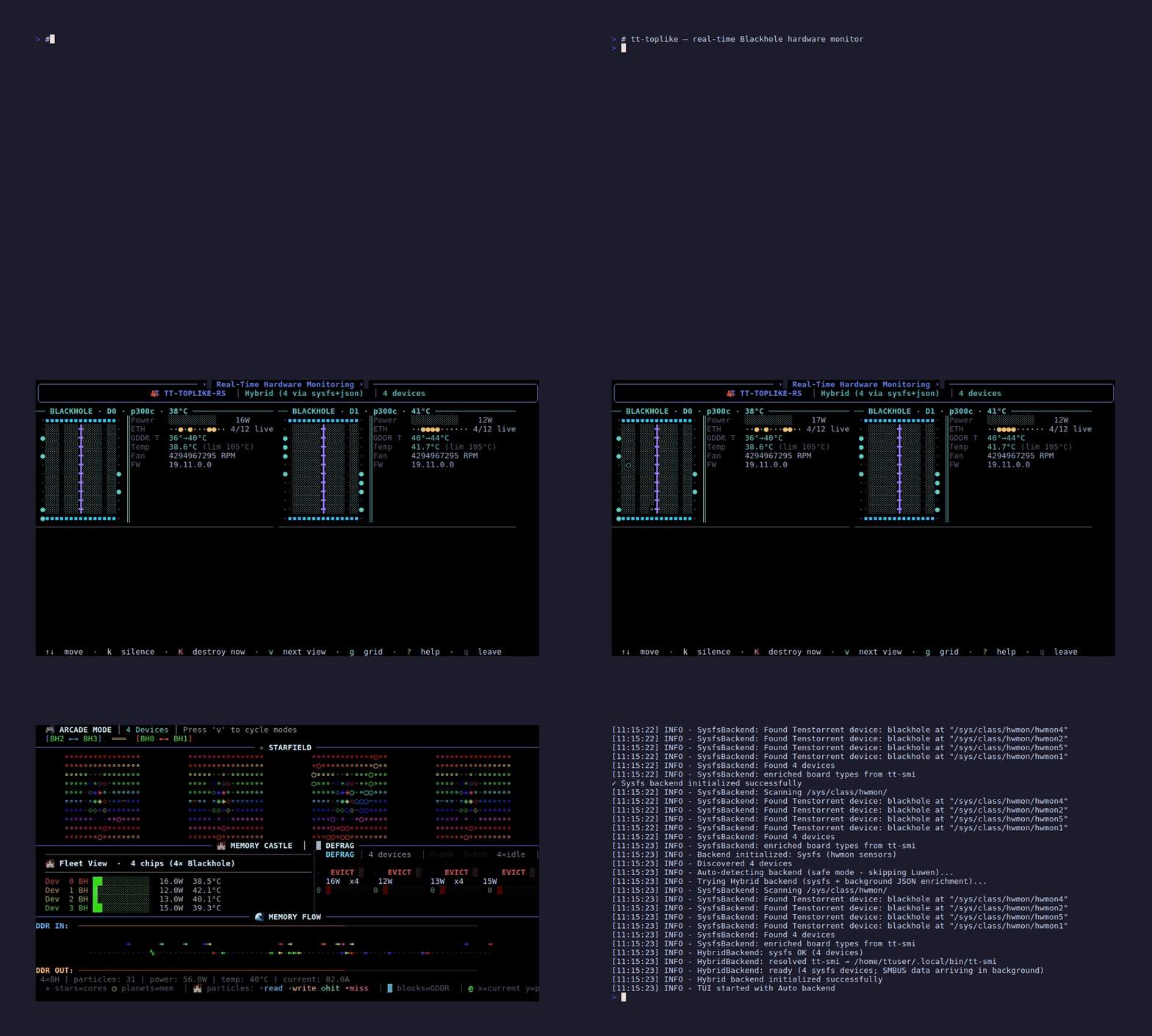
tt-toplike: Real-Time Hardware View
tt-toplike is htop for your Blackhole chips. Install it once, run it alongside inference, watch what the hardware does.
# Install from the Tenstorrent apt repository (set up by tt-installer)
sudo apt update && sudo apt install tt-toplike
# "Repository is not signed"? Re-download the signing key, then retry:
#   sudo curl -fsSL -o /etc/apt/keyrings/tt-pkg-key.asc https://ppa.tenstorrent.com/tt-pkg-key.asc
# No repository? Grab the .deb from https://github.com/tenstorrent/tt-toplike/releases
# and install it with `sudo dpkg -i tt-toplike_*.deb` — or via cargo: cargo install tt-toplike

# Launch in arcade mode — real-time chip visualization
tt-toplike --mode arcade

# Other modes worth knowing
tt-toplike --mode starfield    # particle visualization of chip activity
tt-toplike --mode flow         # DRAM bandwidth-focused display
tt-toplike --mode normal       # table mode, scriptable output
The arcade mode is not decoration. The activity pattern it shows maps directly to what the chips are computing — dense uniform patterns during prefill, pulsing DRAM-heavy patterns during decode. Once you can read those patterns, you can tell at a glance whether a run is behaving as expected.
Full documentation: docs.tenstorrent.com/tt-toplike →
tt-smi: Snapshot Mode for Scripted Monitoring
While vLLM runs, pull hardware metrics in a second terminal:
# Snapshot mode — outputs JSON, no TUI
tt-smi -s

# Pretty-print it
tt-smi -s | python3 -m json.tool
For repeated polling, a small script is more reliable than cramming this into a
one-liner (also: asic_temperature/power/aiclk are nested under
telemetry, not flat fields on each device entry — see Is This Thing
On? — and there’s no device_id field to
print, so enumerate the list instead). Save as ~/tt-scratchpad/tt-smi-watch.py:
import json, sys

data = json.load(sys.stdin)
for i, d in enumerate(data["device_info"]):
    t = d["telemetry"]
    print(f"Chip {i}: {t['asic_temperature']}°C  {t['power']}W  aiclk={t['aiclk']}MHz")
Then poll every 2 seconds:
watch -n 2 'tt-smi -s | python3 ~/tt-scratchpad/tt-smi-watch.py'The JSON field names you care about per chip: asic_temperature, power, aiclk, current (utilization).
What Good Numbers Look Like
These are reference ranges for a healthy QB2 under inference load. Exact values vary by model, batch size, and ambient conditions.
| Metric | Idle | Single-chip inference | 4-chip 70B inference |
|---|---|---|---|
aiclk |
800–900 MHz | ~1000 MHz (boosted) | ~1000 MHz |
asic_temperature |
30–45°C | 55–75°C | 65–80°C |
power per chip |
20–40 W | 75–120 W | 100–150 W |
current (util) |
low | high during prefill | high during prefill |
If aiclk is consistently below 800 MHz under load, the chip may be thermal-throttling. If temperatures exceed 85°C, check airflow — the QB2 case needs clearance on all sides.
The QB2 fans are loud under full load. This is by design. The acoustic output is a direct signal that the cooling system is working. Fan noise doesn’t indicate a problem; silently cool chips might.
Prefill vs. Decode: Two Different Hardware Modes
Transformer inference has two fundamentally different phases, and they stress the hardware differently.
Prefill processes the entire input prompt in parallel. Every token in your system prompt and user message gets computed at once, across all layers. This phase is compute-bound — the Tensix cores are running at full utilization, arithmetic throughput is the limiting factor. In tt-toplike arcade mode, you see dense uniform activity across the chip grid.
Decode generates one token at a time, autoregressively. Each step uses the full KV-cache (which grows with sequence length) but only computes one new output token. This phase is memory-bandwidth-bound — the cores are bottlenecked on loading the KV-cache from DRAM into L1 for each step, not on arithmetic. In tt-toplike flow mode, you see DRAM read bandwidth spiking with each token.
Prefill: compute-bound, all cores lit. Decode: memory-bound, DRAM rows pulsing.
Understanding this split matters for workload design. Long prompts mean long prefill (slow time-to-first-token). Short prompts with long generated outputs mean fast prefill but decode throughput determines how fast the text appears.
Batch Size and Throughput
Larger batches improve throughput at the cost of time-to-first-token. In vLLM’s continuous batching model, “batch size” isn’t something you explicitly set — the scheduler fills decode slots dynamically as they become available.
You can influence this with --max-num-seqs (maximum concurrent sequences) when starting the server:
On the managed path, pass it straight through to the server:
python3 ~/.local/lib/tt-inference-server/run.py \
  --model Llama-3.1-8B-Instruct \
  --workflow server --tt-device p300x2 --docker-server \
  --max-num-seqs 16
Driving vllm serve yourself (from your own vLLM venv — it is not installed on the host; see
vLLM on QB2):
source ~/.venvs/vllm-tt/bin/activate
export TT_METAL_ARCH_NAME=blackhole
export MESH_DEVICE=P300x2            # all four chips; avoid the two-chip P300 mesh
export HF_MODEL=~/models/Llama-3.1-8B-Instruct

vllm serve "$HF_MODEL" \
  --max-num-seqs 16 \
  --port 8000
For single-user interactive use, lower values (4–8) reduce first-token latency. For batch workloads or multi-user serving, higher values improve throughput — but there is no single safe ceiling that applies across every model on a QB2.
The safe --max-num-seqs ceiling is per-model, not a universal box number. Don’t carry a
“16–32 is safe” rule from one model to the next. Qwen3-32B and Llama-3.3-70B-Instruct tolerate
concurrency up to 8. gemma-4-31B-it and Qwen3.6-27B are single-stream — --max-num-seqs 1 is the
supported ceiling, and pushing past it is exactly the kind of sustained load that has crashed the
runtime on gemma-4-31B-it in our testing. Check the model zoo chapter
for the current model before assuming a concurrency setting carries over.
TTNN Performance Mode
For direct TTNN code (not vLLM), TTNN exposes a performance mode hint. The exact API is subject to change — check the current TTNN documentation for the precise call — but the concept is a mode flag that tells the runtime to prefer aggressive optimization over compilation speed.
# Check the TTNN docs for the current API — this is illustrative
# The concept: trade slower JIT compilation for faster inference
import ttnn

# Example — verify the exact call in the current TTNN release
# ttnn.set_performance_mode(ttnn.PerformanceMode.AGGRESSIVE)
In vLLM, performance optimization happens at the model-loading stage. The compilation step at first run is when the kernels are tuned.
Scaling Across Chips
Chips are added by widening the mesh, not with --tensor-parallel-size — the Tenstorrent
platform rejects tensor and pipeline parallel outright. On a QB2 that means
MESH_DEVICE=P300x2 for all four chips, or MESH_DEVICE=P150 for one. The two-chip mesh in
between (MESH_DEVICE=P300, a single card) has failed fabric bring-up reproducibly on our
hardware — so “half the box” is not a tuning knob you can lean on. See
vLLM on QB2 for the error it produces.
Within the mesh, a model’s weights and attention heads distribute across the chips, and the chips coordinate activations over their Ethernet cores directly, without routing through the CPU.
This matters for scaling intuition: four chips does not mean 4x throughput, because partial activations have to cross chip boundaries at each layer. What you reliably gain is 4x the memory pool — fitting a model that would not fit on one chip — plus a real but sublinear throughput improvement from the compute scale-out.
The Explore TT-Metalium lesson in tt-vscode-toolkit covers how tensor parallel communication is implemented at the kernel level — specifically how AllReduce operations route through the Ethernet cores rather than through the host. Worth reading once you’ve got inference running smoothly and want to understand the mechanics under vLLM.
Profiling with TTNN
For direct TTNN code (not the vLLM server), ttnn.experimental.profiler can emit per-op timing data. This is the Blackhole equivalent of torch.profiler — it shows you which ops are taking the most cycles and where the bottlenecks are.
# Illustrative — check current TTNN docs for the exact profiler API
import ttnn

with ttnn.experimental.profiler.profile():
    result = ttnn.matmul(a, b)

# profiler output goes to a file; inspect with tt-vscode-toolkit perf viewer
The OptimizerFW tool via tt-forge provides higher-level optimization passes that can analyze a full PyTorch model graph and suggest kernel-level improvements.
Next: Going Deeper →