What to Know About Your Workstation
Your workstation is a Tenstorrent Quietbox 2: four AI accelerators inside, an operating system you may not have used before, and the software stack already configured and waiting. The machine is ready to go — what’s left is knowing what you’ve got.
This guide doesn’t assume you know Linux, or Python, or what a PCIe slot is. It assumes you’re curious, and that curiosity is enough.
What’s Inside
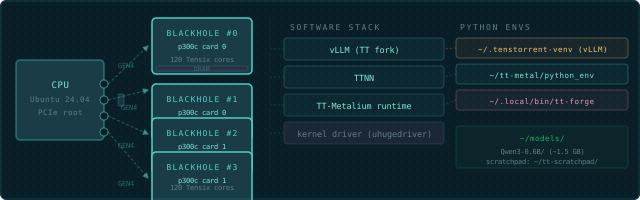
The Tenstorrent Quietbox 2 (QB2) is a workstation with two Blackhole p300c cards — four Blackhole chips in total — on PCIe. Each p300c is a dual-chip card, and each chip is independent — four separate devices from the software’s point of view, connected to a standard CPU running Ubuntu 24.04 LTS.
| What | Detail |
|---|---|
| AI chips | 2× Blackhole p300c cards (4 Blackhole chips) |
| Tensix cores per chip | 120 (12×10 compute grid) |
| Connection | PCIe Gen4 (4 independent devices) |
| OS | Ubuntu 24.04 LTS |
| Pre-installed | Drivers, tt-smi/tt-flash, the TT-Metalium and tt-inference-server containers, tt-studio |
| Source tree | Not included — and neither is ~/tt-metal. TT-Metalium runs as a container (tt-metalium) |
The chips don’t share memory. When you open device 0, you’re talking to one Blackhole chip. To use all four together, you use ttnn.CreateDevices({0, 1, 2, 3}) — not four separate open_device() calls.
What Ships Pre-Installed
Tenstorrent ships the QB2 ready to serve models. You don’t install drivers. You don’t compile anything. The full stack is already there:
- Kernel driver — loaded automatically at boot, makes the chips visible to software
tt-smi— hardware monitoring tool, lives at/usr/bin/tt-smi- TTNN / TT-Metalium — as a container, started by the
tt-metaliumwrapper in~/.local/bin/ - Hardware tooling venv —
~/.tenstorrent-venv/, holdingtt-smiandtt-flash - tt-inference-server — at
~/.local/lib/tt-inference-server; itsrun.pyserves models with vLLM in a container - TT-Forge/XLA — container wrapper at
~/.local/bin/tt-forge, if it was installed (it’s opt-in) - tt-studio — the no-code web UI for serving models, pre-installed (launch with
tt-studio) - A ready-to-run model — Qwen3-32B, weights pre-cached on disk, deployable from tt-studio with no download (your fastest path to a first token: launch
tt-studio, pick it, click Run) - Firmware — already flashed to all four chips
What’s intentionally absent: ~/tt-metal — not just the source code, the whole directory. TT-Metalium reaches you as a container image instead, and tt-metalium is how you get inside it. You can build models, run inference, and work with the full API stack without ever having a checkout. Building from source is a later chapter — a much later chapter.
Physical Tour
The QB2 looks like a standard tower workstation. On the inside:
- CPU and motherboard running Ubuntu 24.04 LTS
- Two Blackhole p300c cards (four Blackhole chips total)
- RAM sized for production inference workloads
- Storage for model weights — but watch it carefully (more on that in Chapter 2)
The chips run warm under load. Fans will get louder when you run inference. This is correct. The cooling is designed for sustained operation at full chip temperature.
One Blackhole chip. You have four, on two p300c cards.
Next: First Boot →