Wormhole™ PCIe Cards
This page covers everything for the Tenstorrent Wormhole™ n150d/n150s/n300d/n300s PCIe add-in boards: how to install them and their full hardware specifications. Use the page navigation on the right to jump between sections.
Hardware Installation
Follow these instructions to install your Tenstorrent Wormhole™ n150d/n150s/n300d/n300s add-in board.
System Installation
Pre-Installation
Disconnect power to the host computer prior to installation.
Verify that the system provides the following:
PCI Express 4.0 x16 slot
For optimal performance, the card requires a x16 configuration without bifurcation.
The n150s and n300s are dual-slot width cards and will require the adjacent expansion slot to be vacant if you’re using the Active Cooling Kit.
The n150d and n300d are 2.5-slot width cards with axial fan coolers. Please ensure your chassis has sufficient airflow to exhaust the heat from these cards.
One (1) EPS12V 4+4-pin power connector
Note
If your PSU does not have this connector available, see the FAQ and Troubleshooting guide to determine which adapter to use.
Discharge your body’s static electricity by wearing an ESD wrist strap (recommended) or touching a grounded surface before touching system components or the add-in card.
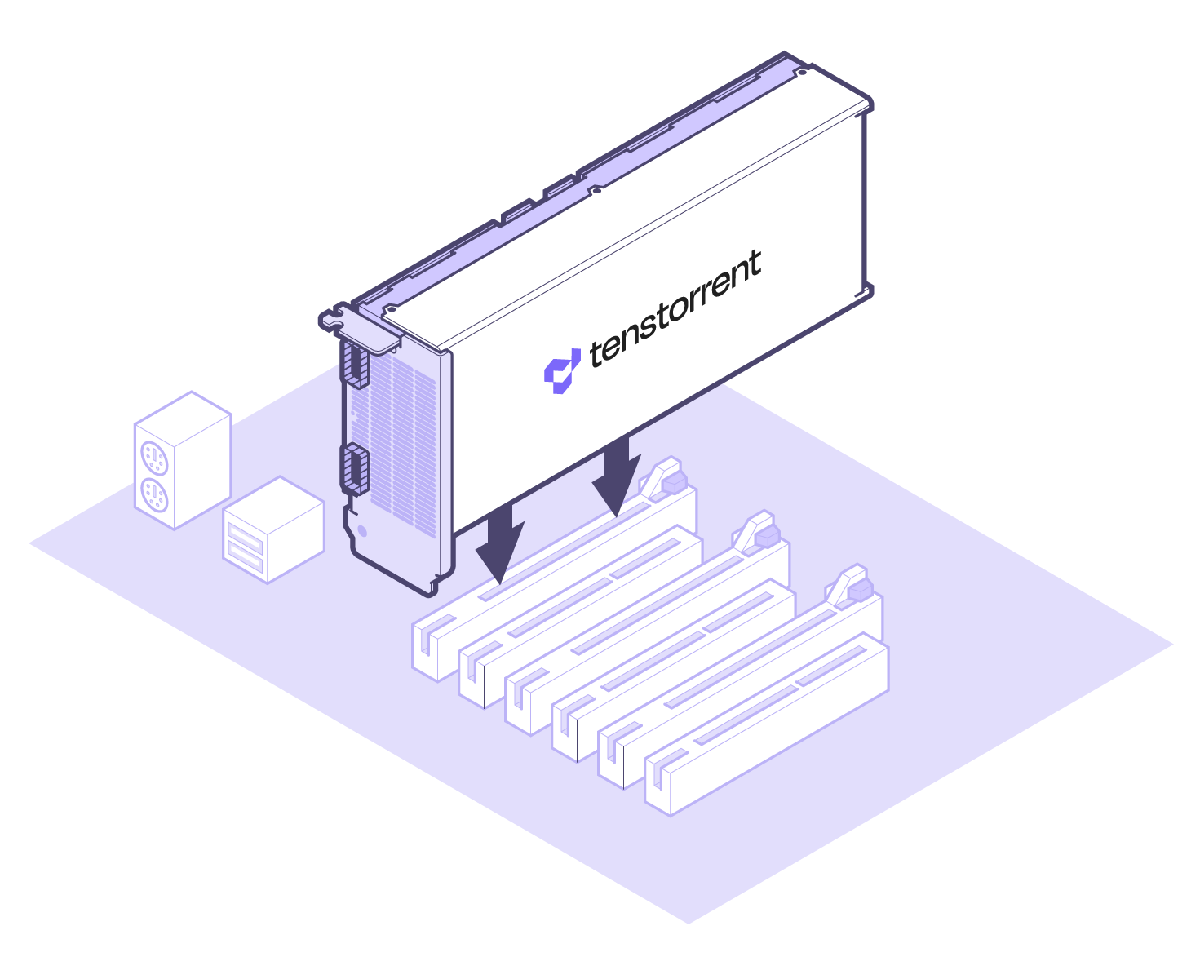
Desktop Workstation Installation
(NOTE: Images shown may not be fully representative of your system. n150s/n300s cards pictured; n150d/n300d will look different.)
Physical Installation
Insert the card into the PCIe x16 slot and secure with necessary screws.
Server Installation (n150s/n300s Only)
(NOTE: Images shown may not be fully representative of your system.)
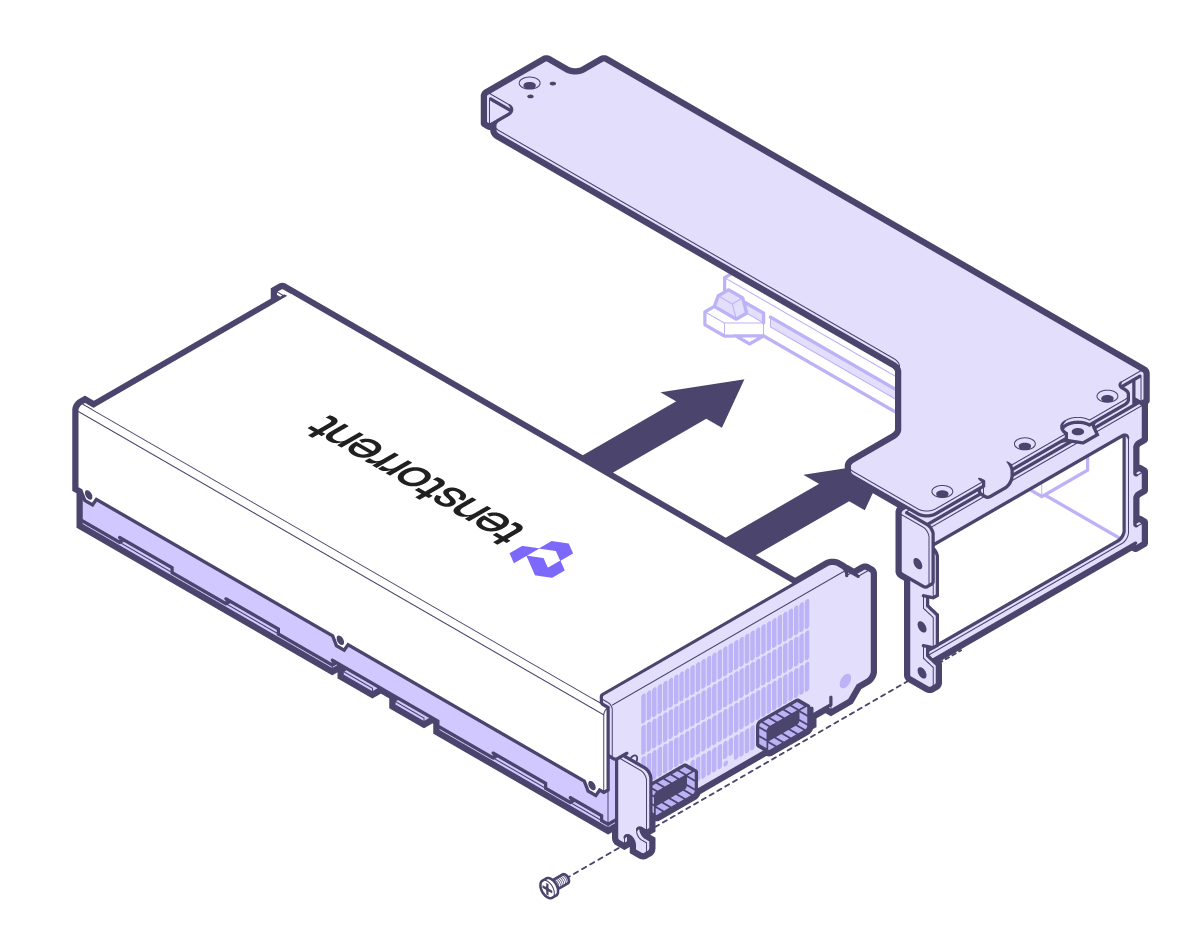
1. Attach Housing
House the card in the casing.
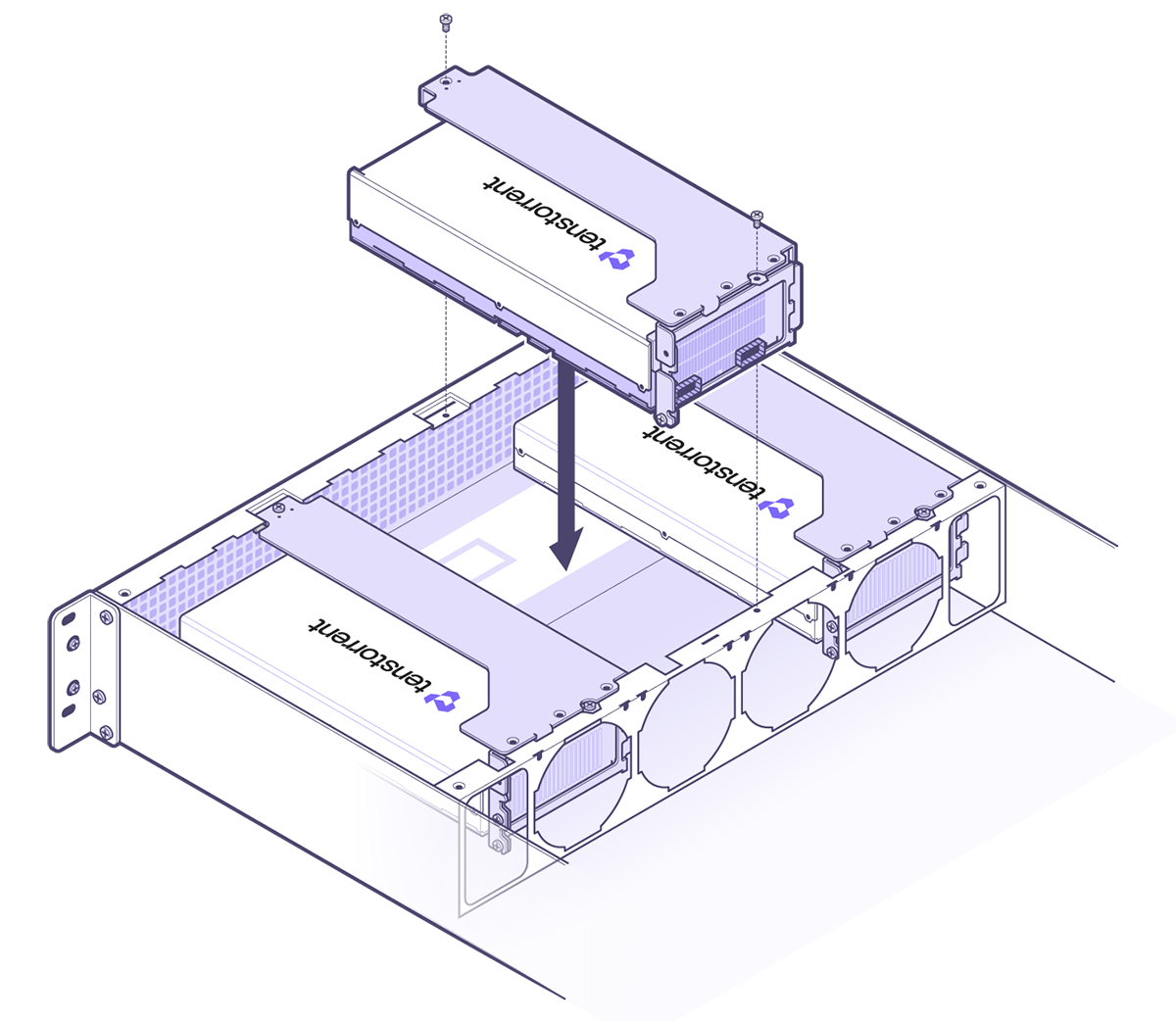
2. Card Installation
Lower the encased card into the chassis and secure with the required screws.
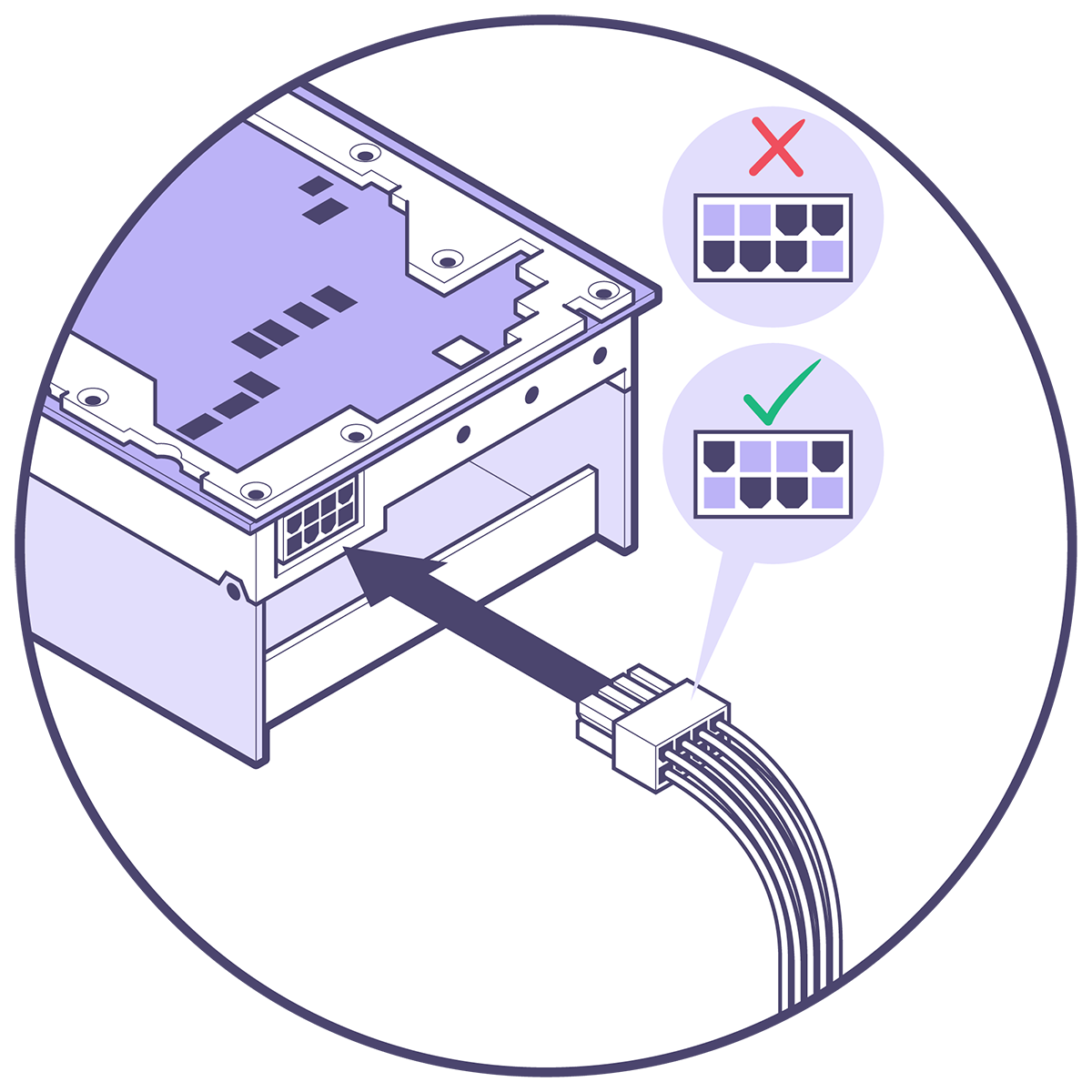
Connecting Power
Connect an 4+4-pin EPS12V power cable to the 8-pin plug. (NOTE: Do not connect a 6+2-pin PCIe power cable to the 8-pin port on the card.)
Software Setup
Instructions on how to set up software on your n150d/n150s/n300d/n300s are available in the Software Setup guide.
Specifications/Requirements
Wormhole™ PCIe Cards
The Wormhole™ n150d, n150s, n300d, and n300s Tensix Processor add-in boards are built using the Tenstorrent Wormhole™ Tensix Processor:
Tensix Core Count: 80
SRAM: 120 MB (1.5 MB per Tensix Core)
Memory: 12 GB GDDR6, 192-bit memory bus
Card Comparison Table
NOTE: The n150s and n300s add-in cards come with a heatsink for passive cooling in systems which can provide sufficient forced airflow to the card. If your system does not (for example, a desktop workstation), installing the bundled Active Cooling Kit is required; we strongly recommend desktop workstations use the n150d and n300d add-in cards which are designed for desktop deployment. If the card isn’t sufficiently cooled, performance will be substantially reduced to stay in a safe operating temperature range and you risk damage to the card.
Specification |
n150d |
n150s |
n300d |
n300s |
|---|---|---|---|---|
Part Number |
TC-02002 |
TC-02001 |
TC-02004 |
TC-02003 |
Wormhole™ ASICs |
1 |
1 |
2 |
2 |
Tensix Cores |
72 |
72 |
128 (64 per ASIC) |
128 (64 per ASIC) |
AI Clock |
1 GHz |
1 GHz |
1 GHz |
1 GHz |
SRAM |
108 MB |
108 MB |
192 MB (96 MB per ASIC) |
192 MB (96 MB per ASIC) |
Memory |
12 GB GDDR6 |
12 GB GDDR6 |
24 GB GDDR6 |
24 GB GDDR6 |
Memory Speed |
12 GT/sec |
12 GT/sec |
12 GT/sec |
12 GT/sec |
Memory Bandwidth |
288 GB/sec |
288 GB/sec |
576 GB/sec |
576 GB/sec |
TeraFLOPS (FP8) |
262 |
262 |
466 |
466 |
TeraFLOPS (FP16) |
74 |
74 |
131 |
131 |
TeraFLOPS (BLOCKFP8) |
148 |
148 |
262 |
262 |
TBP (Total Board Power) |
160W |
160W |
300W |
300W |
External Power |
1x 4+4-pin EPS12V |
1x 4+4-pin EPS12V |
1x 4+4-pin EPS12V |
1x 4+4-pin EPS12V |
Connectivity |
2x Warp 100 Bridge |
2x Warp 100 Bridge |
2x Warp 100 Bridge |
2x Warp 100 Bridge |
Internal Chip-to-Chip |
N/A |
N/A |
200G |
200G |
System Interface |
PCI Express 4.0 x16 |
PCI Express 4.0 x16 |
PCI Express 4.0 x16 |
PCI Express 4.0 x16 |
Cooling |
Active (Axial Fan) |
Passive |
Active (Axial Fan) |
Passive |
Dimensions (WxDxH) |
52.2mm x 256mm x 111mm |
36mm x 254mm x 111mm |
52.2mm x 256mm x 111mm |
36mm x 254mm x 111mm |
Dimensions (w/ Cooling Kit) (WxDxH) |
N/A |
36mm x 393.5mm x 114mm |
N/A |
36mm x 393.5mm x 114mm |
*For connecting to Tenstorrent Wormhole™-based cards only.
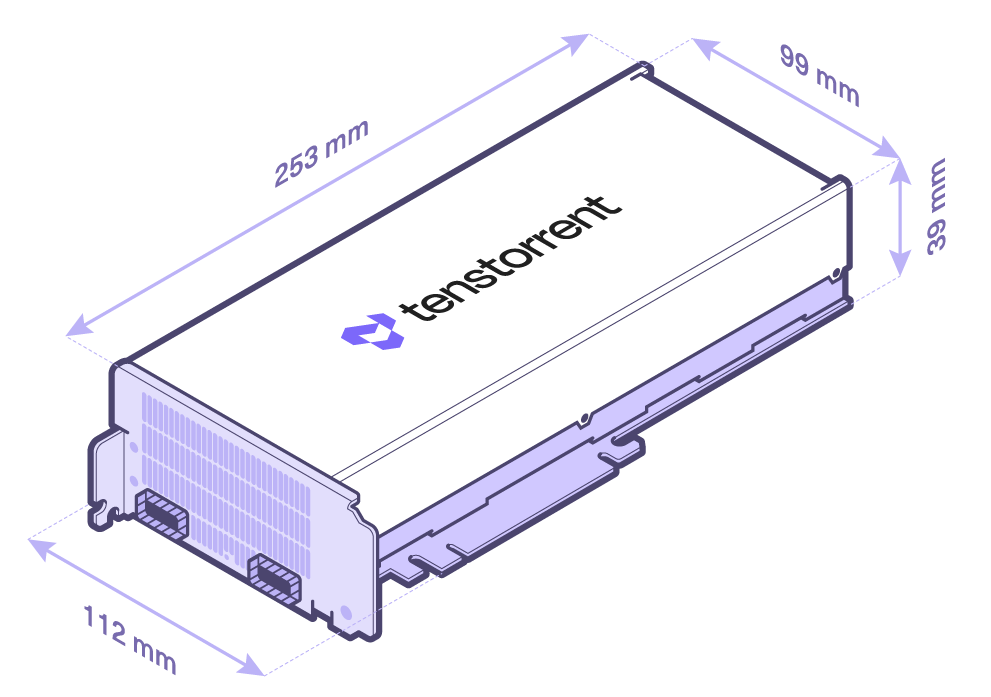
n150s/n300s without Active Cooling Kit
Connectivity
Wormhole™ cards include two different methods for interconnecting cards. (n150s/n300s pictured; n150d and n300d will have the same ports and bridges.)
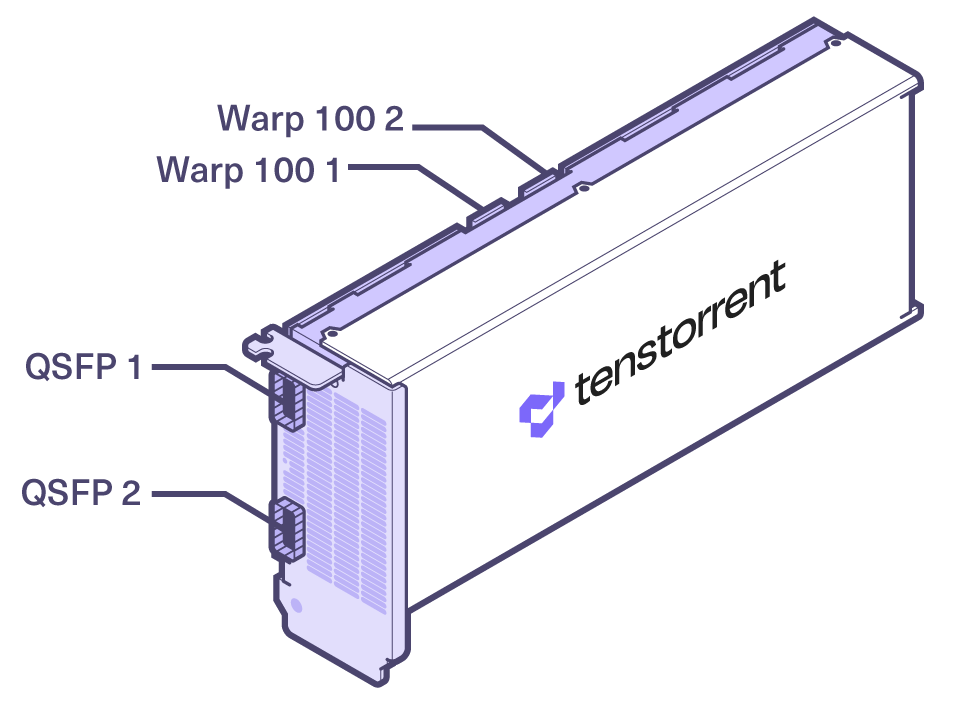
The Warp 100 notches are for attaching internal Warp 100 bridges between Wormhole™ cards.
The two QSFP-DD ports are active and support 200G connectivity between cards and/or Wormhole™-based systems/servers.
Data Precision Formats
The Wormhole™ Tensix Processor supports the following data precision formats:
Format |
Bit Depth |
|---|---|
Floating point |
FP8, FP16, BFLOAT16 |
Block floating point |
BLOCKFP2, BLOCKFP4, BLOCKFP8 |
Integer |
INT8 |
Unsigned Integer |
UINT8 |
TensorFloat |
TF32 |
Vector |
VTF19, VFP32 |
Minimum System Requirements
Part |
Requirement |
|---|---|
CPU |
x86_64 architecture* |
Motherboard |
PCI Express 4.0 x16 slot |
Memory |
64 GB |
Storage |
100 GB (≥2 TB recommended) |
Power Connectors |
4+4-pin EPS12V |
Total Board Power |
Up to 160W (n150d/n150s) / 300W (n300d/n300s) |
Operating Temperature Range (Die) |
0C - 75C |
Operating System |
Ubuntu version 22.04 (Jammy Jellyfish) ** |
Internet Connection |
Required for driver and stack installation. |
** CPU core count and number of sockets will depend on the amount of host preprocessing and post-processing required before and after the accelerator processing.*
**To check your version, type cat /etc/os-release.
Environment Specifications
The Wormhole™ Tensix Processor add-in boards are designed to meet these environmental specifications:
Specification |
Requirement |
|---|---|
Operating Temperature Range |
10°C/50°F - 35°C/95°F |
Storage Temperature Range |
-40°C/-40°F - 75°C/167°F |
Elevation |
-5 ft. to 10,000 ft. |
Air Flow (without Active Cooling Kit) |
≥30 CFM @ up to 35°C/95°F |