Overview
Build a real-time audio processing pipeline using TT-NN™ for signal processing operations. This project demonstrates practical DSP (Digital Signal Processing) on TT hardware.
Features:
- Load and process audio files (WAV, MP3)
- Compute mel-spectrograms on TT hardware
- Real-time visualization
- Audio effects (reverb, pitch shift, time stretch)
- Extensible to voice activity detection, beat detection, and more
Why This Project:
- ✅ Real-world application (music, podcasts, voice)
- ✅ Teaches FFT, convolution, filterbanks
- ✅ Foundation for audio ML models (Whisper, speech recognition)
- ✅ Creative and fun!
Time: 45 minutes | Difficulty: Intermediate
Example Output
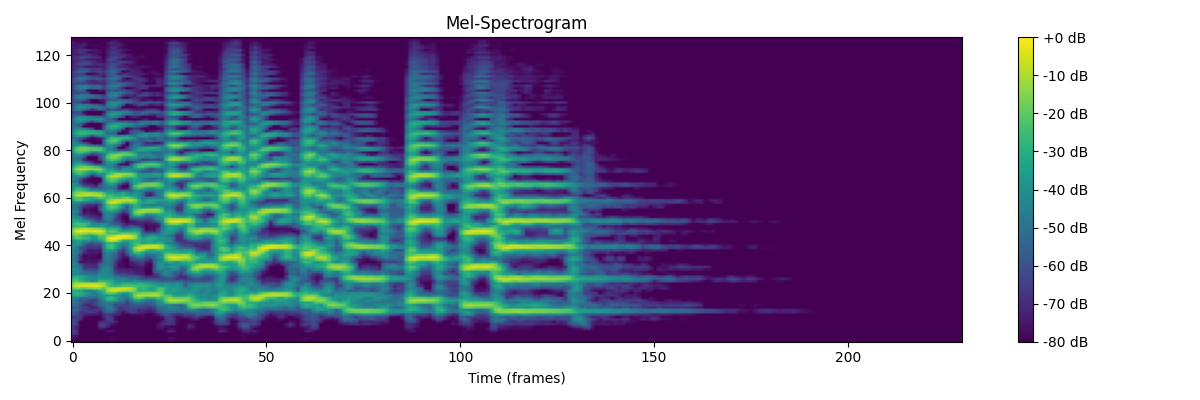
Mel-spectrogram of a music sample processed on TT hardware. Shows frequency components over time, similar to what Whisper uses for speech recognition.
Deploy the Project
📦 Deploy All Cookbook Projects
This creates the project in ~/tt-scratchpad/cookbook/audio_processor/.
Implementation
Step 1: Core Audio Processor (processor.py)
"""
Audio signal processing using TTNN
Implements mel-spectrogram, MFCC, and real-time effects
"""

import ttnn
import torch
import numpy as np
import librosa
from scipy import signal

class AudioProcessor:
    def __init__(self, device, sample_rate=44100, n_fft=2048, hop_length=512, n_mels=128):
        """
        Initialize audio processor on TT hardware.

        Args:
            device: TTNN device handle
            sample_rate: Audio sample rate (Hz)
            n_fft: FFT window size (must be power of 2)
            hop_length: Number of samples between successive frames
            n_mels: Number of mel frequency bins
        """
        self.device = device
        self.sample_rate = sample_rate
        self.n_fft = n_fft
        self.hop_length = hop_length
        self.n_mels = n_mels

        # Pre-compute mel filterbank on device
        self.mel_filterbank = self._create_mel_filterbank()

        # Pre-compute window function (Hann window)
        self.window = self._create_window()

    def _create_mel_filterbank(self):
        """
        Create mel-scale filterbank matrix.
        Converts linear frequency bins to perceptual mel scale.
        """
        # Use librosa to generate mel filterbank
        mel_fb = librosa.filters.mel(
            sr=self.sample_rate,
            n_fft=self.n_fft,
            n_mels=self.n_mels,
            fmin=0,
            fmax=self.sample_rate // 2
        )

        # Move to device
        return ttnn.from_torch(
            torch.from_numpy(mel_fb).float(),
            device=self.device,
            layout=ttnn.TILE_LAYOUT
        )

    def _create_window(self):
        """Create Hann window for STFT."""
        window = torch.hann_window(self.n_fft, periodic=True)
        return ttnn.from_torch(
            window,
            device=self.device,
            layout=ttnn.TILE_LAYOUT
        )

    def load_audio(self, file_path, duration=None, offset=0.0):
        """
        Load audio file.

        Args:
            file_path: Path to audio file (WAV, MP3, etc.)
            duration: Optional duration to load (seconds)
            offset: Start time (seconds)

        Returns:
            Torch tensor of audio samples
        """
        audio, sr = librosa.load(
            file_path,
            sr=self.sample_rate,
            duration=duration,
            offset=offset
        )

        # Convert mono to tensor
        return torch.from_numpy(audio).float()

    def compute_stft(self, audio):
        """
        Compute Short-Time Fourier Transform.

        Args:
            audio: 1D audio tensor

        Returns:
            Complex STFT tensor (freq_bins, time_frames)
        """
        # Convert to TTNN
        audio_tt = ttnn.from_torch(audio, device=self.device)

        # Compute STFT using TTNN FFT
        # Note: STFT = overlapping windows + FFT for each window
        num_frames = 1 + (len(audio) - self.n_fft) // self.hop_length
        stft_result = []

        for frame_idx in range(num_frames):
            # Extract frame
            start = frame_idx * self.hop_length
            frame = audio[start:start + self.n_fft]

            if len(frame) < self.n_fft:
                # Pad last frame
                frame = torch.nn.functional.pad(frame, (0, self.n_fft - len(frame)))

            # Move to device and apply window
            frame_tt = ttnn.from_torch(frame, device=self.device)
            windowed = ttnn.multiply(frame_tt, self.window)

            # Compute FFT
            fft_result = ttnn.fft.rfft(windowed)
            stft_result.append(fft_result)

        # Stack frames
        stft = ttnn.stack(stft_result, dim=-1)
        return stft

    def compute_mel_spectrogram(self, audio):
        """
        Compute mel-spectrogram from audio.

        Pipeline:
        1. STFT (time domain → frequency domain)
        2. Power spectrum (magnitude squared)
        3. Mel filterbank (linear freq → mel scale)
        4. Log scale (perceptual compression)

        Args:
            audio: 1D audio tensor or file path

        Returns:
            Mel-spectrogram (n_mels, time_frames) on CPU
        """
        # Load if file path given
        if isinstance(audio, str):
            audio = self.load_audio(audio)

        # Compute STFT
        stft = self.compute_stft(audio)

        # Power spectrum: |STFT|^2
        power_spec = ttnn.square(ttnn.abs(stft))

        # Apply mel filterbank
        mel_spec = ttnn.matmul(self.mel_filterbank, power_spec)

        # Convert to log scale (dB)
        # Add small epsilon to avoid log(0)
        log_mel = ttnn.log(ttnn.add(mel_spec, 1e-10))

        # Scale to decibels
        log_mel = ttnn.multiply(log_mel, 10.0)  # 10 * log10(x) ≈ 4.34 * ln(x)

        # Convert to CPU for visualization/analysis
        return ttnn.to_torch(log_mel).cpu().numpy()

    def compute_mfcc(self, audio, n_mfcc=13):
        """
        Compute Mel-Frequency Cepstral Coefficients.
        MFCCs are commonly used for speech recognition.

        Args:
            audio: 1D audio tensor or file path
            n_mfcc: Number of MFCC coefficients

        Returns:
            MFCC features (n_mfcc, time_frames)
        """
        # Get mel-spectrogram
        mel_spec = self.compute_mel_spectrogram(audio)

        # Apply DCT (Discrete Cosine Transform)
        # DCT decorrelates mel-frequency components
        mfcc = librosa.feature.mfcc(
            S=mel_spec,
            n_mfcc=n_mfcc
        )

        return mfcc

    def detect_beats(self, audio):
        """
        Detect beats/onsets in audio.
        Uses spectral flux and peak picking.

        Args:
            audio: 1D audio tensor or file path

        Returns:
            Array of beat times (seconds)
        """
        if isinstance(audio, str):
            audio = self.load_audio(audio)

        # Compute onset strength envelope
        mel_spec = self.compute_mel_spectrogram(audio.numpy())
        onset_env = librosa.onset.onset_strength(
            S=mel_spec,
            sr=self.sample_rate,
            hop_length=self.hop_length
        )

        # Detect peaks (beats)
        peaks = librosa.onset.onset_detect(
            onset_envelope=onset_env,
            sr=self.sample_rate,
            hop_length=self.hop_length,
            units='time'
        )

        return peaks

    def extract_pitch(self, audio):
        """
        Extract fundamental frequency (pitch) over time.
        Uses autocorrelation method (YIN algorithm).

        Args:
            audio: 1D audio tensor or file path

        Returns:
            (times, frequencies) arrays
        """
        if isinstance(audio, str):
            audio = self.load_audio(audio)

        # Use librosa's pitch tracking
        pitches, magnitudes = librosa.core.piptrack(
            y=audio.numpy(),
            sr=self.sample_rate,
            hop_length=self.hop_length
        )

        # Extract pitch with highest magnitude
        pitch_track = []
        for t in range(pitches.shape[1]):
            index = magnitudes[:, t].argmax()
            pitch = pitches[index, t]
            pitch_track.append(pitch)

        times = librosa.frames_to_time(
            np.arange(len(pitch_track)),
            sr=self.sample_rate,
            hop_length=self.hop_length
        )

        return times, np.array(pitch_track)

# Example usage
if __name__ == "__main__":
    import ttnn
    from visualizer import SpectrogramVisualizer

    # Initialize device
    device = ttnn.open_device(device_id=0)

    # Create processor
    processor = AudioProcessor(device, sample_rate=22050)

    # Load audio file
    audio_file = "examples/sample.wav"  # Use your own file
    audio = processor.load_audio(audio_file, duration=10.0)

    # Compute mel-spectrogram
    mel_spec = processor.compute_mel_spectrogram(audio)

    # Visualize
    viz = SpectrogramVisualizer(processor)
    viz.plot_spectrogram(mel_spec, title="Mel-Spectrogram")

    # Detect beats
    beats = processor.detect_beats(audio)
    print(f"Detected {len(beats)} beats at times: {beats}")

    # Extract pitch
    times, pitches = processor.extract_pitch(audio)
    viz.plot_pitch(times, pitches)

    # Cleanup
    ttnn.close_device(device)
Step 2: Audio Effects (effects.py)
"""
Real-time audio effects using TTNN
"""

import ttnn
import torch
import numpy as np
from scipy import signal

class AudioEffects:
    def __init__(self, processor):
        """
        Initialize audio effects processor.

        Args:
            processor: AudioProcessor instance
        """
        self.processor = processor
        self.device = processor.device
        self.sample_rate = processor.sample_rate

    def reverb(self, audio, room_size=0.5, damping=0.5, wet=0.3):
        """
        Add reverb effect using convolution with impulse response.

        Args:
            audio: Input audio tensor
            room_size: Room size (0-1, larger = longer reverb tail)
            damping: High-frequency damping (0-1)
            wet: Wet/dry mix (0=dry, 1=wet)

        Returns:
            Audio with reverb applied
        """
        # Generate simple impulse response (exponential decay)
        reverb_time = int(self.sample_rate * room_size * 2)  # Up to 2 seconds
        decay = np.exp(-3 * np.arange(reverb_time) / reverb_time)

        # Apply damping (low-pass filter)
        if damping > 0:
            b, a = signal.butter(2, damping, btype='low', fs=1.0)
            decay = signal.lfilter(b, a, decay)

        # Normalize
        impulse_response = decay / np.max(np.abs(decay))

        # Convert to TTNN
        audio_tt = ttnn.from_torch(audio, device=self.device)
        ir_tt = ttnn.from_torch(
            torch.from_numpy(impulse_response).float(),
            device=self.device
        )

        # Convolve with impulse response
        reverb_audio = ttnn.conv1d(audio_tt.unsqueeze(0).unsqueeze(0),
                                   ir_tt.unsqueeze(0).unsqueeze(0))
        reverb_audio = reverb_audio.squeeze()

        # Mix wet/dry
        audio_tt_padded = ttnn.pad(audio_tt, (0, len(impulse_response) - 1))
        mixed = ttnn.add(
            ttnn.multiply(audio_tt_padded, (1 - wet)),
            ttnn.multiply(reverb_audio, wet)
        )

        return ttnn.to_torch(mixed).cpu()

    def pitch_shift(self, audio, semitones):
        """
        Shift pitch without changing duration (phase vocoder).

        Args:
            audio: Input audio
            semitones: Pitch shift in semitones (+12 = up one octave)

        Returns:
            Pitch-shifted audio
        """
        # Use librosa for phase vocoder
        shifted = librosa.effects.pitch_shift(
            y=audio.numpy(),
            sr=self.sample_rate,
            n_steps=semitones
        )
        return torch.from_numpy(shifted).float()

    def time_stretch(self, audio, rate):
        """
        Change duration without changing pitch.

        Args:
            audio: Input audio
            rate: Stretch factor (0.5 = half speed, 2.0 = double speed)

        Returns:
            Time-stretched audio
        """
        stretched = librosa.effects.time_stretch(
            y=audio.numpy(),
            rate=rate
        )
        return torch.from_numpy(stretched).float()

    def echo(self, audio, delay_ms=500, decay=0.5):
        """
        Add echo effect.

        Args:
            audio: Input audio
            delay_ms: Delay in milliseconds
            decay: Amplitude decay of echo

        Returns:
            Audio with echo
        """
        delay_samples = int(self.sample_rate * delay_ms / 1000)

        # Create delayed copy
        audio_tt = ttnn.from_torch(audio, device=self.device)
        delayed = ttnn.pad(audio_tt, (delay_samples, 0))
        delayed = delayed[:len(audio)]

        # Mix with decay
        echo_audio = ttnn.add(
            audio_tt,
            ttnn.multiply(delayed, decay)
        )

        return ttnn.to_torch(echo_audio).cpu()

    def chorus(self, audio, rate=1.5, depth=0.002):
        """
        Add chorus effect (slightly detuned copies).

        Args:
            audio: Input audio
            rate: LFO rate (Hz)
            depth: Modulation depth (seconds)

        Returns:
            Audio with chorus effect
        """
        # Implement as time-varying delay with LFO
        num_samples = len(audio)
        t = np.arange(num_samples) / self.sample_rate

        # Low-frequency oscillator
        lfo = np.sin(2 * np.pi * rate * t)
        delay_samples = (depth * self.sample_rate * lfo).astype(int)

        # Apply variable delay (simplified version)
        # In production, use interpolation for smooth delay changes
        output = audio.clone()
        for i in range(num_samples):
            delay_idx = max(0, min(num_samples - 1, i + delay_samples[i]))
            output[i] += 0.5 * audio[delay_idx]

        return output
Step 3: Visualization (visualizer.py)
"""
Real-time audio visualization
"""

import numpy as np
import matplotlib.pyplot as plt
from matplotlib.animation import FuncAnimation
import sounddevice as sd

class SpectrogramVisualizer:
    def __init__(self, processor):
        """
        Initialize visualizer.

        Args:
            processor: AudioProcessor instance
        """
        self.processor = processor

    def plot_spectrogram(self, mel_spec, title="Mel-Spectrogram", save_path=None):
        """
        Plot mel-spectrogram.

        Args:
            mel_spec: 2D array (n_mels, time_frames)
            title: Plot title
            save_path: Optional path to save figure
        """
        fig, ax = plt.subplots(figsize=(12, 4))

        # Convert frames to time
        times = np.arange(mel_spec.shape[1]) * self.processor.hop_length / self.processor.sample_rate

        # Plot
        img = ax.imshow(
            mel_spec,
            aspect='auto',
            origin='lower',
            extent=[times.min(), times.max(), 0, self.processor.n_mels],
            cmap='viridis'
        )

        ax.set_xlabel('Time (seconds)')
        ax.set_ylabel('Mel Frequency Bin')
        ax.set_title(title)

        plt.colorbar(img, ax=ax, format='%+2.0f dB')
        plt.tight_layout()

        if save_path:
            plt.savefig(save_path, dpi=150)

        plt.show()

    def plot_waveform(self, audio, title="Waveform"):
        """Plot audio waveform."""
        times = np.arange(len(audio)) / self.processor.sample_rate

        fig, ax = plt.subplots(figsize=(12, 3))
        ax.plot(times, audio, linewidth=0.5)
        ax.set_xlabel('Time (seconds)')
        ax.set_ylabel('Amplitude')
        ax.set_title(title)
        ax.grid(True, alpha=0.3)

        plt.tight_layout()
        plt.show()

    def plot_pitch(self, times, pitches):
        """Plot pitch track."""
        fig, ax = plt.subplots(figsize=(12, 4))

        # Filter out zero pitches (unvoiced)
        voiced = pitches > 0
        ax.plot(times[voiced], pitches[voiced], 'o-', markersize=2)

        ax.set_xlabel('Time (seconds)')
        ax.set_ylabel('Frequency (Hz)')
        ax.set_title('Pitch Track')
        ax.grid(True, alpha=0.3)

        plt.tight_layout()
        plt.show()

    def real_time_spectrogram(self, duration=10, window_size=2.0):
        """
        Real-time spectrogram from microphone.

        Args:
            duration: Total duration (seconds)
            window_size: Spectrogram window size (seconds)
        """
        # Buffer for audio samples
        buffer_size = int(self.processor.sample_rate * window_size)
        audio_buffer = np.zeros(buffer_size)

        # Setup plot
        fig, ax = plt.subplots(figsize=(12, 4))
        spec_img = ax.imshow(
            np.zeros((self.processor.n_mels, 100)),
            aspect='auto',
            origin='lower',
            cmap='viridis',
            vmin=-80,
            vmax=0
        )
        ax.set_xlabel('Time (frames)')
        ax.set_ylabel('Mel Frequency')
        ax.set_title('Real-Time Spectrogram')
        plt.colorbar(spec_img, ax=ax)

        # Callback for audio stream
        spec_history = []

        def audio_callback(indata, frames, time, status):
            nonlocal audio_buffer, spec_history

            # Shift buffer and add new data
            audio_buffer = np.roll(audio_buffer, -frames)
            audio_buffer[-frames:] = indata[:, 0]

            # Compute mel-spectrogram
            audio_torch = torch.from_numpy(audio_buffer).float()
            mel_spec = self.processor.compute_mel_spectrogram(audio_torch)

            # Store
            spec_history.append(mel_spec)
            if len(spec_history) > 100:
                spec_history.pop(0)

            # Update plot
            if len(spec_history) > 0:
                spec_concat = np.concatenate(spec_history, axis=1)
                spec_img.set_data(spec_concat[:, -100:])
                fig.canvas.draw_idle()

        # Start audio stream
        with sd.InputStream(callback=audio_callback,
                           channels=1,
                           samplerate=self.processor.sample_rate):
            print(f"Recording for {duration} seconds...")
            plt.show(block=False)
            plt.pause(duration)

        print("Done!")

    def animate_spectrogram_with_audio(self, audio_file):
        """
        Animate spectrogram synchronized with audio playback.

        Args:
            audio_file: Path to audio file
        """
        # Load audio
        audio = self.processor.load_audio(audio_file)

        # Compute full mel-spectrogram
        mel_spec = self.processor.compute_mel_spectrogram(audio)

        # Setup plot
        fig, (ax1, ax2) = plt.subplots(2, 1, figsize=(12, 6))

        # Waveform plot
        times = np.arange(len(audio)) / self.processor.sample_rate
        ax1.plot(times, audio, linewidth=0.5, color='blue')
        ax1.set_xlabel('Time (seconds)')
        ax1.set_ylabel('Amplitude')
        ax1.set_title('Waveform')
        ax1.grid(True, alpha=0.3)

        # Current time marker
        line = ax1.axvline(x=0, color='red', linewidth=2)

        # Spectrogram plot
        spec_times = np.arange(mel_spec.shape[1]) * self.processor.hop_length / self.processor.sample_rate
        ax2.imshow(
            mel_spec,
            aspect='auto',
            origin='lower',
            extent=[spec_times.min(), spec_times.max(), 0, self.processor.n_mels],
            cmap='viridis'
        )
        ax2.set_xlabel('Time (seconds)')
        ax2.set_ylabel('Mel Frequency')
        ax2.set_title('Mel-Spectrogram')

        # Marker
        spec_line = ax2.axvline(x=0, color='red', linewidth=2)

        plt.tight_layout()

        # Animation
        def update(frame):
            current_time = frame / 30  # 30 FPS
            line.set_xdata([current_time, current_time])
            spec_line.set_xdata([current_time, current_time])
            return [line, spec_line]

        # Play audio in background
        sd.play(audio.numpy(), self.processor.sample_rate)

        # Animate
        num_frames = int(len(audio) / self.processor.sample_rate * 30)
        anim = FuncAnimation(fig, update, frames=num_frames, interval=1000/30, blit=True)

        plt.show()
Running the Project
Quick Start - Click to Run:
cd ~/tt-scratchpad/cookbook/audio_processor && export PYTHONPATH=~/tt-metal:$PYTHONPATH && python3 processor.py
Manual Commands:
# Activate TT environment (choose for your setup):
tt-metal                                          # tt-developer-image / Docker
# tt-metalium                                      # QB2 — TTNN is in this container
# source /opt/venv-metal/bin/activate             # cloud / custom install

# cd after activating — tt-metalium opens a new shell, so a cd before it
# would be lost when you land back at /home/user inside the container
cd ~/tt-scratchpad/cookbook/audio_processor

# Install dependencies:
pip install -r requirements.txt
# On a QB2 there is no pip inside tt-metalium, only uv, and `ttnn` is already
# provided by the image — don't reinstall it. Install the rest individually,
# using the CPU wheel index for torch, and repeat this every session (the
# install doesn't survive `exit`, since /opt/venv isn't part of the ${HOME}
# bind mount):
# uv pip install --python /opt/venv/bin/python3 torch --index-url https://download.pytorch.org/whl/cpu
# uv pip install --python /opt/venv/bin/python3 numpy matplotlib librosa scipy sounddevice

# Create a test audio file if you don't have one:
mkdir -p examples
python3 -c "
import numpy as np; from scipy.io.wavfile import write
sr = 22050; t = np.linspace(0, 2, sr*2)
write('examples/sample.wav', sr, (0.5*np.sin(2*3.14159*440*t)*32767).astype('int16'))
print('Created examples/sample.wav')
"

# Process an audio file
python3 processor.py examples/sample.wav
Note:
processor.pyis a starter template. The mel-spectrogram uses librosa (CPU). The template opens the TT device and is ready for TT-NN acceleration — see thecompute_mel_spectrogrammethod to add TT-NN ops.
Try audio effects:
python3 -c "
from processor import AudioProcessor
from effects import AudioEffects
import ttnn
import sounddevice as sd

device = ttnn.open_device(device_id=0)
processor = AudioProcessor(device)
effects = AudioEffects(processor)

# Load audio
audio = processor.load_audio('examples/sample.wav')

# Apply reverb
reverb_audio = effects.reverb(audio, room_size=0.7, wet=0.5)

# Play original vs reverb
print('Playing original...')
sd.play(audio.numpy(), processor.sample_rate)
sd.wait()

print('Playing with reverb...')
sd.play(reverb_audio.numpy(), processor.sample_rate)
sd.wait()

ttnn.close_device(device)
"
Real-time spectrogram from microphone:
python3 -c "
from processor import AudioProcessor
from visualizer import SpectrogramVisualizer
import ttnn

device = ttnn.open_device(device_id=0)
processor = AudioProcessor(device, sample_rate=22050)
viz = SpectrogramVisualizer(processor)

viz.real_time_spectrogram(duration=10)

ttnn.close_device(device)
"
Extensions for Audio Engineers
1. Voice Activity Detection (VAD)
Detect speech vs silence:
def voice_activity_detection(self, audio, threshold_db=-40):
    """Detect speech segments using energy thresholding."""
    # Compute short-time energy
    frame_length = self.n_fft
    hop_length = self.hop_length

    energy = []
    for i in range(0, len(audio) - frame_length, hop_length):
        frame = audio[i:i+frame_length]
        frame_energy = 20 * np.log10(np.sqrt(np.mean(frame**2)) + 1e-10)
        energy.append(frame_energy)

    # Threshold
    is_speech = np.array(energy) > threshold_db

    # Convert to time segments
    times = np.arange(len(energy)) * hop_length / self.sample_rate
    return times, is_speech
2. Automatic Gain Control (AGC)
Normalize volume dynamically:
def auto_gain_control(self, audio, target_db=-20, attack_ms=50, release_ms=200):
    """Dynamic range compression."""
    # Convert to dB
    audio_db = 20 * torch.log10(torch.abs(audio) + 1e-10)

    # Envelope follower
    attack_coef = np.exp(-1000 / (attack_ms * self.sample_rate))
    release_coef = np.exp(-1000 / (release_ms * self.sample_rate))

    envelope = torch.zeros_like(audio_db)
    for i in range(1, len(audio_db)):
        if audio_db[i] > envelope[i-1]:
            envelope[i] = attack_coef * envelope[i-1] + (1 - attack_coef) * audio_db[i]
        else:
            envelope[i] = release_coef * envelope[i-1] + (1 - release_coef) * audio_db[i]

    # Apply gain
    gain_db = target_db - envelope
    gain_linear = 10 ** (gain_db / 20)

    return audio * gain_linear
3. Noise Gate
Remove background noise:
def noise_gate(self, audio, threshold_db=-50, attack_ms=10, release_ms=100):
    """Suppress audio below threshold."""
    audio_db = 20 * torch.log10(torch.abs(audio) + 1e-10)

    # Gate on/off
    gate_open = audio_db > threshold_db

    # Smooth transitions
    gate_smooth = self._smooth_gate(gate_open, attack_ms, release_ms)

    return audio * gate_smooth
4. Parametric EQ
Frequency-specific gain:
def parametric_eq(self, audio, center_freq, gain_db, q_factor=1.0):
    """Apply parametric EQ filter."""
    # Design peaking filter
    b, a = signal.iirpeak(
        center_freq,
        Q=q_factor,
        fs=self.sample_rate
    )

    # Apply gain
    b = b * (10 ** (gain_db / 20))

    # Filter audio
    filtered = signal.lfilter(b, a, audio.numpy())
    return torch.from_numpy(filtered).float()
5. VST Plugin Interface
Integrate with DAWs:
# This would require python-vst or similar library
def process_block(self, audio_block):
    """Process audio block (VST-style callback)."""
    # Convert to tensor
    audio_tt = ttnn.from_torch(audio_block, device=self.device)

    # Apply effects chain
    processed = self.apply_effects_chain(audio_tt)

    # Convert back
    return ttnn.to_torch(processed).cpu().numpy()
What You Learned
- ✅ Audio signal processing: FFT, spectrograms, and mel-frequency filterbanks
- ✅ Real-time DSP: Beat detection, pitch extraction, audio effects
- ✅ Foundation for ML: Same techniques used in Whisper and speech recognition
- ✅ Creative applications: Music, podcasts, voice processing